Investors see hundreds of companies a month. Most first impressions happen in under two minutes, often on a phone between meetings, and a clear one-page summary can decide whether a founder gets the next conversation. This Startup Investor One-Pager Fact Sheet is built for exactly that moment. It fits a seed or Series A story onto a single US Letter page: what the company does, how fast it is growing, how big the market is, who is building it, and how much money it is raising. It works as an email attachment, a leave-behind at demo days, and a pre-read before a pitch meeting.
What an Investor Looks For on One Page
An investor reading a one-pager is trying to answer five questions quickly. Is the problem real and painful? Is the solution different? Is there evidence that customers want it? Is the market big enough to matter? And can this team pull it off? This template gives each question its own clearly labelled space, so nothing important gets buried in a paragraph. It also keeps the numbers investors scan for first (stage, raise, runway, and revenue) in a sidebar that can be read in seconds.
A Navy Sidebar and a Clean Main Column
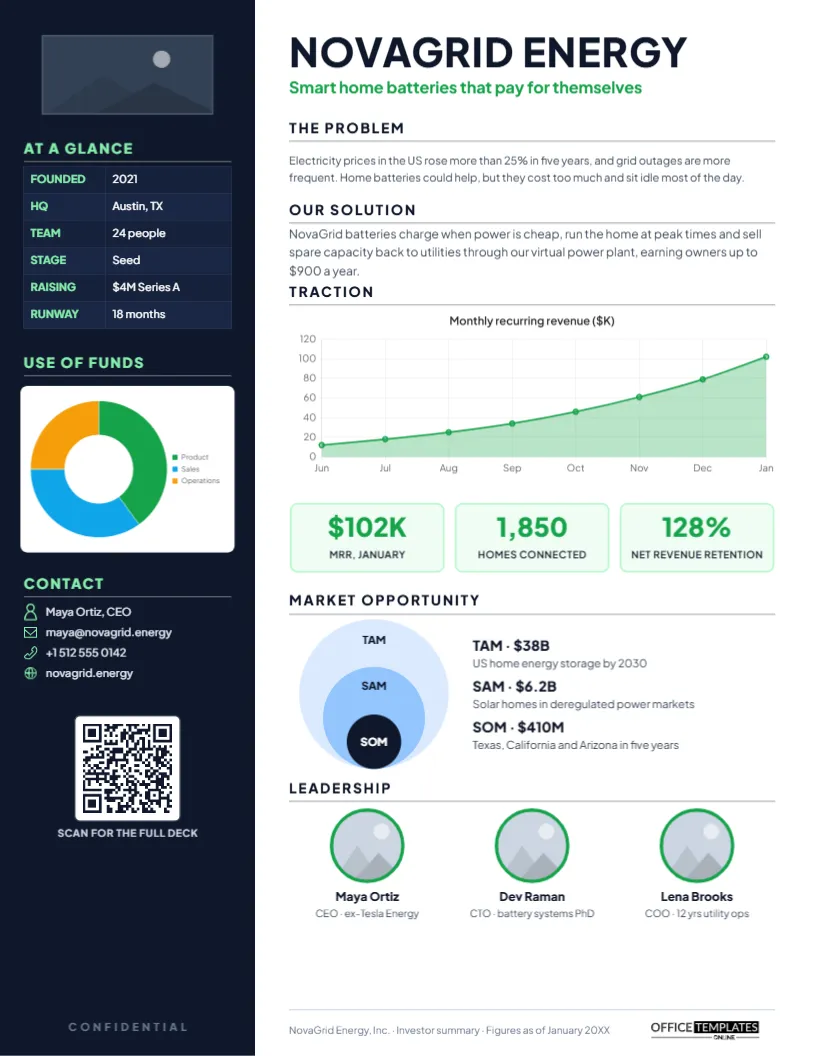
The page is split into two parts. A deep navy sidebar runs down the left third. At the top is a logo placeholder, followed by an At a Glance table with founding year, headquarters, team size, stage, amount raising, and runway, printed in white with green labels. Under it, a Use of Funds doughnut chart shows how the round will be spent, split into product, sales, and operations. The sidebar ends with contact details (name, email, phone, and website, each with a small icon) and a QR code labelled Scan for the full deck.
The main column on the white side starts with the company name, NOVAGRID ENERGY on the sample, in bold Plus Jakarta Sans, and a green tagline. Short sections explain the problem and the solution. A green area chart shows monthly recurring revenue climbing over eight months, and three stat tiles highlight the headline metrics: monthly revenue, homes connected, and net revenue retention. The Market Opportunity section uses the familiar nested circles for TAM, SAM, and SOM with a figure and a short definition beside each. The page closes with three leadership photos with names and one-line backgrounds.
The page size is US Letter, 8.5 by 11 inches, in portrait.
Sections at a Glance
| Section | What to include | Tip |
|---|---|---|
| At a glance | Founded, HQ, team size, stage, raise, runway | Keep every value to a few words |
| Use of funds | Three or four spending categories | Percentages should add up to 100 |
| Problem | Who suffers, how often, what it costs | Use one striking number |
| Solution | What you do differently | Avoid jargon and feature lists |
| Traction | Revenue or usage over time | Show a trend, not a single month |
| Market | TAM, SAM and SOM with sources | Be realistic about the SOM |
| Leadership | Founders and key hires | One line of relevant experience each |
Editing the NovaGrid Template
- Logo: click the placeholder at the top of the sidebar and use Replace Image to add your logo.
- Company name and tagline: double-click the headline and green line to type your own. A good tagline states the benefit, not the technology.
- Key facts: the At a Glance grid is an editor Table; select it and use Edit Data to change the values, or + Row to add one, such as Revenue model.
- Charts: both the doughnut and the revenue chart are live editor charts. Select one, open Chart Options, and click Edit Chart Data to type your own numbers and labels; the chart redraws itself.
- Market circles: the TAM, SAM, and SOM labels and figures are text boxes you can retype.
- Team photos: click each circle and replace the image with a headshot.
- QR code: open the Barcodes & QR panel and link it to your full deck or data room.
How to Size Your Market Credibly
The TAM, SAM, and SOM circles are often where one-pagers lose credibility. Total addressable market (TAM) is everyone who could buy a product like yours; serviceable available market (SAM) is the part your product and business model can actually reach; serviceable obtainable market (SOM) is the share you can realistically win in the next few years. Build these numbers from the bottom up when you can: number of potential customers multiplied by what each would pay. Cite your source in the deck, and keep the SOM modest. An investor will trust a small, well-reasoned SOM far more than a huge, hand-waved one.
Showing Traction That Means Something
Not every startup has revenue. If you are pre-revenue, change the chart to the metric that best proves demand: weekly active users, waitlist sign-ups, pilots signed, letters of intent, or retention. Whatever you show, show it over time so the trend is visible, and make sure the three stat tiles underneath reinforce the chart instead of repeating it. Growth rate, retention, and customer count usually make a strong trio.
Writing the Problem and Solution in Plain Language
Each of these sections has room for about two sentences, and that constraint is useful. Describe the problem from the customer’s point of view: what happens to them today, how often, and what it costs. Then describe the solution in terms of the outcome it creates. If a smart friend outside your industry cannot repeat your solution back to you after reading it once, rewrite it until they can.
When to Send It and When to Hold It Back
Send the one-pager when an investor asks for something short, after a warm introduction, or as a follow-up to a networking conversation. Many founders send it before the full deck, because it is easy to forward to partners. Mark it confidential if it contains non-public figures, and keep a version without sensitive numbers for public events. Update the figures monthly; stale traction is worse than none.
Beyond Fundraising
The same layout works as a one-page company overview for accelerator applications, grant programs, bank loan officers, board updates, and potential partners. Change the Use of Funds chart to revenue by channel, or the market section to a competitive landscape, and you have a versatile business summary.
Printing and Sharing Tips
Download the PDF for email; it keeps fonts and charts sharp and opens on every device. For printed leave-behinds, the navy sidebar prints richly on a laser printer; use bright white 32 lb paper so the green accents stay vivid. Check that the QR code scans from the printed page before a big event.
Founder Questions
Should the one-pager include financial projections?
Keep projections for the deck or financial model. The one-pager should focus on facts you can defend today, plus the size of the raise.
Can I add a competitors section?
Yes. Replace the market circles with a small comparison Table using the editor’s Table tool, listing two or three competitors and your advantage.
Is the chart just a picture?
No. It is an editor chart object, so you can change its data, colours, and type from Chart Options at any time.
Open the template, add your logo, numbers, and team, and send investors a one-pager that makes the next meeting an easy yes.