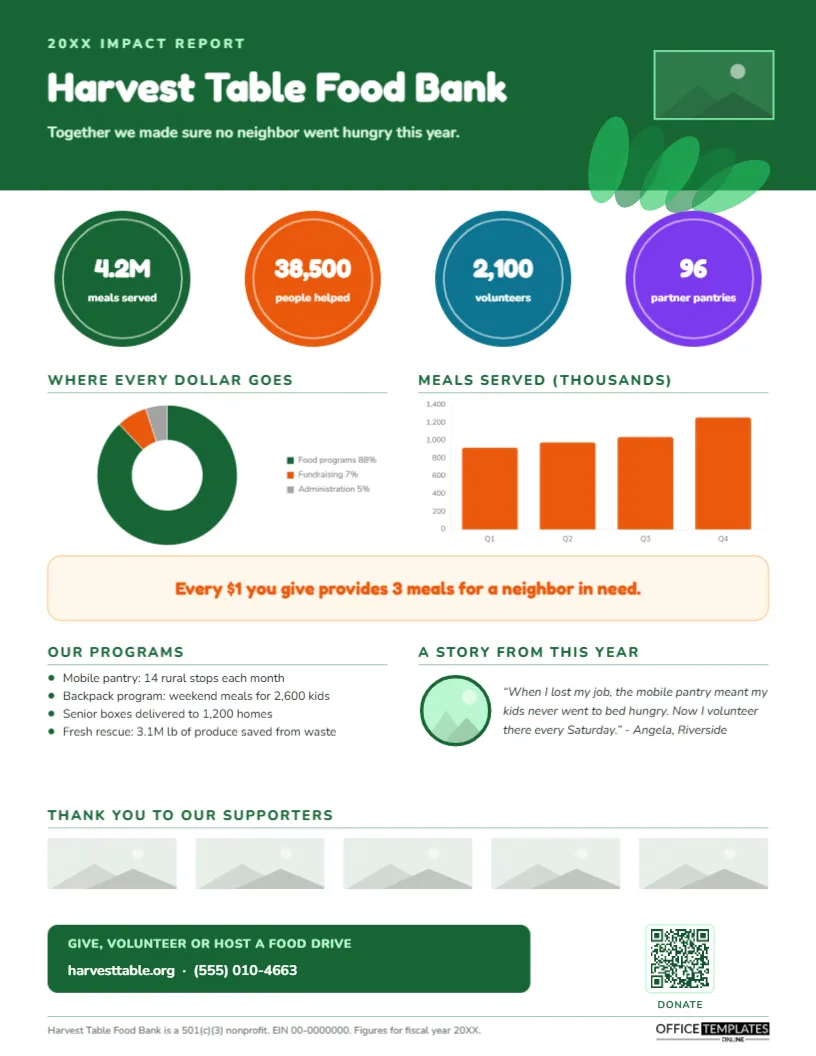
Donors want to know that their gift made a difference. Most will never read a forty-page annual report, but nearly all will glance at one page that shows what happened because of them: how many people were helped, where the money went, and one real story. A Nonprofit Impact Fact Sheet, sometimes called an impact report or annual snapshot, does exactly that. This template, shown for a food bank, turns a year’s work into a bright, hopeful page that invites the next gift.
Show Impact, Not Activity
There is a difference between what an organisation did and what changed. We ran 14 mobile pantry routes describes activity; 38,500 people had enough to eat describes impact. Donors respond to the second. This template leads with outcomes in big coloured circles, supports them with charts, and makes the impact personal with a story. Activity details appear lower on the page in the programs list, where they explain how the results were achieved.
Green Leaves, Orange and Four Impact Circles
A deep green header carries a pale green 20XX IMPACT REPORT label, the organisation’s name, Harvest Table Food Bank, in rounded Fredoka, and a line of thanks. A cluster of overlapping green leaf shapes decorates the lower right of the header, and a logo slot sits at the top right. Below, four large coloured circles, green, orange, teal and purple, each hold a headline number: meals served, people helped, volunteers and partner pantries.
The middle of the page holds two charts: Where every dollar goes, a doughnut chart showing program, fundraising, and administration spending, and Meals served (thousands), an orange bar chart by quarter. A soft orange banner states the giving message: Every $1 you give provides 3 meals for a neighbor in need. Below it, Our programs lists four programs with results, and A story from this year pairs a round photo slot with a quote from a neighbour who received help and now volunteers. Thank you to our supporters offers five logo slots for sponsors and foundations. A green call-to-action box, Give, volunteer, or host a food drive, sits beside a QR code labelled DONATE, and the footer gives the 501(c)(3) status, EIN, and fiscal year. It fills a single 8.5 x 11 inch US Letter page, portrait.
Gathering the Numbers: A Data Checklist
| Figure | Where to find it | Tip |
|---|---|---|
| People served | Client intake or program records | Count unduplicated individuals if you can |
| Units delivered (meals, visits, nights) | Distribution or service logs | Use the same conversion every year |
| Volunteers and hours | Volunteer management system | Hours can be valued in dollars too |
| Spending breakdown | Audited financials or Form 990 | Match your functional expense categories |
| Trend by quarter or year | Program data | Shows growth and seasonal demand |
| Partners | Partner agency list | Count active partners in the fiscal year |
Customising the Harvest Table Template
- Retype the year, organisation name and thank-you line; replace the logo slot using Replace Image.
- Change the numbers and labels inside the four circles. Recolour the circles to your brand palette if you like.
- Select either chart, open Chart Options, and choose Edit Chart Data to enter your spending percentages or service figures; switch the bar chart to a line chart if you show several years.
- Rewrite the giving message with your own cost-per-outcome figure.
- Update the programs list and the story; replace the story photo with Replace Image, with the person’s consent.
- Replace the five supporter logos, or delete the row if you prefer to thank supporters elsewhere.
- Link the QR code to your donation page in the Barcodes & QR panel.
The “Every Dollar” Message
A cost-per-outcome statement, such as $1 provides 3 meals or $50 funds a week of tutoring, makes a donation tangible. Base it on real program costs and be ready to explain how you calculated it. Food banks often use a meals-per-dollar figure based on donated food and distribution costs; other organisations can use cost per participant, per night of shelter, or per tree planted.
Telling One Story Well
Numbers show scale; stories create connection. Choose one person whose experience represents your work, get their written permission, and let them speak in their own words. Keep it short, specific, and dignified: the template’s story describes a hard moment, the help received, and what happened next. Use first names or pseudonyms if privacy matters, and never share details that could embarrass or identify someone without consent.
Transparency Builds Trust
The where every dollar goes chart answers the question many donors have but do not ask. Use figures consistent with your audited financial statements and public filings. If fundraising or administration costs are higher than you would like, explain why briefly; donors increasingly understand that strong organisations need to invest in operations.
Where to Share It
Mail it to donors with a thank-you letter, include it in year-end appeals, hand it out at events and board meetings, send it to foundations with grant reports, post it on your website and social media, and give it to volunteers so they can talk about your impact. Corporate partners often share it internally to encourage employee giving.
Other Missions This Fits
Shelters, youth programs, animal rescues, environmental groups, health charities, arts organisations, schools’ foundations and faith-based charities can all use this layout. Swap the circles, charts and story for your own mission and palette.
Paper Choices for Donor Mailings
For mailed donor packs, print on 80 lb or 100 lb silk paper so the colours look rich. Many nonprofits choose recycled paper, which suits the design. The PDF is ideal for email and websites.
Development Team FAQs
Can I show several years?
Yes. Change the bar chart labels to years in Edit Chart Data to show growth over time.
Should I include our financial summary?
Add a second page with revenue and expense tables if major donors and foundations ask for it.
What if our story participant wants to stay anonymous?
Use a first initial or a pseudonym, and replace the photo with an illustration or a photo of your program.
Open the template, add your year’s results and one real story, and show every donor the difference they made.