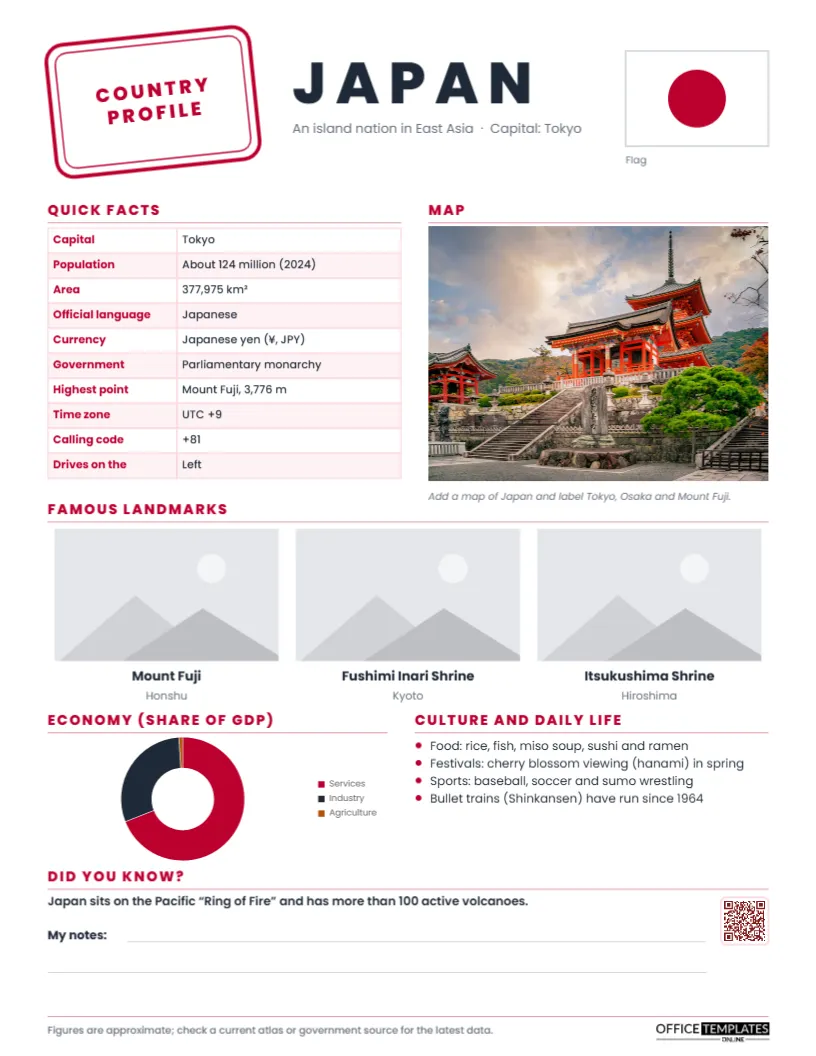
Choosing a country and making a fact sheet is one of the most common geography assignments in schools, and a staple of international days, social studies units, and travel clubs. Students research the capital, population, language, currency, government, landmarks, economy, and culture, then present it on one page. This Country Profile Fact Sheet Template, completed for Japan, gives students a clean, well-organised page to follow and gives teachers a reference handout ready for class.
A Passport Stamp and a Flag
The page opens with a red, slightly tilted double-bordered rectangle that reads COUNTRY PROFILE, just like a passport entry stamp, the motif that ties the design to travel. Next to it, JAPAN is set in bold, widely spaced Poppins capitals with the line: An island nation in East Asia · Capital: Tokyo. On the right, the flag is drawn from shapes: a red circle on a white rectangle with a thin grey border, so it stays sharp and editable.
A Quick facts table on the left lists ten facts: capital, population, area, official language, currency, government, highest point, time zone, calling code, and which side of the road people drive on. On the right, a Map slot with a prompt to label Tokyo, Osaka, and Mount Fuji. Across the page, Famous landmarks shows three photo slots captioned Mount Fuji, Fushimi Inari Shrine, and Itsukushima Shrine with their locations. The lower half has an Economy doughnut chart of services, industry, and agriculture as shares of GDP, Culture and daily life in four bullets, and a Did you know? fact about the Ring of Fire, lined space for students’ notes, and a QR code. A footer reminds readers to check figures in a current atlas. It prints on US Letter paper (8.5 x 11 inches, portrait).
Research Worksheet: Where to Find Each Fact
| Fact | Good source | Tip |
|---|---|---|
| Population, area | National statistics office, world factbooks | Write the year next to the population |
| Government | Encyclopedia, government website | Use simple terms, e.g., parliamentary monarchy |
| Currency | Central bank website | Include the symbol and code |
| Highest point | Atlas | Give the height in metres and feet |
| Economy by sector | World Bank data | Round to whole percentages |
| Landmarks and culture | Tourism board, encyclopedia | Pick three landmarks from different regions |
Making a Profile for Another Country
- Change the country name and description line.
- Redraw the flag: recolour the circle and rectangle, or delete them and add shapes for stripes, crosses or stars. For complex flags, add a flag image from a public-domain source.
- Select the quick facts table and use Edit Data to enter the new country’s facts; add rows such as Largest city or National animal with + Row.
- Click the map slot and the three landmark slots and choose Replace Image for each.
- Select the economy chart, open Chart Options, and use Edit Chart Data to enter the new percentages.
- Rewrite the culture bullets and the Did you know? fact.
- Link the QR code to a video or virtual tour you have checked, in the Barcodes & QR panel.
About the Japan Facts
The figures on the sample are rounded and dated where they change. Japan’s population, about 124 million in 2024, has been slowly declining, which makes a good discussion point about ageing societies. The area is 377,975 square kilometres, Mount Fuji rises 3,776 metres, the currency is the yen, and Japan drives on the left. The economy is dominated by services, with a strong industrial sector known for cars, electronics and machinery. Because statistics change, the footer asks readers to check a current atlas or government source.
Teaching Ideas Around the Profile
Use completed profiles for a passport activity: students visit classmates’ country sheets around the room and collect a stamp at each one. Compare two countries using the quick facts tables. Plot the economy charts side by side to discuss how economies differ. Ask students to write a postcard from one of the landmarks, or to plan a three-day trip using the map. The My notes lines at the bottom work well for recording a question students still have.
Choosing Three Landmarks
The three landmark photos should show variety: one natural wonder, one historic or religious site, and one modern or urban scene, ideally from different regions. For Japan, the sample pairs Mount Fuji on Honshu with the red torii gates of Fushimi Inari in Kyoto and the floating gate of Itsukushima near Hiroshima. Students could swap in the Tokyo Skytree, Himeji Castle, or the snow monkeys of Nagano. Asking students to explain why they chose each landmark turns a picture exercise into a thinking one.
Respectful Cultural Research
Country projects are a chance to teach respect. Encourage students to describe culture in the country’s own terms, avoid stereotypes, and include everyday life, not just famous sights. Where possible, invite students or families with a connection to the country to share their perspective. Use official names and correct spellings, including accents and romanisation of place names.
Adapting for Different Ages
Younger students can complete a simplified version with the flag, capital, language, one landmark and one food. Older students can add history, a timeline of key events, a climate graph or a population pyramid chart. Language classes can write the whole profile in the target language.
Travel Clubs, Libraries and Study-Abroad Offices
Travel agencies, study-abroad offices, international student clubs, exchange programs and libraries can use the template for destination guides. Families preparing for a trip can make a country profile with children to build excitement and knowledge before they travel.
Printing the Profile
The red-and-white Japan palette prints beautifully in colour. Landmark photos look best printed in colour on slightly heavier paper for display boards. For a black-and-white class set, the table and headings still read clearly.
Common Questions From Teachers and Students
Can I use real photos of landmarks?
Yes. Use photos from public-domain or openly licensed sources and credit them in the footer.
How do I draw a more complex flag?
Use the editor’s shapes for stripes and circles, or insert an openly licensed flag image into the flag area.
Can students fill it in online?
Yes. Every text box, table, and photo slot can be edited in the editor before downloading.
Open the template to share the Japan profile, or turn it into a passport to any country your students want to explore.