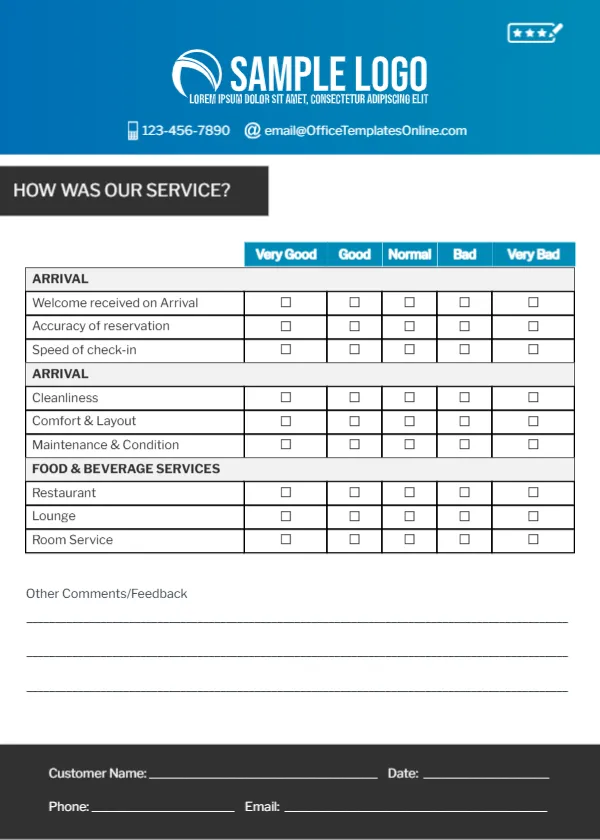
Rating Arrival, Rooms and Dining on a Hotel Feedback Card
A bright blue header with a white SAMPLE LOGO, a star rating icon, a phone and an email sits at the top. A charcoal banner reads HOW WAS OUR SERVICE?. A table with blue headers rates items from Very Good to Very Bad in three sections: Welcome on arrival, accuracy of reservation and speed of check in, then cleanliness, comfort and layout and maintenance, then restaurant, lounge and room service. Comment lines and a charcoal footer with name, date, phone and email lines close the card.
Three Grouped Sections
The card is 5 x 7 inches, portrait. Grouping items by stage of the stay helps guests think through their visit in order and gives managers clear results by department.
A Repeated Section Heading
The second section heading repeats ARRIVAL, but its items, cleanliness, comfort and layout and maintenance, are about the room. Rename it ROOM or ACCOMMODATION. The header shows the template site’s email, so type your hotel’s contacts.
Preparing the Hotel Card
- Rename the second ARRIVAL heading.
- Swap the logo.
- Type hotel contacts.
- Place a card in every room.
- Collect at checkout.
Placing Cards in Rooms
Leave a card and a pen on the desk in each room, or hand one over at checkout. Guests often fill them in on the last evening, when the stay is fresh.
Departments That Learn From the Card
Front desk, housekeeping and the restaurant each get their own section. Share results with each team monthly so praise and problems reach the right people.
Adding Spa or Parking
If your hotel has a spa, pool or parking, add a fourth section or replace the lounge row.
Responding to Poor Ratings
A manager reading cards daily can resolve problems before the guest leaves, which often turns a complaint into a good review.
Printing the Hotel’s Blue Header
The blue prints brightly on matte card.
Online Review Links
Add a short line inviting happy guests to leave an online review, with a QR code if you like.
Using the Hotel Feedback Cards
Read them daily during busy seasons.
Step by Step Editing of the Hotel Blue Arrival Rooms Design
- On the hotel blue arrival rooms design, click the main headline and type your own words, keeping a similar length.
- Retype every name, date and contact line on the hotel blue arrival rooms design, checking each against a trusted source.
- Search the hotel blue arrival rooms design for the words Lorem and Company so that no placeholder remains.
- Click any logo or photo on the hotel blue arrival rooms design, choose Replace Image and resize the new picture to fit.
- Zoom the hotel blue arrival rooms design to full size and read each line aloud before you save it.
- Keep a clean master of the hotel blue arrival rooms design without private details, so later versions start tidy.
Next to try is the tour and travel feedback card. Have a look at the restaurant feedback card. Another option is the spa comment card. Looking beyond the hotel blue arrival rooms design? See all feedback and comment card templates.