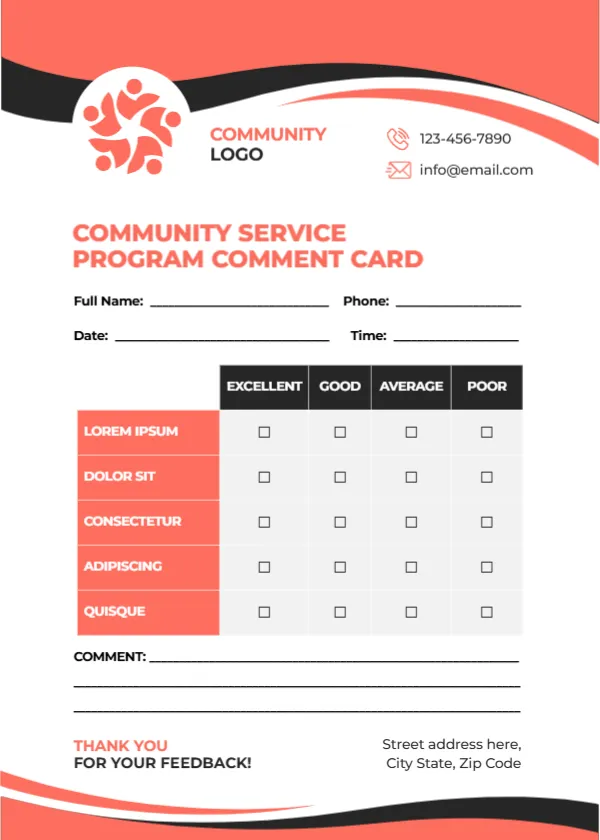
Coral Waves and a Community Logo for Volunteer Program Feedback
Coral and charcoal waves sweep across the top and bottom of this white card. A coral community logo of linked figures sits beside COMMUNITY LOGO, with a phone and email at the right. COMMUNITY SERVICE PROGRAM COMMENT CARD runs in coral capitals, followed by name, phone, date and time lines. A table with charcoal headers rates five coral rows from Excellent to Poor, three comment lines follow, and a thank you and address sit at the foot. It suits charities, councils and volunteer groups that want to hear from the people they serve.
Five Rated Rows
The card is 5 x 7 inches, portrait. This is the first of a family of cards that share the same layout with different colours and titles.
Rows to Fill With Program Criteria
The five rated rows read LOREM IPSUM, DOLOR SIT, CONSECTETUR, ADIPISCING and QUISQUE, so replace them with real criteria. For a community program, try Organisation, Volunteer support, Communication, Impact on the community and Overall experience.
Preparing the Community Card
- Replace the five Lorem rows.
- Swap the logo.
- Type contacts and address.
- Hand out after events.
- Collect in a box.
Feedback From Volunteers and Participants
Programs serve volunteers and the people they help. Print two versions with different criteria so both groups can comment. Volunteers might rate training and support, while participants might rate how helpful the service was.
Using Feedback in Grant Reports
Funders like evidence of impact. Summaries of comment cards can support grant applications and annual reports. Quotes from comment cards, used with permission, bring reports to life.
Printing Coral
Coral prints warmly on white card. A black and white copy works for large print runs.
Making Cards Accessible
Offer to read questions aloud for participants who need help. Large print copies help older participants.
Thanking Respondents
A thank you at the foot shows that every response matters.
Keeping Records Private
Store completed cards securely.
Using the Community Comment Cards
Review them after each program cycle.
Step by Step Editing of the Community Service Coral Waves Design
- On the community service coral waves design, click the main headline and type your own words, keeping a similar length.
- Retype every name, date and contact line on the community service coral waves design, checking each against a trusted source.
- Search the community service coral waves design for the words Lorem and Company so that no placeholder remains.
- Click any logo or photo on the community service coral waves design, choose Replace Image and resize the new picture to fit.
- Zoom the community service coral waves design to full size and read each line aloud before you save it.
- Keep a clean master of the community service coral waves design without private details, so later versions start tidy.
You may also like the event feedback card. For comparison, open the library user feedback card. Consider the museum feedback card. The rest of the series around the community service coral waves design is in feedback and comment card templates.