Satisfaction Ratings for Doctors, Nurses and Waiting Times
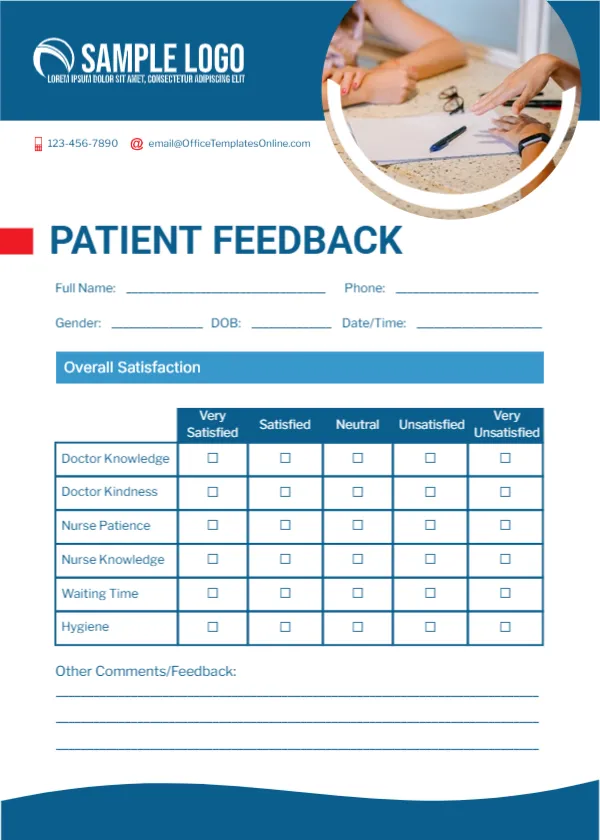
A blue header carries a white logo, with a round photo of a doctor’s hand and a patient’s hand across a desk. A small red bar sits beside PATIENT FEEDBACK in bold blue capitals. Lines ask for full name, phone, gender, date of birth and date and time. A blue Overall Satisfaction bar sits over a table rating Doctor Knowledge, Doctor Kindness, Nurse Patience, Nurse Knowledge, Waiting Time and Hygiene from Very Satisfied to Very Unsatisfied. Comment lines and a blue wave close the card.
Five Point Satisfaction Scale
The card is 5 x 7 inches, portrait. The satisfaction scale is common in healthcare and easy for patients of all ages to understand.
Personal Details to Review
The card asks for gender and date of birth, which are personal health related details. Many clinics make feedback anonymous, so consider removing these lines or marking them optional. This is a feedback layout, not a medical record, and any data should be handled under your local privacy rules.
Preparing the Patient Card
- Decide which personal lines to keep.
- Swap the logo and contacts.
- Keep or adjust the ratings.
- Place cards in the waiting room.
- Provide a sealed box.
Anonymous Feedback Gets Honest Answers
Patients are more open when they do not have to give their name. A sealed box in the waiting area lets them leave cards privately.
What the Ratings Tell You
Waiting time and hygiene ratings often show quick wins, such as better appointment spacing or more hand sanitiser points.
Sharing Results With Staff
Share positive comments with doctors and nurses, since praise from patients is a strong motivator.
Printing for Clinics
Print on matte card so pens write smoothly. Keep a stack at reception.
Accessibility
Offer a large print version or help filling in the card for patients with poor eyesight.
Replacing the Photo
Swap the photo for one of your own clinic if you prefer.
Using the Patient Feedback Cards
Review results monthly with the team.
Step by Step Editing of the Patient Blue Clinic Photo Design
- On the patient blue clinic photo design, click the main headline and type your own words, keeping a similar length.
- Retype every name, date and contact line on the patient blue clinic photo design, checking each against a trusted source.
- Search the patient blue clinic photo design for the words Lorem and Company so that no placeholder remains.
- Click any logo or photo on the patient blue clinic photo design, choose Replace Image and resize the new picture to fit.
- Zoom the patient blue clinic photo design to full size and read each line aloud before you save it.
- Keep a clean master of the patient blue clinic photo design without private details, so later versions start tidy.
Also worth a look: healthcare clinic feedback card. Next to try is the service quality card. Have a look at the hotel feedback card. Find more designs next to the patient blue clinic photo design in feedback and comment card templates.