When a company considers a new plant, office or distribution centre, site selection consultants start with data: population, labour force, income, industries, education and transport access. Economic development organisations answer with a community profile. So do chambers of commerce, regional planning agencies, local governments and utilities. A strong one-page profile helps a community make the first cut, and it is equally useful for grant applications, council presentations and residents who want to understand where they live. This Community and Economic Profile Template, shown for a fictional county, turns public data into a clear, confident page.
What Site Selectors and Investors Look For
Site selection is a process of elimination. Consultants screen communities quickly on a few factors: workforce size and skills, cost of doing business, available sites and buildings, transport and logistics, and quality of life. A community profile should present those factors honestly and make it easy to compare. This template puts the headline numbers first and the reasons to choose the county last, so the data builds toward the pitch.
Deep Teal, Aqua and Amber
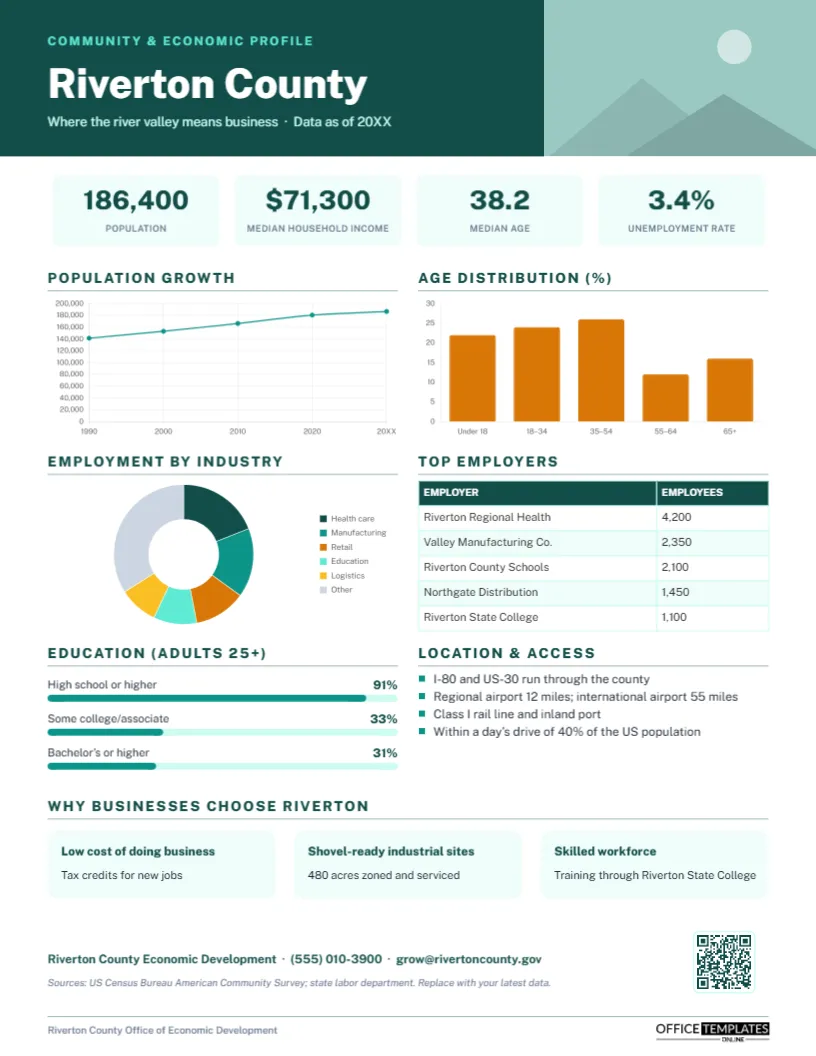
A deep teal header on the left holds an aqua COMMUNITY & ECONOMIC PROFILE label, the place name, Riverton County, in bold white Public Sans, and a tagline with the data year; a photo slot fills the right side of the header for a skyline, main street, or landscape. Four pale teal tiles show population, median household income, median age, and unemployment rate.
The page is then organised into panels. Population growth is an aqua line chart from 1990 to today. Age distribution is an amber bar chart by age group. Employment by industry is a doughnut chart of the main sectors, and Top employers is a table of the largest employers and their headcounts. Education shows attainment as three progress bars, and Location & access lists highways, airports, rail, and market reach. Why businesses choose Riverton presents three pale teal cards with advantages and supporting details. The economic development office’s contact line, data sources, a QR code, and a footer finish the page. It prints on one portrait 8.5 x 11-inch US Letter sheet.
Free Data Sources for Each Section (US)
| Section | Typical source | Update frequency |
|---|---|---|
| Population and age | Census Bureau estimates and American Community Survey | Annual |
| Median household income, education | American Community Survey | Annual (5-year estimates for small areas) |
| Unemployment rate | Bureau of Labor Statistics local area data | Monthly |
| Employment by industry | Quarterly Census of Employment and Wages or County Business Patterns | Quarterly/annual |
| Top employers | Local survey, state labor department, business journals | Annual |
| Location and access | State transport department, airport and rail operators | As needed |
Outside the US, national statistics offices publish equivalent data. Always cite the source and year, as the template’s source line does.
Loading Your Community’s Data
Retype the place name and tagline, and click the header photo to Replace Image with a striking local image. Update the four headline tiles. The three charts are editor charts: select each, click Chart Options, and use Edit Chart Data to paste in your population series, age groups, or industry shares. The top employers table is an editor Table; update it with Edit Data and add rows with + Row. For the education bars, change the percentages and resize each aqua bar to match. Rewrite the location bullets and the three advantage cards, update the contact and sources, and point the QR code, via the Barcodes & QR panel, at your available sites database or data portal.
Choosing the Three Advantages
The three cards at the bottom are your pitch. Choose advantages you can prove and that matter to your target industries: incentives or tax credits, shovel-ready sites with utilities, workforce training partnerships, low energy costs, logistics access, a university research base, or quality of life. Pair each headline with a specific detail, such as 480 acres zoned and serviced, rather than a slogan.
Presenting Data Honestly
Site selectors verify every number, so accuracy protects your credibility. Use the most recent data available, keep the same source for comparable figures, avoid mixing years without saying so, and round sensibly. If a figure is unflattering, such as a lower education level, present it plainly and use the advantage cards to explain what the community is doing about it, such as training partnerships.
The Header Photo Sells the Place
Data persuades consultants, but a photograph reminds them that real people live and work in the community. Choose an image that supports your pitch: an industrial park with trucks and rail for a logistics pitch, a lively downtown for office and tech prospects, or a river valley landscape for quality of life. Avoid generic stock images; site selectors recognise them instantly.
Audiences Beyond Site Selection
Local governments use community profiles in budget presentations and comprehensive plans. Chambers of commerce give them to new businesses and residents. Grant writers attach them to applications that require community context. Real estate brokers include them in commercial listings. Schools and colleges use them for program planning. Keep a public version on your website and update it each year.
Cities, Regions and Neighbourhoods
The layout works at any scale: a small town, a city, a metropolitan region, a downtown district or a neighbourhood revitalisation area. Neighbourhood profiles might replace top employers with local businesses and add housing data. Regional partnerships can make one profile per member county in the same design.
Printing for Trade Missions and Meetings
Print on bright white silk paper for site visits, trade shows and investment missions; the teal and amber palette looks professional, and the charts remain clear. Bring the PDF on a tablet for quick sharing.
Economic Developer FAQs
Can I compare our county with the state?
Yes. Add a second dataset to any chart in Edit Chart Data, for example, state age distribution beside the county’s.
Should I list incentives?
Mention the main ones in the advantage cards and link to details through the QR code.
How often should the profile be updated?
At least once a year when new census estimates are released, and whenever a major employer changes.
Open the template, load your community’s data and advantages, and give investors a profile that puts your community on the shortlist.