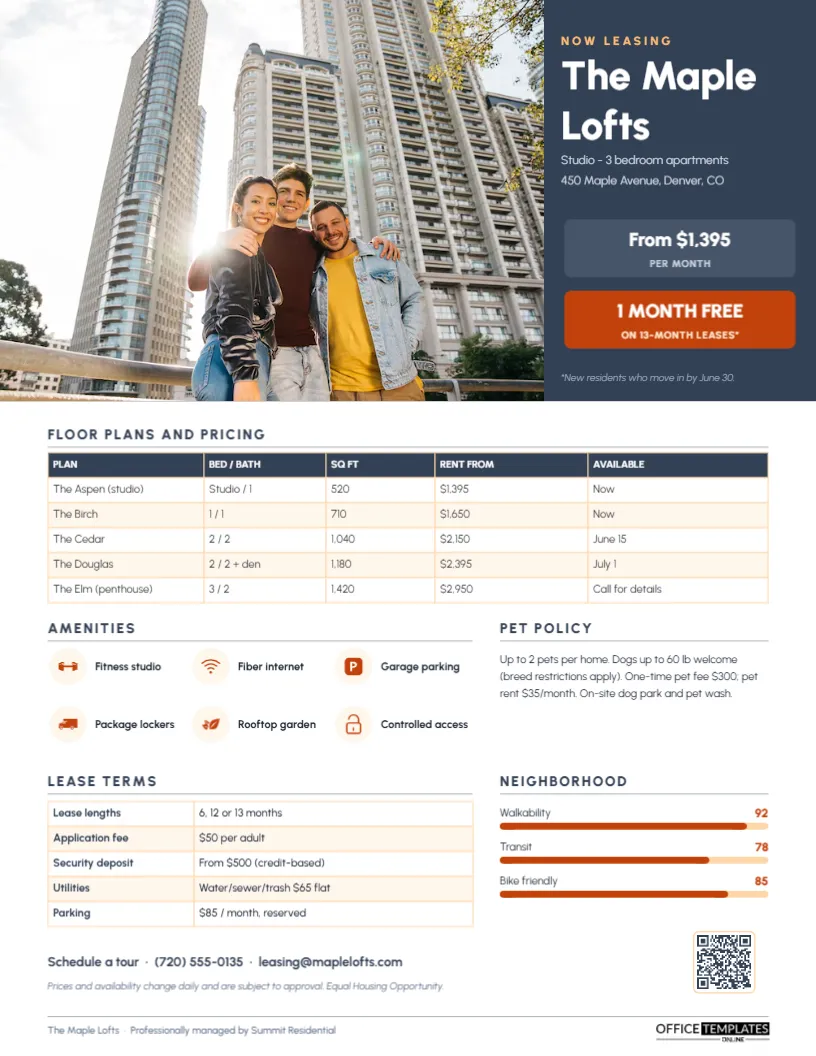
Renters shopping for an apartment compare a handful of communities at once, and they want the same details from each: rents by floor plan, availability, amenities, pet policy, fees, and location. A property’s website has all of that, spread across many pages. A one-page Apartment Community Fact Sheet puts it together, so leasing agents can hand it to visitors after a tour, email it after a phone call, and use it at relocation fairs. This template, shown for a loft building called The Maple Lofts, is modern, clear, and ready for any multifamily property.
The Leasing Office’s Most Useful Handout
After a tour, prospects leave with memories that blur together, especially if they toured three properties in an afternoon. A fact sheet with prices, fees, and the pet policy helps them remember your community and makes the decision easier. It also answers the questions that otherwise fill the leasing team’s inbox: what the deposit is, what utilities cost, how much parking is, and when the two-bedroom becomes available.
Slate, Terracotta and a Big Building Photo
The top of the page is split. A large photo slot on the left shows the building or its best interior. On the right, a slate panel announces NOW LEASING in soft orange, the community’s name, The Maple Lofts, in bold white Urbanist, the unit range, and address. Two panels below it show the starting rent, from $1,395 per month, and a terracotta special: 1 month free on 13-month leases, with the offer’s conditions in small italics.
A floor plan and pricing table list five named plans with bed and bath counts, square footage, rent from, and availability. Amenities shows six icons in pale peach circles (fitness studio, fiber internet, garage parking, package lockers, rooftop garden, and controlled access). Pet policy gives limits, fees, and pet rent in a short paragraph. Lease terms list lease lengths, application fee, deposit, utilities, and parking costs, and Neighborhood shows walkability, transit, and bike scores as terracotta progress bars. A tour line with phone and email, a fair-housing disclaimer, a QR code, and a footer naming the management company completes the page. It is sized to US Letter paper, 8.5 x 11 inches, portrait.
Updating Prices and Availability
Rents and availability change constantly, so keep the sheet current. The floor plan table is an editor Table: select it and use Edit Data to update rents and dates, or + Row to add a plan. Print a fresh batch each week, or more often during busy leasing season, and date the disclaimer line if prices move daily. For communities with revenue management software, Rent From with a date is the safest wording.
Setting Up the Template for Your Community
- Replace the photo with Replace Image; exteriors at dusk or bright living rooms perform best.
- Retype the community name, unit types, and address in the slate panel.
- Change the starting rent and the special, or delete the special panel if you have none.
- Update the six amenities. Icons are editable vectors; swap them from the icon library to match your features.
- Rewrite the pet policy and select the lease terms table to update fees with Edit Data.
- Adjust the neighbourhood scores by changing the numbers and the length of each terracotta bar.
- Link the QR code to your online tour booking or application in the Barcodes & QR panel.
Fee Transparency Renters Appreciate
Renters increasingly expect to see the total cost of living in a community before they apply, and some jurisdictions now require fee disclosure in advertising. List mandatory monthly fees (utilities, trash, amenity or technology fees), one-time fees (application, administrative, pet), and optional costs (parking, storage). The lease terms table on the template is built for this. Clear fees reduce surprises at lease signing and build trust.
Fair Housing in Marketing
All rental advertising in the United States must comply with the Fair Housing Act and state and local fair housing laws. Describe the property and its amenities, not the kind of people who should live there; avoid phrases such as perfect for young professionals or ideal for singles. Include the Equal Housing Opportunity statement or logo, as the template’s disclaimer does, and apply pet and breed policies consistently while accommodating assistance animals as the law requires.
A Post-Tour Follow-Up Sequence
| When | Action |
|---|---|
| Day 0 (tour) | Hand over the fact sheet, circle the plan they liked |
| Day 0 (evening) | Email the PDF with a thank-you and the application link |
| Day 2 | Call or text to answer questions; mention availability changes |
| Day 5 | Share a photo of the exact unit or a neighbourhood highlight |
| Day 10 | Final check-in, with an updated sheet if prices changed |
Choosing the Six Amenities
Six icons is a deliberate limit. Pick the amenities renters in your market ask about most, not every feature in the building. In urban properties, that is often internet speed, package lockers, parking, and controlled access; in suburban communities, a pool, in-unit laundry, and a dog park may matter more. Put apartment features (in-unit washer and dryer, balconies) in the floor plan notes and use the icons for shared community amenities.
Other Rental Properties
The layout works for student housing (add per-bed pricing and roommate matching), senior living (add care levels and activities), build-to-rent homes (plans become home models), single-family rental portfolios and short-term furnished rentals. Property management companies can create one fact sheet per property with a shared design, changing only the photo, palette, and data.
Print Runs and Digital Copies
Print weekly batches on bright white paper for the leasing office and tours. The slate and terracotta palette prints clearly on office colour printers. Email the PDF and use the QR code at open houses so prospects can apply from their phones.
Leasing Team FAQs
Can I show floor plan drawings?
Add a second page with each floor plan drawing and its dimensions.
What if the special changes mid-month?
Edit the terracotta panel or delete it, and reprint; the rest of the page stays the same.
Can I add a map?
Replace the neighbourhood scores with a small map image showing transit stops and nearby amenities.
Open the template, add your community’s photo, plans, and prices, and give every prospect a fact sheet that brings them back to sign.