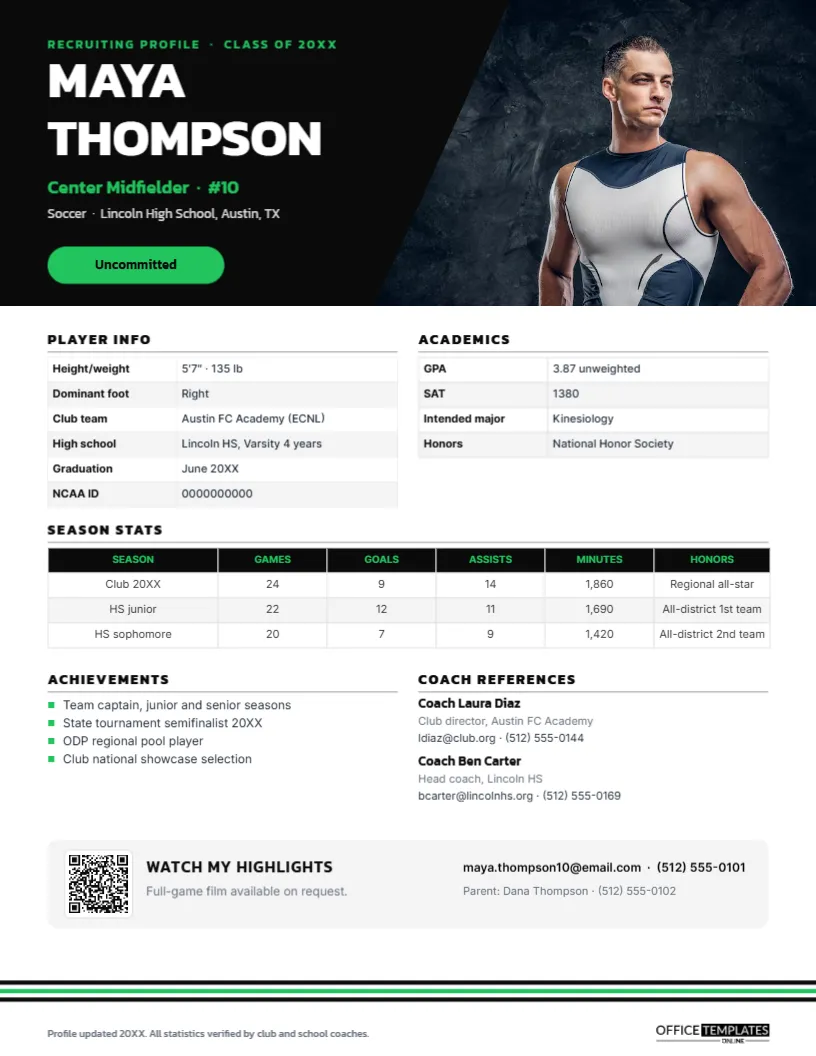
College coaches receive hundreds of emails from high school athletes every season. The ones that get opened and saved are clear, short, and complete: who the athlete is, what they play, how good they are, how they do in school, and who can vouch for them. A one-page Athlete Recruiting Profile, sometimes called a sports résumé, puts that information in a format coaches can scan in thirty seconds and file for later. This template, shown for a soccer midfielder, gives student-athletes and their families a profile that looks as sharp as their highlight video.
What College Coaches Scan For
Coaches want to answer three questions quickly. Can this athlete play at our level? Will they be admitted and stay academically eligible? Is there someone I trust who has seen them play? The profile gives each question a place: the header and stats for ability, the academics table for eligibility, and coach references for credibility. Contact details and the highlight video link sit at the bottom, ready for the coach’s next step.
Black, Green and Diagonal Stripes
The top of the page is a black hero panel with three diagonal stripes, the centre one in bright green, like the stripes on a team kit. On the right, a slanted photo slot for an action shot fills the space behind the stripes. On the left, a green RECRUITING PROFILE · CLASS OF 20XX label introduces the athlete’s name, MAYA THOMPSON, in large white Kanit, her position and number in green, her sport and school, and a green pill showing her status: Uncommitted.
Below the hero, Player info lists height and weight, dominant foot, club team, high school, graduation date, and NCAA ID. Academics shows GPA, test score, intended major, and honours. A Season stats table covers club and high school seasons with games, goals, assists, minutes, and honours. Achievements lists four highlights with green square bullets, and Coach references gives two coaches with roles, emails, and phone numbers. A grey bar at the bottom holds a QR code with WATCH MY HIGHLIGHTS, the athlete’s email and phone, and a parent contact. Three thin black and green stripes echo the header at the foot of the page. It is a portrait US Letter page, 8.5 x 11 inches.
Stats Coaches Expect by Sport
The season stats table is an editable table, so it can be changed for any sport. Use the statistics coaches in that sport actually look at:
| Sport | Useful columns |
|---|---|
| Soccer | Games, goals, assists, minutes; for keepers, saves and goals-against average. |
| Basketball | Points, rebounds, assists, steals, FG% and 3P% |
| Volleyball | Kills, digs, assists, blocks, aces, hitting % |
| Baseball/softball | AVG, OBP, SLG, RBI; for pitchers, ERA, strikeouts, velocity |
| Track and swimming | Events and personal bests with dates and meets |
| Football | Position-specific stats plus 40-yard dash and verified measurements |
Building Your Own Profile
- Click the slanted photo area and choose Replace Image; use a sharp action photo in your uniform, not a posed portrait.
- Retype your name, position, number, sport, school, and graduation year.
- Change the status pill to Uncommitted, Verbally committed, or leave it out.
- Select the player info and academics tables and use Edit Data; add rows such as Wingspan or ACT.
- Update the season stats table and add rows for more seasons with + Row.
- List four achievements and two coach references who have agreed to be contacted.
- Link the QR code to your highlight video in the Barcodes & QR panel, and update your contact details.
Making a Highlight Video Worth Scanning
The QR code is only as good as the video it opens. Keep highlights to three to five minutes, put your best clips in the first thirty seconds, identify yourself before each clip with a spot shadow or arrow, and show the full range of your skills for your position. Include your name, graduation year, position, and contact information at the start. Offer full-game film on request, as the profile does, because many coaches want to see how you play for a whole match.
Honesty and Verification
Coaches check. Measurements, times, and statistics should be accurate and, where possible, verified by a coach or an official event. The footer on the template states that statistics are verified by club and school coaches. Inflated numbers damage credibility quickly, and coaches talk to each other.
Emailing a Coach
Send the profile as a PDF attached to a short, personal email: say why you are interested in that school and program, mention an upcoming tournament or showcase where they could see you play, and include your highlight link in the body too. Use a subject line with your graduation year, position, and club team. Follow the recruiting contact rules for your sport and division, which limit when coaches can reply.
Choosing Coach References
Pick two coaches who have watched you play recently and can speak about both your ability and your character: typically your club coach and your high school coach. Ask them first, tell them which colleges you are contacting, and send them your profile so their comments match it. Always include both an email and a phone number, because college coaches often prefer a quick call.
Beyond High School Soccer
The layout works for any sport and level: club athletes, junior college transfers, international students seeking US scholarships, e-sports players, and even professional trialists. Parents can make a profile for each child who plays, and club directors can create profiles for their whole roster in the same design.
Printing for Showcases
At showcases and ID camps, bring printed copies on bright white paper to hand to coaches, with the QR code large and clear. The black hero prints richly on a colour laser printer. Keep the PDF ready to send the same day.
Student-Athlete FAQs
Should I include my GPA if it is not great?
Yes. Coaches will find out anyway, and showing an improving trend or strong recent grades is better than leaving it out.
Can I add a second photo?
Keep one strong action photo; use the video for more.
How often should I update the profile?
After every season or major tournament, and whenever test scores or grades change.
Open the template, add your photo, stats, and highlights, and give college coaches a recruiting profile that earns a closer look.