Electrical Services Proposal Template with Lightning Bolt Cover
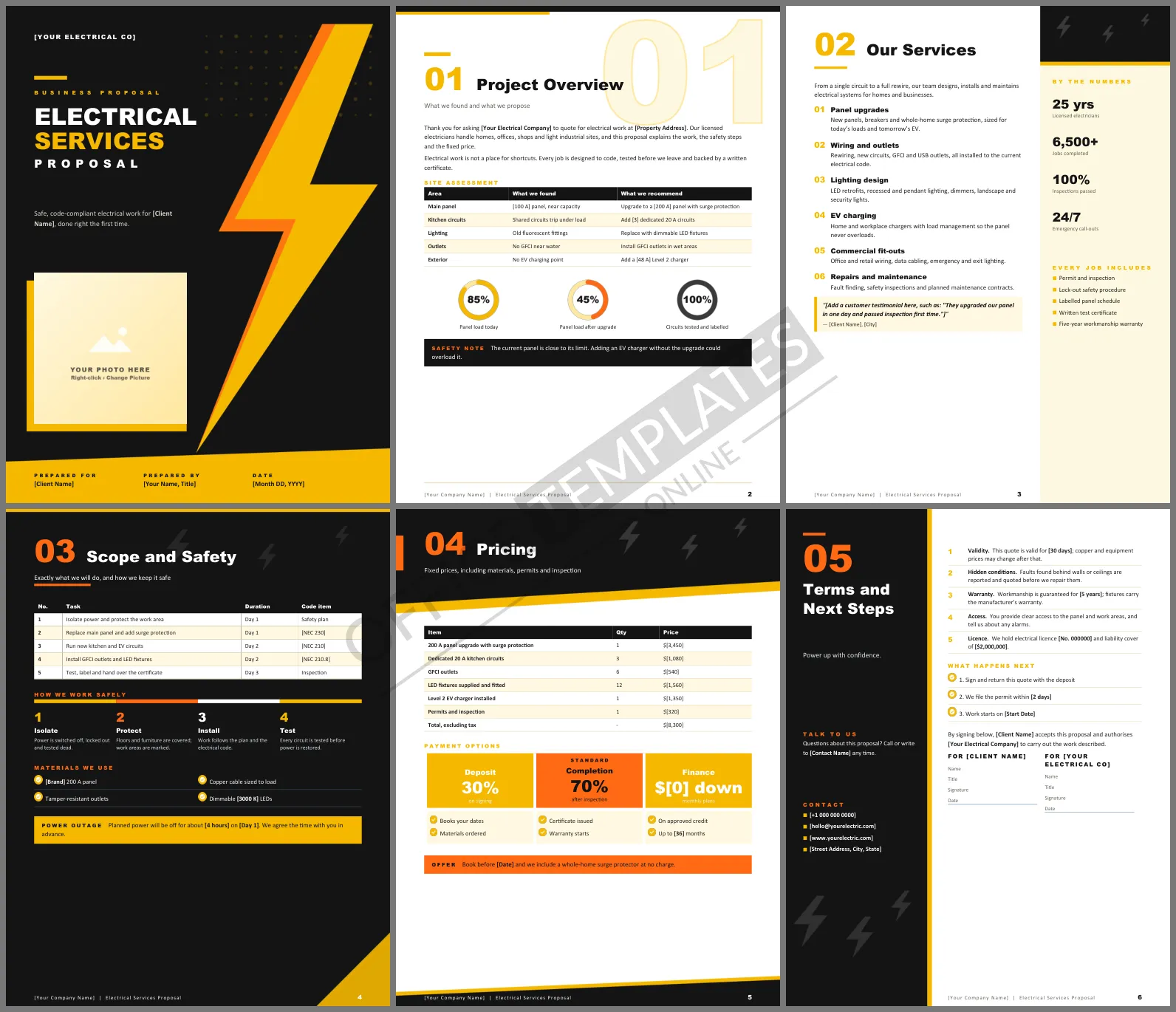
Electrical work is invisible once the walls are closed, so customers judge an electrician by the paperwork. A proposal that lists every circuit, every code item, and every safety step tells them the hidden work will be done properly. This Electrical Services Proposal Template gives contractors six high-contrast Word pages that feel as sharp as a freshly installed panel.
A Tour of the Six Pages
A giant yellow and orange lightning bolt crosses the black cover beside a framed photo. Project Overview places an oversized outline 01 behind the heading, followed by a site assessment table, three rings showing panel load before and after the upgrade, and a safety note. Our Services uses a sidebar layout: numbered services run down the left, while a pale yellow column on the right lists company figures and what every job includes. Scope and Safety is a black page with a task table that references code items, a four-step safe-work bar, and a materials checklist. Pricing itemizes the job to a total and offers deposit, completion and finance options. The last page puts your contact details in a black side panel next to the terms and signature lines.
Black, Yellow and a Heavy Typeface
The colors borrow from safety signage: electric yellow and warning orange on near-black. Headings are set in Arial Black, a heavy typeface that matches the bold mood, with Calibri keeping the body text easy to read. Small lightning bolts repeat in the dark headers.
Permit and Inspection Checklist
Use this order on every job and mention it in the scope table so customers see you handle the paperwork:
- Confirm the load calculation and panel size.
- File the permit before work starts.
- Complete rough-in and book the inspection.
- Finish, test, and label every circuit.
- Book the final inspection and hand over the certificate.
Pricing That Survives Scrutiny
Customers compare electrical quotes line by line. The pricing table shows quantity and price for each item, ending in a total, so nobody can claim a hidden charge. Keep allowances for unknowns, such as damaged wiring behind walls, in the terms rather than padding the price, and explain that you will quote before fixing anything unexpected.
Editing the Word File
Replace the bold [placeholders] with your license number, site address, quantities and prices. The assessment, scope, and pricing tables accept new rows for extra circuits or fittings. Click the cover photo and choose Change Picture to show your team or a finished switchboard. The figures in the yellow sidebar are text boxes you can update.
Explaining the Upgrade in Plain Words
Most customers do not know what a 200 amp panel is, but they do understand a fuse that keeps tripping. Link every line in the assessment table to something they have noticed: lights flickering when the kettle runs, a breaker that trips with the heater on, or no outdoor socket for the car. The rings on the overview page show the change in panel load in a way anyone can read at a glance.
Electrician FAQs
Can I use it for commercial fit-outs?
Yes. Change the site assessment rows to floors or tenancies and list data cabling and emergency lighting in the scope.
Where do I show the outage time?
The power outage callout at the bottom of the scope page tells the customer when power will be off.












