Seven Questions About an Office Assistant Name Card
1. Who is it for?
It suits office assistants, administrators, clerks and support staff who deal with visitors, suppliers and colleagues across a company. These roles often involve introductions by phone and in person, so a card gives people a clear reference.
2. What does it look like?
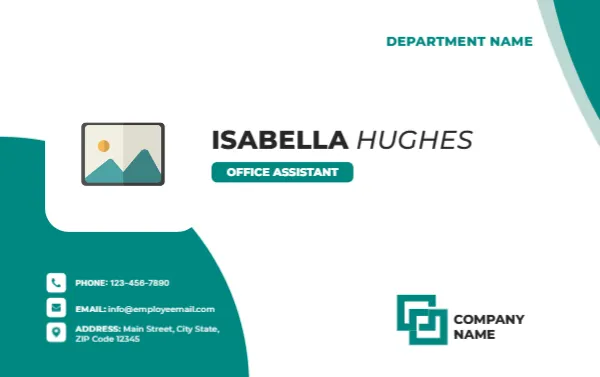
The card is 3.375 x 2.125 inches in landscape. The background is white. Large teal curves sweep in from the lower left and the top right, and a smaller pale mint curve follows the top edge. In the middle left, a photo placeholder sits in a rounded white cut-out. To its right, the name ISABELLA HUGHES is set in bold capitals with the family name in italic, and a teal pill shaped tag reads OFFICE ASSISTANT. At the top right, DEPARTMENT NAME appears in teal.
3. Where are the contact details?
In the lower left, over the teal curve, three small white icons show a phone, an envelope and a map pin, with white text for PHONE 1234567890, EMAIL [email protected] and ADDRESS Main Street, City State, ZIP Code 12345. The company logo block and COMPANY NAME sit at the lower right.
4. Which parts can I edit?
All the text lines are editable. The curves are part of the background. The logo block is a picture you can replace. Click the photo placeholder and choose Replace Image to add a portrait.
5. What should I put in the Department field?
Use the team name that colleagues know, such as Administration, Front Office or Operations. Keep it short, because it sits in a small line at the top right.
6. Is a title like Office Assistant too humble for a card?
No. Clear titles help callers reach the right person. If your role is wider, use a more specific title such as Office Coordinator or Administrative Assistant. The pill shaped tag can hold up to about 20 characters at the default size.
7. How should I print it?
Use 300 gsm card stock with a matte finish. The teal areas print well on most printers. Eight cards fit on a letter sheet. If many staff need cards, ask a print shop for a batch with the same finish.
8. What do I check before printing?
Check the spelling of the name, the phone number and the email address. Make sure the address line is accurate, and that the department name matches the company’s records. Ask a colleague to read the card aloud, which often catches errors.
9. Where are other cards in this style?
10. How can I make a set for the whole team?
Save one file per person with the same layout, and change only the name, the title and the contact line. Print them as a single batch so that the colours match. If you have many staff, ask a print shop to cut the cards together, which keeps the edges consistent.
11. Can the card show my working hours?
Yes. Add a small text line under the department with your hours, such as Monday to Friday, 8 to 5. Visitors and suppliers often want to know when you are at the desk, and a line on the card saves them a call.
See the receptionist name card, the intern name card and the remote worker name card. More are in ID cards.