The Student Card Is Used More Than Any Other School Document
Students show their ID to enter the building, borrow books, take exams, use the canteen, travel on school transport and prove their age. For the school, it also helps staff recognise who belongs and contact parents in an emergency. A good student card is clear, hard to forge and hard to lose. This template for an educational institution uses a traditional navy and gold look that suits a school or college.
Student Card Front: Navy, Gold and Octagon Photo
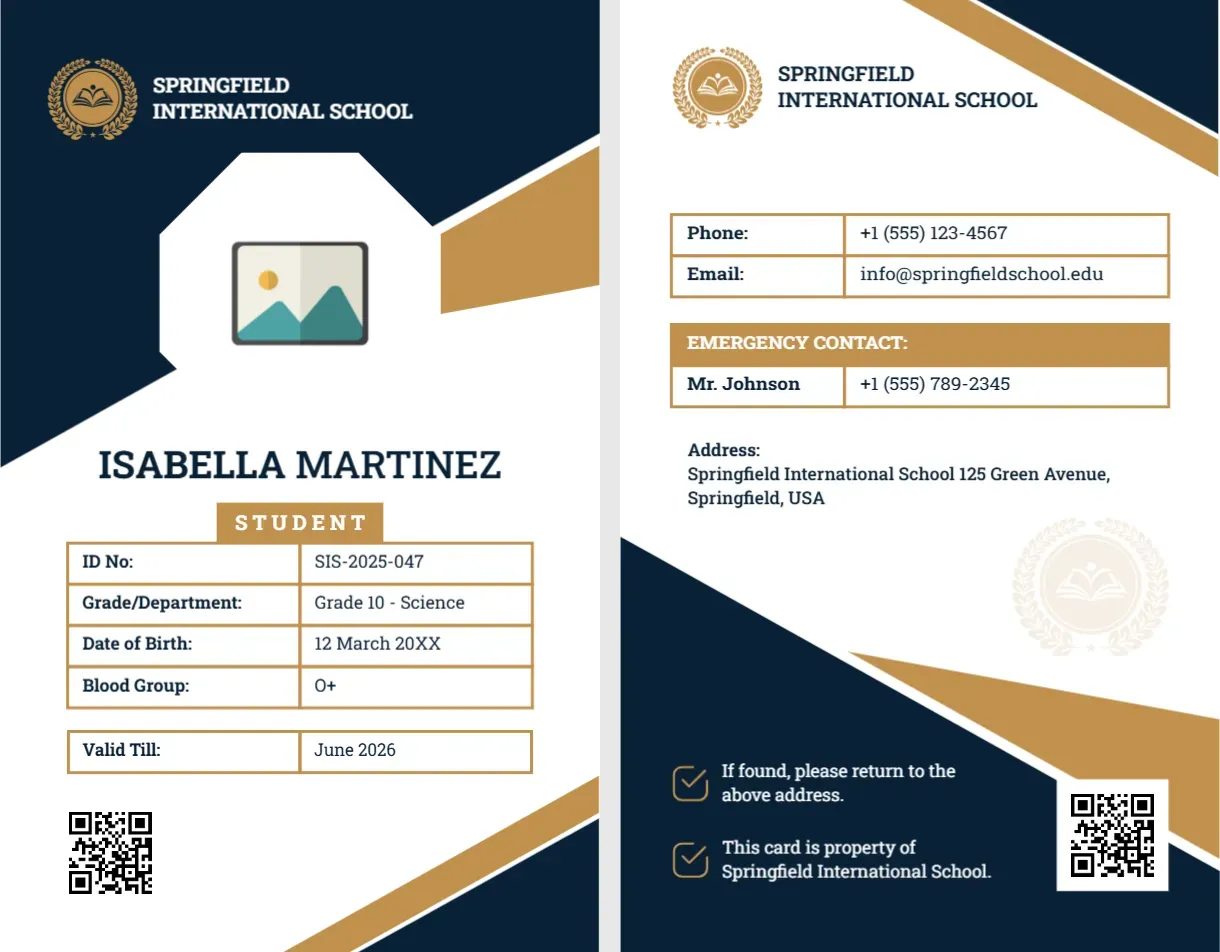
The card is portrait, 2.125 x 3.375 inches. The top is deep navy with a gold laurel and book crest and the words SPRINGFIELD INTERNATIONAL SCHOOL in white. A white octagon holds the photo placeholder, with a gold stripe on the right. Below, ISABELLA MARTINEZ is in bold navy capitals, with a gold tab reading STUDENT. A boxed table lists ID No: SIS-2025-047, Grade/Department: Grade 10 Science, Date of Birth: 12 March 20XX, Blood Group: O+ and Valid Till: June 2026. A QR code sits at the lower left, and a gold diagonal closes the bottom right. The font is Roboto Slab.
Student Card Back: School Contact and Emergency Box
The back repeats the crest and school name. A boxed table gives Phone: +1 (555) 123-4567 and Email: [email protected]. A gold bar reads EMERGENCY CONTACT, and a box below lists Mr. Johnson with a phone number. Beneath, Address: Springfield International School, 125 Green Avenue, Springfield, USA. A navy wedge at the bottom has two check lines: If found, please return to the above address. This card is property of Springfield International School. A QR code finishes the card.
What to Print and What to Leave Off
Student cards carry personal data, and cards get lost. Think about what really needs to be on the card. The name, photo, ID number and school are essential. The grade is helpful. The date of birth and blood group may not be necessary, and a lost card with a child’s birth date is a privacy risk. Your school’s data protection policy should guide you.
The Emergency Contact on the Back
The back’s emergency contact is useful if a student is hurt away from the school. Use a number that is monitored, such as the school office, rather than a parent’s mobile. If you print a parent’s number, get written permission and update it when numbers change.
Customise for Your School
- Replace the crest and school name on both sides.
- Click the photo and choose Replace Image to add the student’s photograph.
- Retype the name, ID number, grade and dates.
- Replace the QR code with a link to the school’s directory or delete it.
- Edit the address, phone and email on the back.
Colours and House Systems
Many schools use colours for houses or year groups. You can change the gold tab and the text colour for each year, so that staff can tell grades at a glance. Keep the navy as the base, so the cards look like one set.
Printing Student Cards
Print on PVC for a year of use, or on 250 to 300 gsm card stock laminated. Both sides should be aligned. Punch a slot for a lanyard or a clip. Issue the cards at the start of the year, and keep a spare supply for new students.
For a staff card in black and blue, see the teacher ID card. For a younger intern, see the intern ID card. More are in ID cards.