A Red Alert Card for Something That Cannot Wait
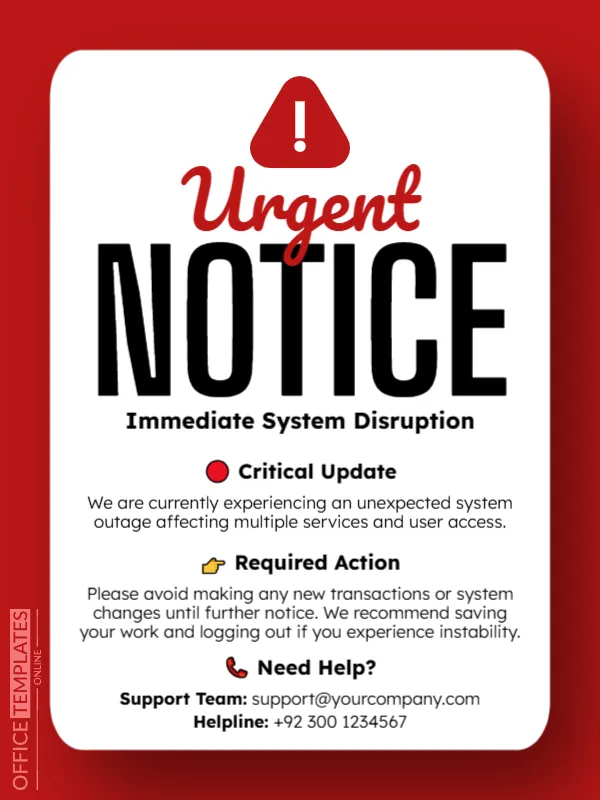
Some news has to be seen at once: a system outage, a safety problem or a sudden change. This notice grabs attention with a bright red frame, a white card with a warning triangle and the words Urgent NOTICE in huge black type. Three labelled sections tell readers what is happening, what to do and who to call. It suits companies, schools, services and organisations.
Red Frame and White Alert Card
The design is 600 x 800 pixels, portrait, one page. A white rounded card sits on a deep red page. A red triangle with an exclamation mark crowns the card. Urgent is in red script over NOTICE in tall black capitals, with a bold subheading. The sections use icons: a red circle, a pointing hand and a telephone.
Critical Update, Required Action and Help
The subheading says Immediate System Disruption. Critical Update explains We are currently experiencing an unexpected system outage affecting multiple services and user access. Required Action asks people to avoid making new transactions or system changes, to save work and to log out if they see instability. Need Help? lists a support email and a helpline, +92 300 1234567. Replace every part with your own facts, including the helpline number and country code.
Rules for an Urgent Notice
- State the problem in one plain sentence.
- Say who is affected.
- Give one or two clear actions.
- Provide a contact that is staffed.
- Promise and give updates.
Keeping the Tone Calm
Red signals danger, so the words should be calm and factual. Avoid blame and speculation. State what is known and what is being done, and say when the next update will arrive.
Updating the Notice as Things Change
Replace the card with an update as soon as new facts emerge, and finally post an all clear. Do not leave an old alert up after the problem is resolved, or people will start to ignore your notices.
Saving and Posting the Alert
Post on every channel that users check: website banner, email, social media and in app. Save the image in the right size and test it on a phone. Make sure the helpline works.
Step by Step Editing of the Urgent Red Alert Design
- On the urgent red alert design, click the main headline and type your own words, keeping a similar length.
- Retype every name, date and contact line on the urgent red alert design, checking each against a trusted source.
- Search the urgent red alert design for the words Lorem and Company so that no placeholder remains.
- Click any logo or photo on the urgent red alert design, choose Replace Image and resize the new picture to fit.
- Zoom the urgent red alert design to full size and read each line aloud before you save it.
- Keep a clean master of the urgent red alert design without private details, so later versions start tidy.
Have a look at the maintenance downtime announcement. Another option is the event cancellation announcement. A related layout is the event reschedule announcement. The rest of the series around the urgent red alert design is in announcements.