A Pinned Notice That Shows the Old and the New Date
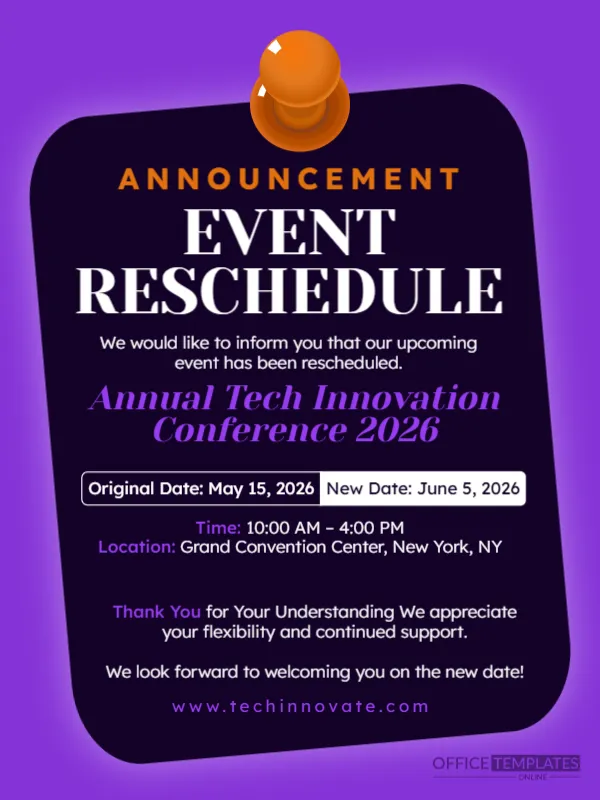
When an event moves, people need to see both dates side by side. This announcement shows them on a white label inside a dark card that is tilted and pinned with a big orange thumbtack. The headline EVENT RESCHEDULE is in bold white capitals. It suits conferences, classes, meetings and shows that change the date but not the plan.
Tilted Card, Pin and Date Label
The design is 600 x 800 pixels, portrait, one page. A violet background holds a dark purple rounded card tilted slightly clockwise. An orange pin sits at the top centre. The title is spaced capitals ANNOUNCEMENT in orange above EVENT RESCHEDULE in large white serif letters. A split white label shows the dates.
Dates, Time, Place and Thanks
We would like to inform you that our upcoming event has been rescheduled opens the text. The event name is Annual Tech Innovation Conference 2026 in violet italics. The label reads Original Date: May 15, 2026 and New Date: June 5, 2026, with Time: 10:00 AM to 4:00 PM and Location: Grand Convention Center, New York, NY. A thank you paragraph and www.techinnovate.com close the card. Note that the Thank You paragraph runs the first sentence into the second without a full stop, so add a full stop after Understanding.
Reschedule Details to Confirm
- The old and the new date.
- Whether the time and place stay the same.
- What happens to tickets already bought.
- How to cancel and get a refund if the new date does not suit.
- A contact for questions.
Keeping the Old Date Visible
Showing the original date helps people who saw an earlier post connect the two. Keep both on the card and remove the old date from other materials, such as the website and calendar invitations.
Updating Calendars and Tickets
Send a new calendar invitation to registered attendees and update the event page and the listing on ticket sites. Offer refunds to those who cannot attend the new date. This keeps goodwill high.
Saving the Reschedule Notice
The tilt makes the text slightly harder to align, so check the date label at phone size. Save in the format of your platform and pin the post.
Step by Step Editing of the Reschedule Notice Design
- On the reschedule notice design, click the main headline and type your own words, keeping a similar length.
- Retype every name, date and contact line on the reschedule notice design, checking each against a trusted source.
- Search the reschedule notice design for the words Lorem and Company so that no placeholder remains.
- Click any logo or photo on the reschedule notice design, choose Replace Image and resize the new picture to fit.
- Zoom the reschedule notice design to full size and read each line aloud before you save it.
- Keep a clean master of the reschedule notice design without private details, so later versions start tidy.
Have a look at the event cancellation announcement. Another option is the event reminder countdown. A related layout is the urgent notice announcement. Every reschedule notice style alternative sits in announcements.