A Diagonal Apply Now Banner and Three Numbered Job Circles
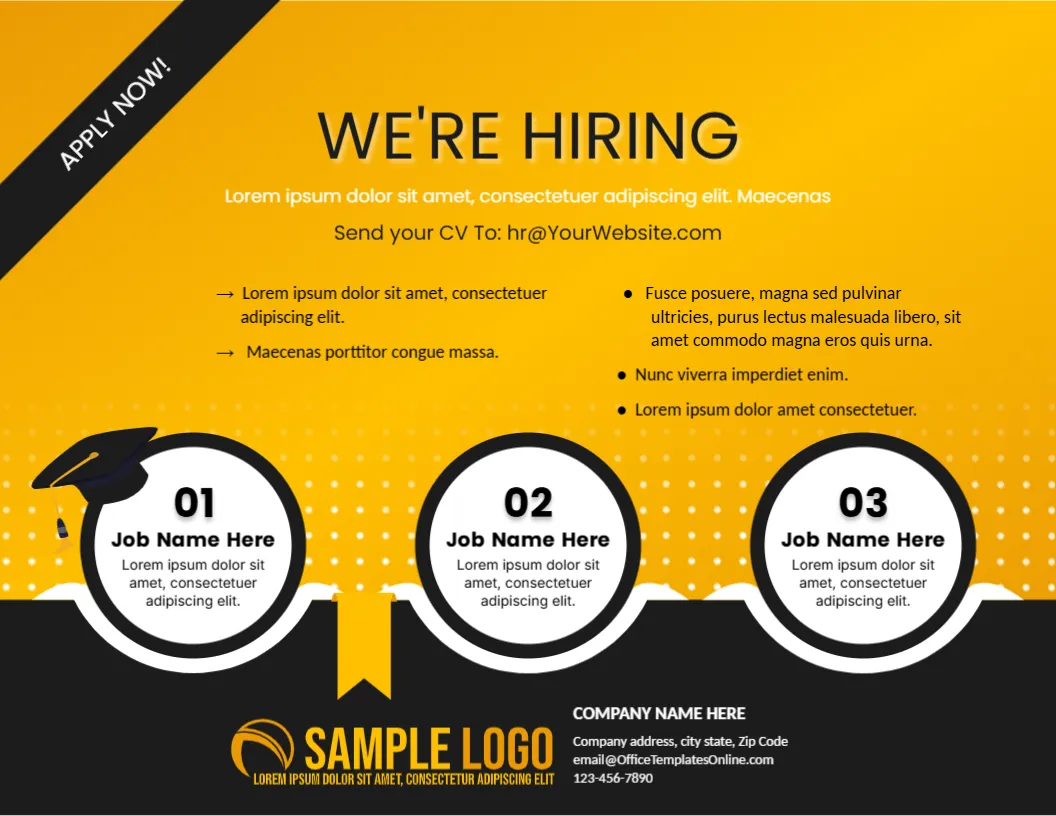
A warm yellow gradient fills this landscape flyer, with a black diagonal APPLY NOW! banner across the top left corner and WE’RE HIRING in dark type at the top. A Lorem ipsum line and Send your CV To: [email protected] sit above two bullet columns. Three black ringed circles numbered 01, 02 and 03, each reading Job Name Here, sit on a black foot with a graduation cap, a ribbon, a logo and company contacts.
A Landscape Flyer for Fresh Graduates
The page is 11 x 8.5 inches. The graduation cap on the first circle hints at entry level and trainee roles, which suits campus recruitment and graduate schemes.
Job Circles and Contact Lines
Type three job titles in the circles and replace each Lorem ipsum line under them. Edit the two bullet columns, the CV email and the COMPANY NAME HERE block, whose email line uses the template site address.
Preparing the Three Role Flyer
- Rename the three job circles.
- Rewrite the bullet columns.
- Replace the CV email.
- Swap the logo.
- Print on bright paper.
Three Roles at a Glance
The numbered circles let you advertise three vacancies at once. Candidates scan the numbers, pick the one that fits, and read the short line below each.
Black and Yellow Contrast
Yellow with black is the colour pair of warning signs, so it grabs attention. Use it for campaigns that need quick responses, and avoid more than two accent colours.
Two Bullet Columns for Requirements
The top area holds two columns, one with arrows and one with dots. Use one for duties and the other for requirements, so readers can tell the two lists apart.
The Ribbon Under the Middle Circle
A yellow ribbon hangs from the black foot beneath the second circle. It adds a rewards feel, and it leads the eye towards the contact details at the lower right.
A Graduate Friendly Tone
If you target graduates, say so in the intro line, and mention training or mentoring. Candidates look for growth, and a sentence about development makes the poster more appealing.
Corner Banner for Urgency
The diagonal banner reads APPLY NOW!. Add a closing date near it, as the flyer has no deadline line, and applications are then easier to manage.
Distributing at Campus Events
Bring printed copies to job fairs and leave a stack at the careers office. A matching digital version can go on the university job board.
Step by Step Editing of the We Are Hiring Flyer Yellow Circles Graduation Cap Design
- On the we are hiring flyer yellow circles graduation cap design, click the main headline and type your own words, keeping a similar length.
- Retype every name, date and contact line on the we are hiring flyer yellow circles graduation cap design, checking each against a trusted source.
- Search the we are hiring flyer yellow circles graduation cap design for the words Lorem and Company so that no placeholder remains.
- Click any logo or photo on the we are hiring flyer yellow circles graduation cap design, choose Replace Image and resize the new picture to fit.
- Zoom the we are hiring flyer yellow circles graduation cap design to full size and read each line aloud before you save it.
- Keep a clean master of the we are hiring flyer yellow circles graduation cap design without private details, so later versions start tidy.
Compare it with the yellow and grey hiring poster. You may also like the red hiring poster. For comparison, open the job requirement flyer. Looking beyond the we are hiring flyer yellow circles graduation cap design? See all announcement templates.