Sharing the News of an Engagement in Pink and White
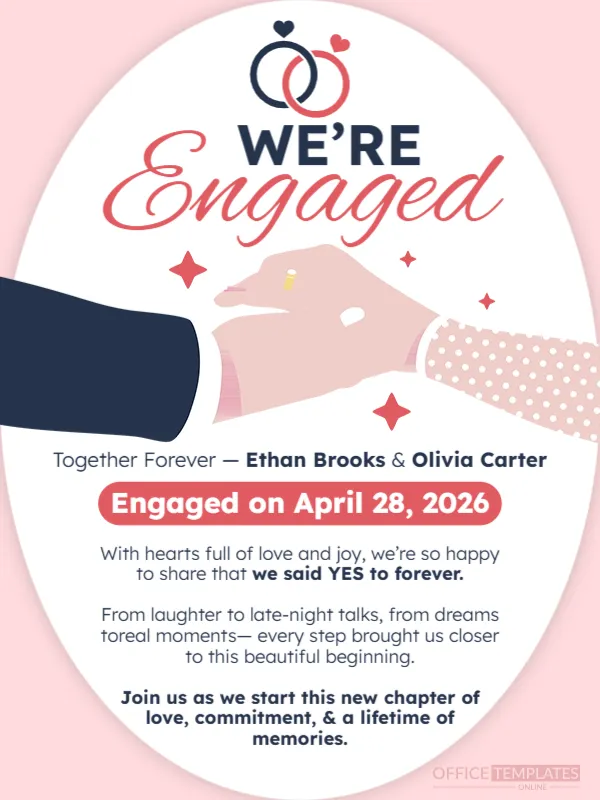
The first thing people want to see is the ring, and this announcement shows it: an illustration of a hand with a small gold ring on a finger, inside a white oval on a soft pink page. Above it, two entwined rings with hearts and the words WE’RE Engaged announce the news. It suits couples who want to post the news on social media or send it by message.
White Oval, Ring Icon and Hands
The design is 600 x 800 pixels, portrait, one page. A large white oval holds the content. Two interlocking rings, one navy and one red, with small hearts, sit at the top. WE’RE is in navy capitals and Engaged in a large red script. Under it, a drawing shows a navy sleeve and a polka dot sleeve with hands and a ring.
Names, Date and Message with a Typo
Together Forever, Ethan Brooks & Olivia Carter introduces a red pill that says Engaged on April 28, 2026. The message reads With hearts full of love and joy, we’re so happy to share that we said YES to forever. The second paragraph has a typo: dreams toreal moments should read dreams to real moments. Correct it, or rewrite the paragraph in your own words. A bold closing line invites friends to join the new chapter.
What to Include in an Engagement Post
- Both names.
- The date of the proposal, if you wish.
- A line of thanks to those who helped.
- Whether a wedding date is set.
- A photo of the couple, if you like.
Adding a Real Photo
The illustration is charming, but many couples like to add a photo. Place a picture of the two of you in the lower half of the oval, or replace the illustration entirely. Keep the oval and the rings for the frame.
Telling Family First
Before you post publicly, tell close family and friends in person or by phone. Nobody wants to learn big news from a feed. Then post the announcement with a short caption and thank everyone for their wishes.
Saving the Engagement Post
Save an image for your feed and one for stories. Check the red script on a phone, and fix the paragraph typo before you save.
Step by Step Editing of the Engagement Soft Design
- On the engagement soft design, click the main headline and type your own words, keeping a similar length.
- Retype every name, date and contact line on the engagement soft design, checking each against a trusted source.
- Search the engagement soft design for the words Lorem and Company so that no placeholder remains.
- Click any logo or photo on the engagement soft design, choose Replace Image and resize the new picture to fit.
- Zoom the engagement soft design to full size and read each line aloud before you save it.
- Keep a clean master of the engagement soft design without private details, so later versions start tidy.
Similar designs include the elegant minimal wedding announcement. Set it beside the wedding announcement with couple photo. You may also like the baby arrival announcement. Looking beyond the engagement soft design? See all announcements.