A Gentle Peach Arch for a Wedding Announcement
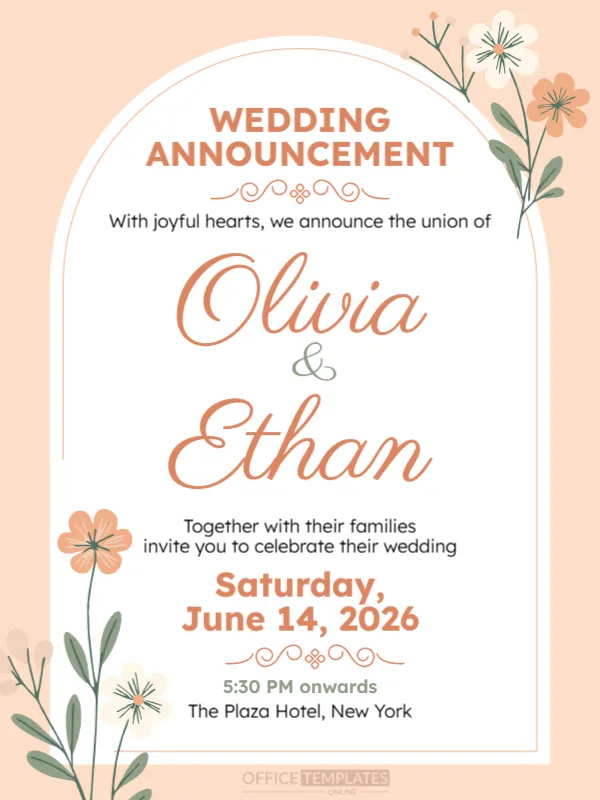
This wedding announcement is quiet and graceful. A tall white arch sits on a soft peach page, with two floral stems climbing the sides, the couple’s names in a large coral script and a few lines of text. It suits couples who want an elegant card to share on social media or by message, either as an announcement or as an invitation.
White Arch, Peach Page and Flowers
The design is 600 x 800 pixels, portrait, one page. The white arch has a thin coral outline. Coral and cream flowers with green stems curl around the upper right and the lower left. Decorative flourishes separate the sections. The names are in a script font and the rest in clean sans serif.
Names, Date and Venue
WEDDING ANNOUNCEMENT sits at the top, followed by With joyful hearts, we announce the union of, then Olivia & Ethan in coral script. Together with their families invite you to celebrate their wedding leads to Saturday, June 14, 2026, 5:30 PM onwards and The Plaza Hotel, New York. In the sample, 14 June 2026 is a Sunday, not a Saturday, so check your own calendar and correct the weekday or the date.
Details to Replace
- Both names, in the order you prefer.
- The wording about families, if it does not apply.
- Date with the correct weekday.
- Start time and venue.
- A line for RSVP or a website.
Checking the Weekday
A weekday that does not match the date is the commonest mistake in invitations. Look at a calendar for your wedding year and read the date aloud against the day. A quick check avoids confused guests.
Choosing Between Announcement and Invitation
The words with their families invite you to celebrate make this card an invitation. If you only want to announce the wedding, change the lines to a simple statement. Add details of the reception if needed.
Saving the Wedding Card
Save the finished image and send it with a personal note. For a printed version, ask a shop for 300 gsm matte card, and keep the editable file for reprints.
Step by Step Editing of the Elegant Wedding Minimal Design
- On the elegant wedding minimal design, click the main headline and type your own words, keeping a similar length.
- Retype every name, date and contact line on the elegant wedding minimal design, checking each against a trusted source.
- Search the elegant wedding minimal design for the words Lorem and Company so that no placeholder remains.
- Click any logo or photo on the elegant wedding minimal design, choose Replace Image and resize the new picture to fit.
- Zoom the elegant wedding minimal design to full size and read each line aloud before you save it.
- Keep a clean master of the elegant wedding minimal design without private details, so later versions start tidy.
Adapting the Design for a Save the Date
To make it a save the date, change the heading to SAVE THE DATE and delete the lines about families. Keep the names and the date, and add that a formal invitation will follow. Send it three to six months before the wedding.
You may also like the engagement announcement. For comparison, open the wedding announcement with couple photo. Consider the marriage announcement template. Looking beyond the elegant wedding minimal design? See all announcements.