A Podium Post That Celebrates First, Second and Third
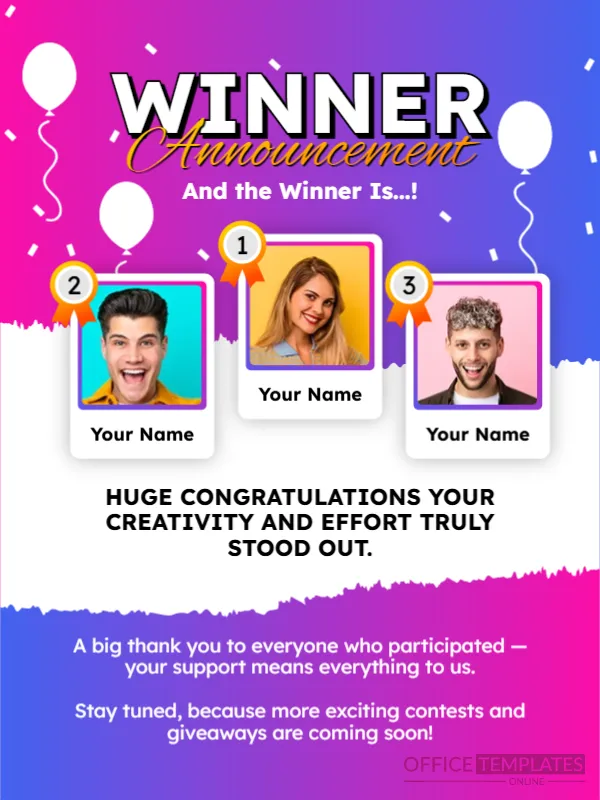
When a contest has more than one winner, a podium post feels right. This announcement shows three photo cards with medals marked 1, 2 and 3, balloons, confetti and the words WINNER Announcement in bold white with a gold script. It suits contests, challenges, quizzes and employee competitions on social media or in newsletters.
Gradient, Balloons and Three Medal Cards
The design is 600 x 800 pixels, portrait, one page. A pink to violet gradient fills the page, separated by a torn white edge. The first place card is in the middle and higher, with second and third on each side. Each card has a photo frame, a ribbon medal and a name label reading Your Name.
Message and Next Steps
And the Winner Is…! sits above the cards. Below, HUGE CONGRATULATIONS YOUR CREATIVITY AND EFFORT TRULY STOOD OUT. celebrates the winners, and at the foot a note says A big thank you to everyone who participated, your support means everything to us. Stay tuned, because more exciting contests and giveaways are coming soon! Replace the names and photos, and adapt the message to your contest.
Tips for Announcing Multiple Winners
- Order names clearly: first, second, third.
- Add the prize for each place.
- Tag winners if they agreed.
- Thank all participants.
- Tell people about the next contest.
Getting Good Winner Photos
Ask winners for a cheerful, well lit picture, preferably square. Crop heads close so that faces are clear in the small frames. Do not publish photos of children without parental consent.
Building Goodwill After a Contest
People who lost still read the announcement. A warm thank you and a hint about the next contest keeps them engaged. Share a small consolation, such as a discount code, if your budget allows.
Saving the Winner Post
Check that the name labels are readable on a phone. Save an image for your feed and one for stories. Keep the editable file for the next contest.
Step by Step Editing of the Celebration Winner Podium Design
- On the celebration winner podium design, click the main headline and type your own words, keeping a similar length.
- Retype every name, date and contact line on the celebration winner podium design, checking each against a trusted source.
- Search the celebration winner podium design for the words Lorem and Company so that no placeholder remains.
- Click any logo or photo on the celebration winner podium design, choose Replace Image and resize the new picture to fit.
- Zoom the celebration winner podium design to full size and read each line aloud before you save it.
- Keep a clean master of the celebration winner podium design without private details, so later versions start tidy.
Tagging and Thanking Participants
Tag each winner if they agreed, and thank the people who judged. Comments on the post will be warm if you also reply to participants. Publish the results in the caption as text, so that screen readers can announce them.
A related layout is the announcement template for winners. Also worth a look: contest launch announcement. Next to try is the giveaway announcement. Every celebration winner podium style alternative sits in announcements.