A Contest Alert With Everything People Need to Enter
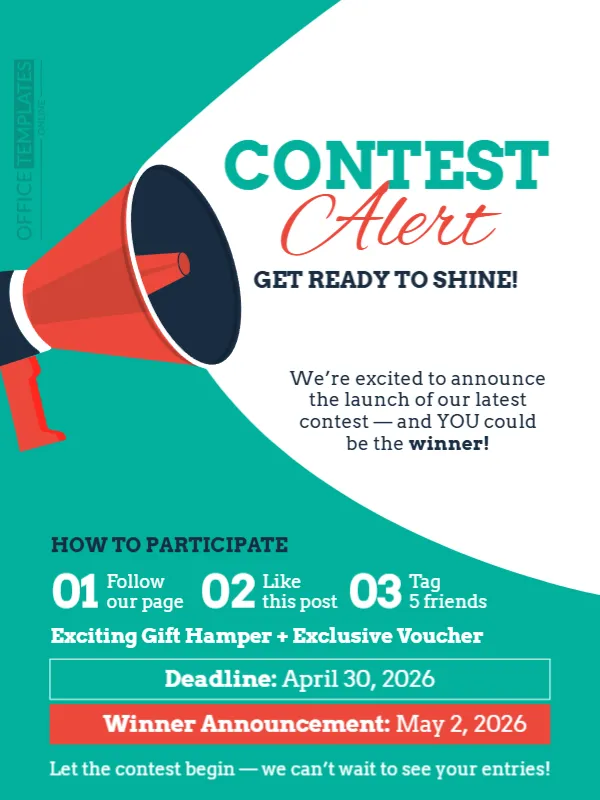
The best contest posts answer three questions in a few seconds: what can I win, what do I do and when does it end. This one does, with a giant megaphone, a teal curve and the words CONTEST Alert in green and red, followed by three entry steps and two dates. It suits brands, shops, schools and creators that launch a contest on social media or in a newsletter.
Teal Curve and a Giant Megaphone
The design is 600 x 800 pixels, portrait, one page. A big teal shape sweeps from the lower right to the top left, and a red and navy megaphone sits in the white space at the left. CONTEST is in teal slab serif capitals, and Alert is in red script. The text is clear and well spaced. The fonts are strong serif and script faces.
Steps, Prize and Dates
GET READY TO SHINE! introduces a paragraph: We’re excited to announce the launch of our latest contest, and YOU could be the winner! HOW TO PARTICIPATE lists 01 Follow our page, 02 Like this post and 03 Tag 5 friends. The prize reads Exciting Gift Hamper + Exclusive Voucher. Two bars give Deadline: April 30, 2026 and Winner Announcement: May 2, 2026. Update the steps, the prize and the dates before you post.
Rules to Write Into the Caption
- Who may enter and where.
- How the winner is chosen.
- What the prize includes and its value.
- How the winner is contacted.
- Any age limit or required documents.
Choosing Easy Entry Steps
Every extra step reduces entries. Three actions are the most that most people will do. Tagging friends spreads the post, but some platforms discourage it, so check their rules before you require it.
Handling the Winner Announcement
Use a fair method to pick the winner and say how. Post the result on the date you promised, and contact the winner directly. A short thank you post to everyone keeps followers interested for the next contest.
Saving the Contest Post
Check the three step line on a phone, since the small numbers can be tight. Save the design as an image and keep the editable file for your next contest.
Step by Step Editing of the Teal Contest Alert Design
- On the teal contest alert design, click the main headline and type your own words, keeping a similar length.
- Retype every name, date and contact line on the teal contest alert design, checking each against a trusted source.
- Search the teal contest alert design for the words Lorem and Company so that no placeholder remains.
- Click any logo or photo on the teal contest alert design, choose Replace Image and resize the new picture to fit.
- Zoom the teal contest alert design to full size and read each line aloud before you save it.
- Keep a clean master of the teal contest alert design without private details, so later versions start tidy.
Another option is the giveaway announcement. A related layout is the winner announcement in celebration style. Also worth a look: announcement template for winners. The rest of the series around the teal contest alert design is in announcements.