A Friendly Announcement for a Community Meetup
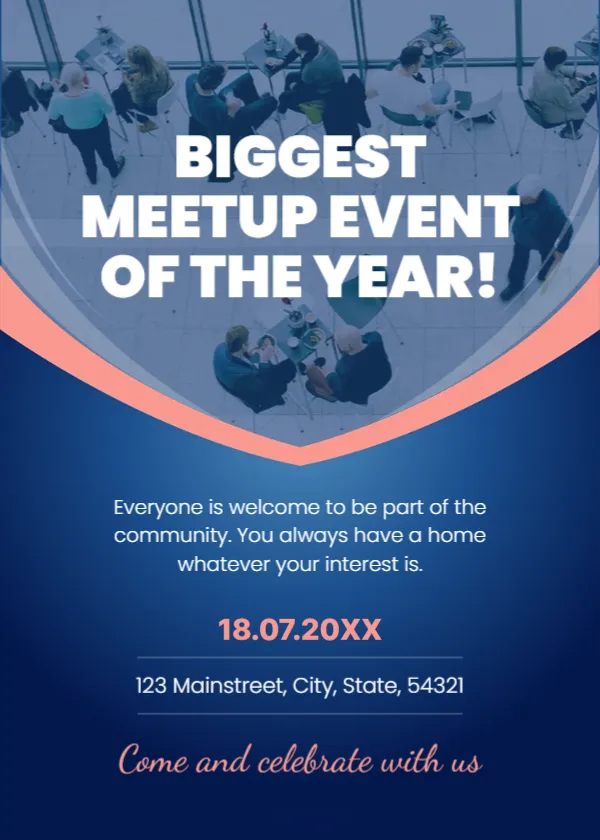
A meetup is about people, so this announcement shows them: a bird’s eye photo of groups talking at tables, a coral curve and a deep blue gradient that fades into the text. The headline BIGGEST MEETUP EVENT OF THE YEAR! gives it a festive tone, and a script line says Come and celebrate with us. It suits clubs, hobby groups, alumni, professional circles and neighbourhood gatherings.
Overhead Photo and Curved Coral Line
The page is 5 x 7 inches, portrait, one page. The upper half is a photo tinted blue, cut by a V shaped coral line. The lower half is a blue gradient with centred text. The fonts are a bold geometric sans serif and a script for the closing line.
Welcome Text, Date and Place
The paragraph reads Everyone is welcome to be part of the community. You always have a home whatever your interest is. The date appears in coral as 18.07.20XX, which uses day, month and year with dots, and the address is 123 Mainstreet, City, State, 54321. Replace them, and consider writing the date in words to avoid confusion between day and month formats. Add the start time, which the sample does not give.
Meetup Details to Add
- Start and end time.
- The theme or topic of the evening.
- Entry fee or free entry.
- What to bring, such as a laptop or a dish to share.
- How to RSVP.
Making a Meetup Welcoming
Say who the meetup is for and that newcomers are welcome. Name a host people can look for at the door. A simple name tag table helps shy guests start conversations.
Choosing a Photo That Fits
Replace the sample photo with a picture of your own past meetup, with consent from people in it. Photos of real faces build trust. If you do not have one, use an image of the venue.
Printing the Meetup Flyer
Print on 150 gsm in colour and pin it on community boards. For online groups, save an image and share it with a link to the event page.
Step by Step Editing of the Meetup Event Design
- On the meetup event design, click the main headline and type your own words, keeping a similar length.
- Retype every name, date and contact line on the meetup event design, checking each against a trusted source.
- Search the meetup event design for the words Lorem and Company so that no placeholder remains.
- Click any logo or photo on the meetup event design, choose Replace Image and resize the new picture to fit.
- Zoom the meetup event design to full size and read each line aloud before you save it.
- Keep a clean master of the meetup event design without private details, so later versions start tidy.
Keeping the Group Welcoming After the Event
Collect email addresses or social handles with permission, and send a thank you note with photos. Announce the date of the next meetup at the end of the night. Regular events build a community, and the announcement design can stay the same each time.
Compare it with the general announcement flyer. You may also like the event launch announcement poster. For comparison, open the business event announcement poster. Looking beyond the meetup event design? See all announcements.