A Flyer for Any Announcement You Can Think Of
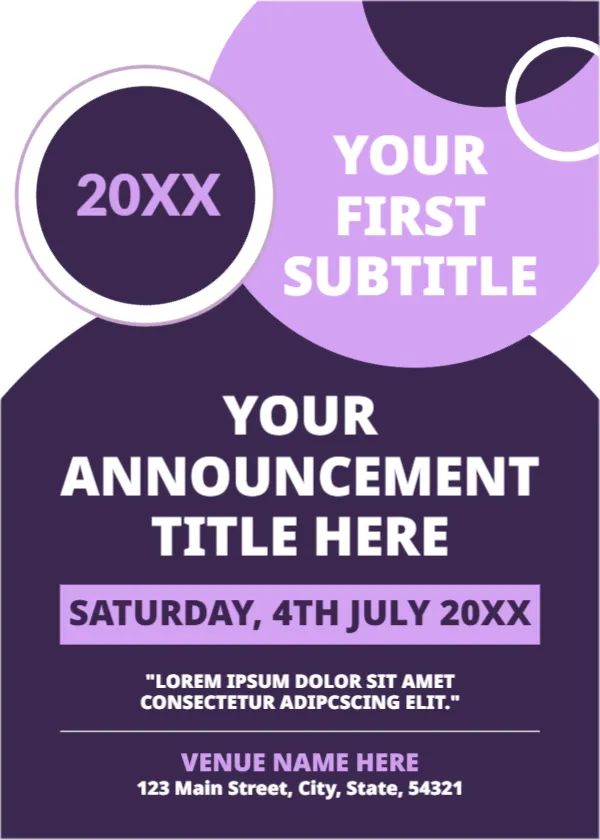
Sometimes you just need a flyer. This one is a blank frame for an announcement of any kind: a meeting, a launch, a sale, a service, a talk. A big dark purple shape with overlapping lilac circles frames a clear title, a date bar and a venue. It suits clubs, schools, businesses and community groups that need to spread the word quickly.
Overlapping Circles on a Dark Panel
The page is 5 x 7 inches, portrait, one page. A lilac circle sits at the upper right, a dark circle holds 20XX at the left, and a large dark purple panel fills the lower two thirds. A lilac bar carries the date. All text is white or lilac on the dark panel, which makes it very legible.
Title, Date, Quote and Venue
YOUR FIRST SUBTITLE appears in the lilac circle, and YOUR ANNOUNCEMENT TITLE HERE in large white capitals. The date bar reads SATURDAY, 4TH JULY 20XX. A quote line below it contains a placeholder with the misspelling ADIPCSCING, so replace it entirely. At the foot, VENUE NAME HERE and 123 Main Street, City, State, 54321 give the place. Check the weekday matches the date.
What to Put in Each Block
- The year or edition in the dark circle.
- A short subtitle, such as the organiser or theme.
- The headline: five words at most.
- Day, date and time in the lilac bar.
- Venue name and address, and a line for contact.
Using the Quote Line
The quote line can carry a short invitation or a note about cost, for example Free entry, all welcome. Keep it to two lines. If you do not need it, delete it and the page will still look balanced.
Handing Out a 5 x 7 Flyer
This size fits a pocket and prints four to a sheet on Letter paper. Hand it out at events, leave a stack at cafes and libraries, and post an image online. Add a short link or code if people need to register.
Printing the Purple Flyer
Dark purple uses a good amount of toner, so print a test. Use 170 gsm paper for a sturdy flyer. Cut with a guillotine for clean edges.
Step by Step Editing of the Purple General Flyer Design
- On the purple general flyer design, click the main headline and type your own words, keeping a similar length.
- Retype every name, date and contact line on the purple general flyer design, checking each against a trusted source.
- Search the purple general flyer design for the words Lorem and Company so that no placeholder remains.
- Click any logo or photo on the purple general flyer design, choose Replace Image and resize the new picture to fit.
- Zoom the purple general flyer design to full size and read each line aloud before you save it.
- Keep a clean master of the purple general flyer design without private details, so later versions start tidy.
Next to try is the meetup event announcement. Browse the business event announcement poster. Another option is the job announcement flyer. The rest of the series around the purple general flyer design is in announcements.