A Funeral Flyer That Honours the Person First
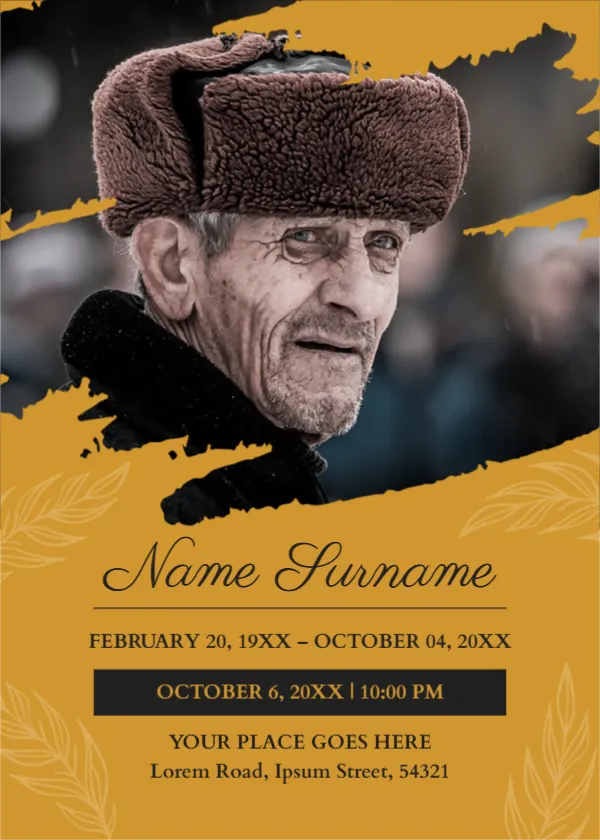
A funeral flyer tells people when and where to say goodbye. This one keeps the person at the centre: a large portrait fills the top, framed by a mustard brush stroke and faint leaf patterns, with the name in elegant script and the dates below. It suits families, communities and congregations that announce a funeral or memorial by flyer, notice board or message.
Portrait, Brush Stroke and Leaf Motifs
The page is 5 x 7 inches, portrait, one page. A black and white style photograph fills the upper half, edged by a rough mustard brush stroke. The lower half is mustard with faint wheat leaf drawings at the corners. The name is set in a script font above a thin rule.
Name, Life Dates and the Service Details
Name Surname is followed by a life date line, FEBRUARY 20, 19XX to OCTOBER 04, 20XX. A black bar shows the funeral date and hour, OCTOBER 6, 20XX | 10:00 PM, and below it YOUR PLACE GOES HERE and an address. The sample time reads 10:00 PM, which is unusual for a funeral, so check it and use the real time. Add information about burial or cremation and a reception if known.
Details Families Usually Include
- Full name and, if used, a nickname.
- Date of birth and date of passing.
- Date, time and place of the funeral.
- Where to send flowers or donations.
- A contact for questions.
Choosing a Respectful Portrait
Choose a picture that the family feels shows the person well. A natural expression works better than a formal pose. If the portrait is hard to choose, ask relatives and friends to suggest a few.
Checking Every Detail
Funeral notices are acted on at once, so mistakes cause real trouble. Ask two people to read the name, dates, times and address before you print or share. Keep the wording gentle and short.
Printing and Sharing the Flyer
Print on 170 gsm matte paper for a dignified look, or share as an image by message. Leave a few copies at the place of worship or community centre.
Step by Step Editing of the Funeral Flyer Design
- On the funeral flyer design, click the main headline and type your own words, keeping a similar length.
- Retype every name, date and contact line on the funeral flyer design, checking each against a trusted source.
- Search the funeral flyer design for the words Lorem and Company so that no placeholder remains.
- Click any logo or photo on the funeral flyer design, choose Replace Image and resize the new picture to fit.
- Zoom the funeral flyer design to full size and read each line aloud before you save it.
- Keep a clean master of the funeral flyer design without private details, so later versions start tidy.
Sharing the Notice Beyond Print
Many families also send the notice by message or post it on a community page. Save the flyer as an image, add the details in the text of the post and ask relatives to share it. Remember that a public post may be seen by many people, so include only what you want to be known.
Consider the funeral announcement card. Similar designs include the general announcement flyer. Compare it with the wedding announcement with couple photo. Find more designs next to the funeral flyer design in announcements.