A Two Sided Card for Two Companies
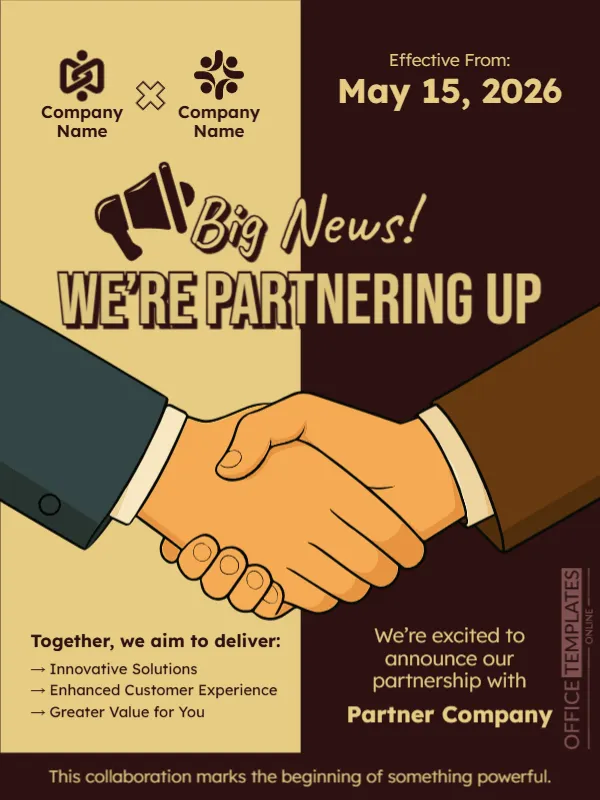
Partnerships are about two organisations, and this card shows both: a page split between warm gold and dark brown, a big handshake illustration and two logo slots at the top. The headline Big News! We’re Partnering Up announces the deal, and a short list of shared goals explains why it matters. It suits businesses, charities, schools and agencies announcing a collaboration.
Gold and Brown Halves With a Handshake
The design is 600 x 800 pixels, portrait, one page. The left half is gold and the right half dark brown, and a large illustrated handshake crosses the centre. Two logo slots with company names sit at the top left, joined by a cross sign. An effective date block sits at the top right. A megaphone icon sits before the script Big News!
Date, Goals and Partner Line
Effective From: May 15, 2026 gives the start date. Under the handshake, the left side lists Together, we aim to deliver with three arrows: Innovative Solutions, Enhanced Customer Experience and Greater Value for You. The right says We’re excited to announce our partnership with and Partner Company. A line at the foot reads This collaboration marks the beginning of something powerful. Replace the names, the date and the goals with the real terms.
What a Partnership Post Should Cover
- Both partners’ names and logos.
- What each side brings.
- What customers will gain.
- When it starts.
- Where to learn more.
Agreeing Wording With the Partner
Both sides should approve the announcement before it goes out, including logos, dates and claims. Share the draft early. A joint post at the same time on both pages doubles the reach.
Being Specific About Benefits
Replace general goals with concrete ones, for example free delivery within the city or joint training courses. Customers care about what changes for them, not only that two companies are friends.
Saving the Partnership Card
Put the logos at a similar size so neither partner looks smaller. Save in the format your platform needs, and check the dark right half on a phone at low brightness.
Step by Step Editing of the Partnering Up Design
- On the partnering up design, click the main headline and type your own words, keeping a similar length.
- Retype every name, date and contact line on the partnering up design, checking each against a trusted source.
- Search the partnering up design for the words Lorem and Company so that no placeholder remains.
- Click any logo or photo on the partnering up design, choose Replace Image and resize the new picture to fit.
- Zoom the partnering up design to full size and read each line aloud before you save it.
- Keep a clean master of the partnering up design without private details, so later versions start tidy.
Sharing the News With Staff First
Tell your own teams about a partnership before the public. Employees will receive questions from customers, and they should know the answers. A short briefing note with the key points helps everyone speak with one voice.
Similar designs include the company milestone announcement. Compare it with the rebranding announcement. Take a look at the event launch announcement poster. Looking beyond the partnering up design? See all announcements.