Turning a Big Number Into a Celebration
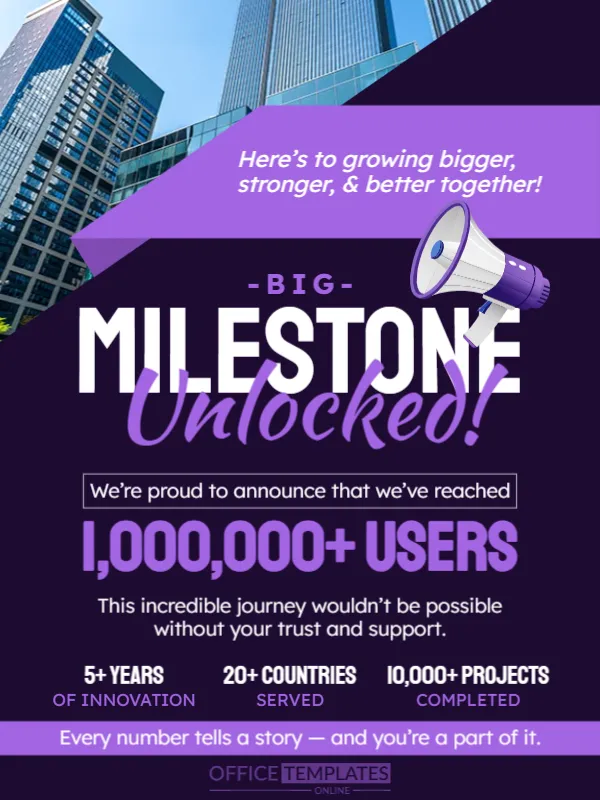
Reaching a million users, a tenth anniversary or a thousandth order is worth a post. This announcement puts the number in the middle of the page in huge purple letters, under a headline that says BIG MILESTONE Unlocked!, with a skyscraper photo and a megaphone. It suits startups, apps, shops and nonprofits that celebrate growth publicly.
Skyscrapers, Purple Ribbon and Megaphone
The design is 600 x 800 pixels, portrait, one page. A photo of glass towers fills the top, a lilac ribbon cuts across it with the line Here’s to growing bigger, stronger, and better together!, and a white megaphone sits at the right. The lower two thirds is dark purple with white and lilac text.
The Number, the Thank You and Three Stats
We’re proud to announce that we’ve reached sits above 1,000,000+ USERS. A thank you line follows, This incredible journey wouldn’t be possible without your trust and support. Three statistics sit in a row: 5+ YEARS OF INNOVATION, 20+ COUNTRIES SERVED and 10,000+ PROJECTS COMPLETED. A band at the foot reads Every number tells a story, and you’re a part of it. Replace the figures with your own true numbers.
Milestones Worth Announcing
- Customer or user counts.
- Years in business.
- Orders, projects or donations completed.
- Awards and certifications.
- Expansion to new countries or branches.
Using Only Numbers You Can Prove
A milestone post gets scrutiny. Use figures that you can show, and avoid rounding up. If the number is a total since launch, say so. Accuracy protects your reputation and strengthens trust.
Thanking the Community Properly
The line about trust and support is generic. Add a specific thank you to customers, partners and staff, and mention one story from the journey. People respond to specifics more than to slogans.
Saving the Milestone Card
Check the large number against the width of the page, since a longer number may need a smaller font. Save in the image format of your platform, and pin the post for a week.
Step by Step Editing of the Big Milestone Design
- On the big milestone design, click the main headline and type your own words, keeping a similar length.
- Retype every name, date and contact line on the big milestone design, checking each against a trusted source.
- Search the big milestone design for the words Lorem and Company so that no placeholder remains.
- Click any logo or photo on the big milestone design, choose Replace Image and resize the new picture to fit.
- Zoom the big milestone design to full size and read each line aloud before you save it.
- Keep a clean master of the big milestone design without private details, so later versions start tidy.
Turning a Milestone Into a Campaign
Do more than post a card. Share a short thank you video from the team, offer a small anniversary perk and invite customers to share their own stories. A milestone is a chance to strengthen relationships, not only to celebrate.
A related layout is the employee promotion announcement. Also worth a look: partnership announcement. Next to try is the rebranding announcement. The rest of the series around the big milestone design is in announcements.