Telling People That an Event Is Off, Clearly and Kindly
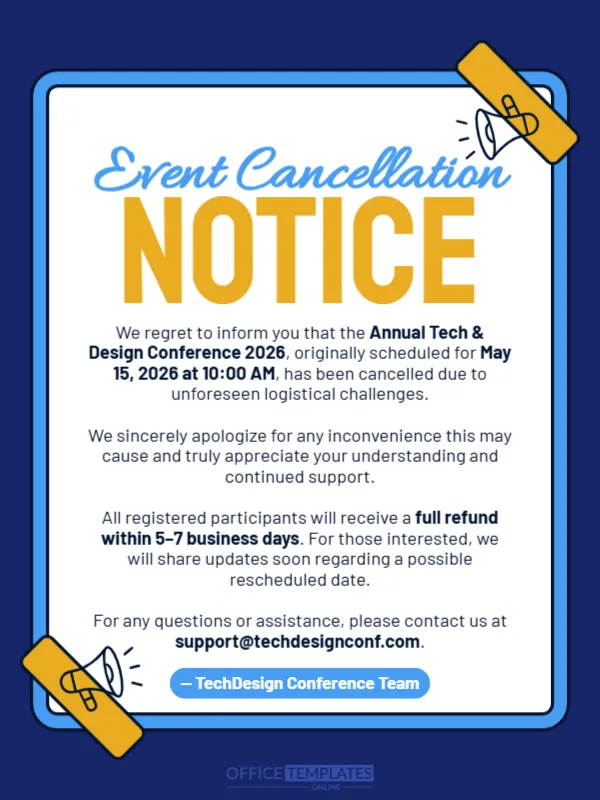
Cancelling an event is unpleasant, and a confusing message makes it worse. This notice keeps things plain: a white card with a blue border on a navy background, the headline Event Cancellation NOTICE in blue script and large yellow capitals, and a few short paragraphs. It suits conferences, workshops, parties, classes and any scheduled event that must be called off.
Notice Card With Taped Corners
The design is 600 x 800 pixels, portrait, one page. A white card with a bright blue border sits on a deep navy page. Two yellow tape strips with small megaphone drawings hold the card at the top right and the lower left corners. Everything is left to right and easy to read.
What the Message Says
The notice states We regret to inform you that the Annual Tech & Design Conference 2026, originally scheduled for May 15, 2026 at 10:00 AM, has been cancelled due to unforeseen logistical challenges. It apologises, promises a full refund within 5 to 7 business days and says that updates may follow about a possible rescheduled date. It ends with a support email and the sign off TechDesign Conference Team. Replace each of these with your own facts, and state the real reason if you can.
What a Good Cancellation Notice Covers
- The event name, date and time.
- A clear statement that it is cancelled.
- A short, honest reason.
- What happens to tickets and payments.
- A contact for help.
Being Honest About the Reason
People accept bad news better when the reason is real. Avoid vague phrases if you can say more, such as venue closure or a speaker illness. Never promise a new date that you cannot guarantee.
Handling Refunds Properly
State the refund method and timeline, and then keep to it. Send a personal email to registered attendees in addition to the public post. Quick refunds protect goodwill for the next event.
Saving the Cancellation Notice
Post the notice on every channel where you promoted the event, and update the event page. Keep the post pinned until the refunds are finished.
Step by Step Editing of the Cancellation Notice Design
- On the cancellation notice design, click the main headline and type your own words, keeping a similar length.
- Retype every name, date and contact line on the cancellation notice design, checking each against a trusted source.
- Search the cancellation notice design for the words Lorem and Company so that no placeholder remains.
- Click any logo or photo on the cancellation notice design, choose Replace Image and resize the new picture to fit.
- Zoom the cancellation notice design to full size and read each line aloud before you save it.
- Keep a clean master of the cancellation notice design without private details, so later versions start tidy.
Preparing Answers to Common Questions
Before you post, list the questions people will ask: refunds, travel costs, new dates and who to contact. Prepare short answers and share them in the comments or in a frequently asked questions page. A quick, calm response reduces frustration.
Also worth a look: event reschedule announcement. Next to try is the event reminder countdown. Have a look at the urgent notice announcement. The rest of the series around the cancellation notice design is in announcements.