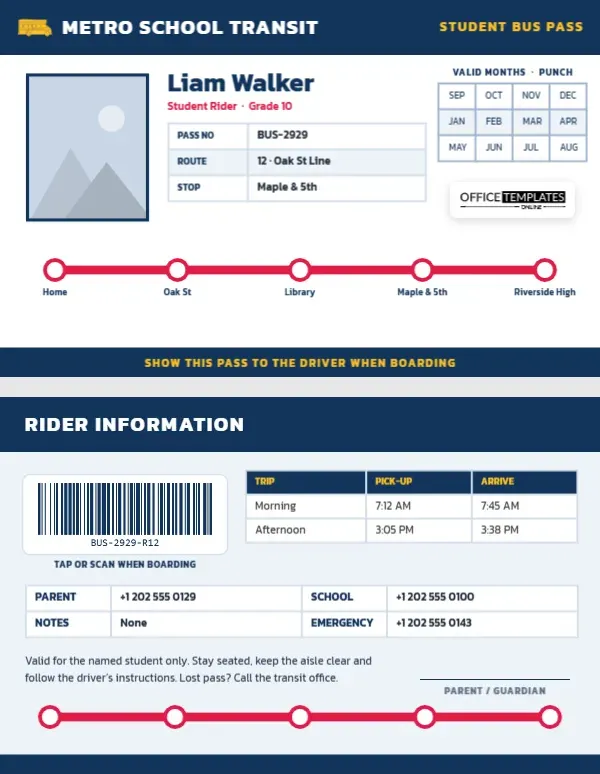
For many students, the school day starts and ends on a bus. School districts and transit agencies need to know which students ride which route, drivers need to confirm that each rider belongs on their bus, and families need to know the pick-up time. A student bus pass handles all of this in the size of a credit card. This Student Bus Pass Template is designed like a transit map, with a bright red route line connecting the student’s stops, and it includes a punch grid of months for passes that are validated monthly.
A Route Map on a Card
The card is horizontal, 3.375 by 2.125 inches. A deep transit-blue header carries a yellow school bus icon, METRO SCHOOL TRANSIT in bold white Kanit, and STUDENT BUS PASS in yellow on the right. The student’s photo is on the left with a blue border; the name, Liam Walker on the sample, is set beside it with Student Rider · Grade 10 in red, and a small table lists the pass number, route, and stop.
On the right, a grid of twelve months, from September to August, is headed VALID MONTHS · PUNCH, so a driver or office can punch or tick each month as it is paid. Our logo sits below the grid. Across the lower part of the card, a thick red route line runs from left to right with white circular stops labelled Home, Oak St, Library, Maple & 5th, and Riverside High, exactly like a line on a metro map. A blue band along the bottom reads SHOW THIS PASS TO THE DRIVER WHEN BOARDING.
Rider Information on the Back
The back has a blue header reading RIDER INFORMATION. A barcode, labelled Tap or scan when boarding, can be read by on-board scanners. A table lists morning and afternoon trips with pick-up and arrival times: 7:12 am pick-up and 7:45 am arrival in the morning, 3:05 pm and 3:38 pm. A contact grid shows a parent’s phone, the school office, driver notes, and an emergency number. A note reminds riders that the pass is for the named student only, to stay seated and keep the aisle clear, and to call the transit office if the pass is lost. A parent signature line and a repeat of the red route line finish the card.
Monthly Punch Grid Explained
| System | How the punch grid is used |
|---|---|
| Monthly paid passes | The office punches or stamps each month once it is paid |
| Free school transport | Punch the months of the school year the student is eligible |
| Term-based passes | Punch only the months within the valid term |
| Digital systems | Leave the grid blank; the barcode carries validity |
The months are a real editor Table, so schools on a different calendar can reorder them easily.
Customising the Metro School Transit Pass
- Photo: the blue-bordered portrait is the rider’s photo slot; choose it and click Replace Image.
- Agency or district name: retype METRO SCHOOL TRANSIT, for example, with your school district’s transportation department.
- Route and stops: retype the five stop names under the route line to match the student’s real route.
- Tables: pass details, months, and trip times are Tables; Edit Data updates them, and a midday kindergarten run is one + Row away.
- Barcode: in the Barcodes & QR panel, enter the rider number your on-board system uses.
- Bus icon and route colour: the bus is an editable vector, and the route line is one group you can recolour to match your transit map colours.
Safety Rules for Riding the School Bus
School buses are one of the safest ways for children to travel, and a few simple rules keep them that way. Arrive at the stop a few minutes early and wait well back from the road. Wait for the bus to stop completely and for the driver’s signal before approaching. Stay seated facing forward, keep bags out of the aisle, and keep hands and heads inside the windows. When getting off, walk several steps ahead of the bus before crossing, so the driver can see you. The note on the back of the pass reinforces the most important of these.
Why Drivers Check Passes
Drivers are responsible for knowing who is on their bus, especially in emergencies. Passes help them confirm that each rider is assigned to that route and stop, identify substitute riders who need permission, and count students on and off at field trips and events. A photo on the pass is particularly useful for substitute drivers who do not know the regular riders.
School Districts, Transit Agencies and Private Schools
School district transportation departments, public transit agencies offering student passes, private schools with their own buses, charter schools, university shuttle services, and summer camps that run bus routes can all adapt this design. Transit agencies can change the stops to the student’s usual journey and keep the month grid for monthly validation.
Printing a Pass for Daily Use
Bus passes are used twice a day, every day, so PVC is the best choice. The blue, red and yellow palette prints strongly and is easy to recognise at a glance. Make sure the punch grid cells are large enough for your hole punch, and test the barcode with the on-board scanner before printing for a whole school.
Updating Passes Mid-Year
Families move, schedules change, and routes are redrawn. When a student’s stop or route changes, update the stop names and trip times and reprint the pass, keeping the same barcode number if the student’s record stays the same. Drivers appreciate a current pass, especially in the first week after a change.
Bus Pass Questions
Can I add more stops to the route line?
The route line is one group with five stops; ungroup it to add another circle and label, or change the labels to key stops only.
What if my student rides two different buses?
Add a row to the trip table for the second route and list both route numbers in the ROUTE row.
Can a parent print this for a private carpool?
Yes. Change the agency name to the carpool or family and the stops to the pick-up points.
Open the template, map the student’s route, punch this month’s box, and make every morning boarding quick and safe.