Every classroom holds a wide range of readiness. Some students need the text read aloud; some are ready for a harder text and a more open task; most sit somewhere in between. Differentiated instruction means planning for that range on purpose, rather than teaching to the middle and hoping. For special education teachers and co-teachers in inclusive classrooms, the plan also has to show accommodations and progress towards IEP goals. This A4 template puts all of that on one page.
A Three-Ring Target
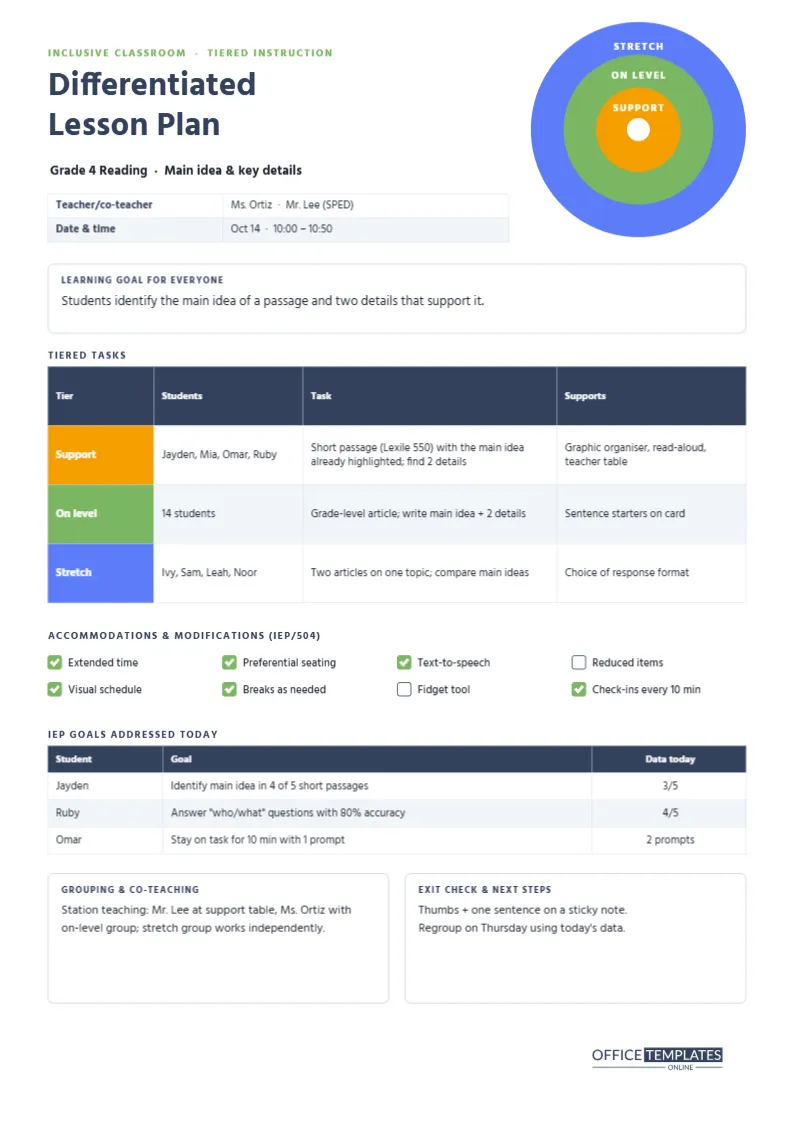
The motif in the top-right corner is a target of three rings: an amber centre labelled Support, a green middle ring labelled On level and a blue outer ring labelled Stretch, with a small white bullseye. The rings make a simple point visually: every student is aiming at the same learning goal, from different starting places. The same three colours are used for the tier labels in the task table.
One Goal for Everyone
A box headed Learning goal for everyone sits under the title. In the sample, a Grade 4 reading lesson on main idea and key details, every student works towards identifying the main idea of a passage and two details that support it. Differentiation changes the path, not the destination; keeping the shared goal visible prevents tiers from turning into different, lower expectations.
The Tiered Task Table
The core of the plan is a real editor table with a coloured tier label in each row:
| Tier | Students | Task | Supports |
|---|---|---|---|
| Support | Jayden, Mia, Omar, Ruby | Short passage with the main idea highlighted; find two details | Graphic organiser, read-aloud, teacher table |
| On level | 14 students | Grade-level article, write the main idea and two details | Sentence starters on a card |
| Stretch | Ivy, Sam, Leah, Noor | Two articles on one topic, compare main ideas | Choice of response format |
Rows are tall enough for two lines in each cell. Edit them with Edit Table Data; group membership should change often, based on recent evidence rather than fixed labels.
Accommodations Checklist
A row of eight tick boxes lists common accommodations and modifications from IEPs and 504 plans: extended time, preferential seating, text-to-speech, reduced items, a visual schedule, breaks as needed, a fidget tool, and check-ins every ten minutes. Tick the ones in use for this lesson. Rename any box to match the accommodations your students actually have.
IEP Goals Addressed Today
A second table records which IEP goals the lesson addresses and the data collected: Jayden is working on identifying the main idea in four of five short passages (three of five today), Ruby on answering who and what questions with 80 percent accuracy (four of five), and Omar on staying on task for ten minutes with one prompt (two prompts today). Collecting a data point every lesson makes progress reports and IEP meetings far easier.
Grouping, Co-Teaching and Exit Checks
Two boxes close the page. Grouping and co-teaching describes station teaching: the special education teacher at the support table, the general education teacher with the on-level group, and the stretch group working independently. Exit check and next steps records the closing check (thumbs plus one sentence on a sticky note) and the plan to regroup on Thursday using the data.
Differentiating Content, Process and Product
Carol Ann Tomlinson’s widely used framework describes three things teachers can differentiate. Content is what students learn or the material they use (the shorter passage, the two articles). Process is how they make sense of it (graphic organisers, read-alouds). Product is how they show learning (writing, drawing, speaking). The tiered table covers all three; note in the Supports column which you are adjusting.
Co-Teaching Models
- Station teaching: each teacher leads a station; students rotate.
- Parallel teaching: the class splits in half, and each teacher teaches the same lesson.
- Alternative teaching: one teacher works with a small group while the other leads the class.
- Team teaching: both teachers lead the whole class together.
- One teach, one observe: one teacher teaches while the other collects data.
Write the model you are using in the grouping box, so both teachers know their role before the lesson starts.
Keeping Plans Confidential
Lesson plans that name students and their IEP goals contain sensitive information. Store them securely, share them only with staff who work with the students, and avoid leaving printed copies on desks. If you share the template with colleagues, replace names with initials or student numbers.
Using It Without IEPs
Not every class has students with IEPs, but every class benefits from differentiation. Delete the IEP goals table and use the space for a second tiered task, or for notes on English learners, gifted students, or students returning after an absence.
A Calm, Readable Design
The page uses Hind, a clear sans-serif, and a muted navy palette with the three tier colours as the only bright accents. That restraint keeps a busy, information-rich page readable, which matters when you glance at it while working with a small group.
Tier Colours That Survive Greyscale Printing
The plan is A4 (210 x 297 mm). Download as PDF and print; the tier colours stay distinguishable in greyscale because they differ in brightness. Teachers in the US can switch the document to Letter in the editor.
Using Data to Form Groups
Base tiers on recent evidence: last week’s exit tickets, a short pre-assessment, or reading levels. Groups should be flexible; a student who needs support with main idea may be ready to stretch in vocabulary. Revisit the groups every week or two, and record why a student moved, so families and colleagues understand the decision.
Differentiated Plan FAQ
Can I add a fourth tier?
Yes. Use Add Row in the tiered task table and add a fourth ring to the target if you like.
Can the accommodations be renamed?
Yes. Each tick box label is editable text.
What size is it?
A4 portrait, 210 x 297 mm.
Can I track progress for more students?
Yes. Use Add Row in the IEP goals table, or add a page for a full caseload data sheet.
Does it work for English learners?
Yes. Use the support tier for language scaffolds such as visuals, sentence frames, and bilingual glossaries.