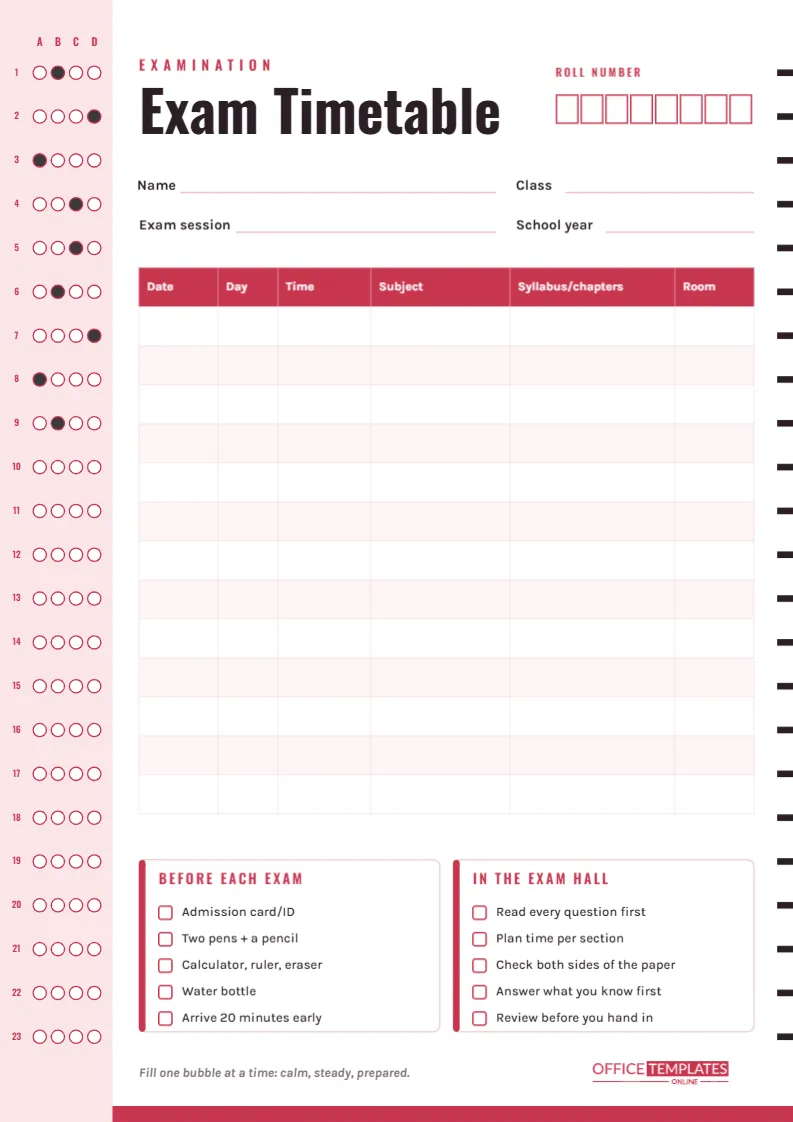
When exam season arrives, the information students need is scattered across a school notice, an email to parents, and a slide shown once in assembly. A single exam timetable collects it: which paper, which day, what time, which room, and which chapters it covers. This version is designed to look like the answer sheet you will meet in the exam hall, so it feels part of the season rather than one more loose note.
An Answer Sheet You Can Plan With
The page is A4 portrait (210 x 297 mm). Down the left edge runs a pale rose column printed like a multiple-choice answer sheet: question numbers 1 to 23, each with four bubbles labelled A, B, C and D, and the first few rows already filled in with pencil-grey dots. Down the right edge runs a line of short black timing marks, the kind scanners use to line up an answer sheet. A rose band closes the bottom of the page.
The header reads EXAMINATION in spaced rose capitals above the title Exam Timetable, set large in condensed Oswald. On the right, a row of eight boxes waits for your Roll Number, one digit per box, exactly as you would fill it in on a real paper. Lines for Name, Class, Exam session, and School year follow.
The Timetable Columns
The centrepiece is a rose-headed table with thirteen rows, enough for a full set of end-of-year or board exams. Its columns are:
- Date
- Day, which helps avoid mixing up a Monday and a Tuesday paper
- Time, including morning or afternoon session
- Subject
- Syllabus/chapters, the widest column, for the units each paper covers
- Room, the hall or classroom number
Sample Exam Week
Here is how the first rows might look for a secondary student. Short entries keep the table readable.
| Date | Day | Time | Subject | Syllabus/chapters | Room |
|---|---|---|---|---|---|
| 9 June | Mon | 9:00 AM | Mathematics P1 | Algebra, ch. | |
| 1-5 | Hall A | ||||
| 10 June | Tue | 1:30 PM | English Language | Reading + writing | Hall A |
| 11 June | Wed | 9:00 AM | Biology | Cells, genetics | Lab 3 |
| 12 June | Thu | 9:00 AM | History | Units 2 and 4 | Room 14 |
| 13 June | Fri | 1:30 PM | Mathematics P2 | Geometry, ch. | |
| 6 9 | Hall A |
Once it is filled in, the gaps between papers become visible too, and those gaps are your revision slots.
Two Checklists for the Day Itself
Beneath the table are two cards with rose tick boxes. Before Each Exam lists an admission card or ID, two pens and a pencil, a calculator, ruler and eraser, a water bottle, and arriving twenty minutes early. In the Exam Hall covers reading every question first, planning time per section, checking both sides of the paper, answering what you know first, and reviewing before you hand in. The line Fill one bubble at a time: calm, steady, prepared sits underneath, next to our logo.
Setting Up Your Timetable
- Double-click the table to open Edit Table Data and type each paper in date order. Add rows with + Add Row if your exams run over more than thirteen sessions.
- Type your roll or candidate number into the boxes in pencil after printing, or place a text box over them in the editor.
- Change the checklist wording to your school’s rules: some halls allow clear pencil cases, some require a specific calculator model.
- Click the rose header colour in the Table panel if you want a different accent; the answer-sheet column can be recoloured to match.
Where Exam Timetables Go Wrong
A few mistakes cause most exam-day panics, and the layout is built to prevent them. Mixing up morning and afternoon sessions is common, so always write AM or PM in the Time column. Rooms change for large exams, so confirm the Room column a day before. Papers with the same subject name, such as Maths Paper 1 and Paper 2, are easy to confuse, which is why the Syllabus column matters. Finally, copy the timetable exactly from the official notice and double-check it against the original; a single wrong date is worse than no timetable at all.
Turning the Gaps Into a Revision Plan
Look at the finished table and draw a line between each pair of exams. The days in between belong to the next paper, not the one you just sat. If Biology is on Wednesday and History on Thursday, Wednesday afternoon is History time, however tempting it is to relax. Where two papers fall on the same day, start revising for the afternoon one a week earlier than usual. And where there is a long gap, say four free days before a Friday paper, split it: two days of new revision, one day of past papers and one lighter day before the exam. Write those plans in pencil next to the table so the timetable and the revision schedule live on the same sheet.
Printing and Placing It
Print on A4 at Actual size. The rose column and timing marks use little ink, so colour printing is cheap. Make two copies: one for the wall above your desk and one folded into your pencil case or planner. Parents often appreciate a third copy on the fridge. A PNG download works well as a phone wallpaper during exam weeks, so the next paper is visible every time you unlock the screen.
Exam Timetable Questions Answered
Are the answer-sheet bubbles meant to be filled in?
They are decorative, but many students enjoy shading one bubble after each exam as a countdown. Twenty-three rows are plenty for a full exam season.
Can a school use this for a class timetable?
Yes. A teacher can fill in the class’s papers once, download the file, and distribute it. Students only add their own roll number.
Does it suit university exams?
It does. Replace Class with Course and Roll Number with Student ID, and use the Syllabus column for lecture weeks.
Walk In Prepared
Fill in each paper, tick the checklists the night before, and walk into every exam knowing exactly where you should be and what you need. The answer sheet is the only thing left to fill in.