Homework rarely arrives in a neat order. Maths sets exercises on Monday that are due Thursday, English wants a reading response by Wednesday, and the science project quietly grows in the background. A Weekly Homework Planner lays the whole week out in front of you, so you can see which evenings are heavy and which are light before the week gets away from you.
This template puts every subject and every school day into a single grid on an A4 landscape page (297 x 210 mm). One glance tells a student, a parent, or a tutor exactly what is due and when.
A Classroom Chalkboard Across the Top
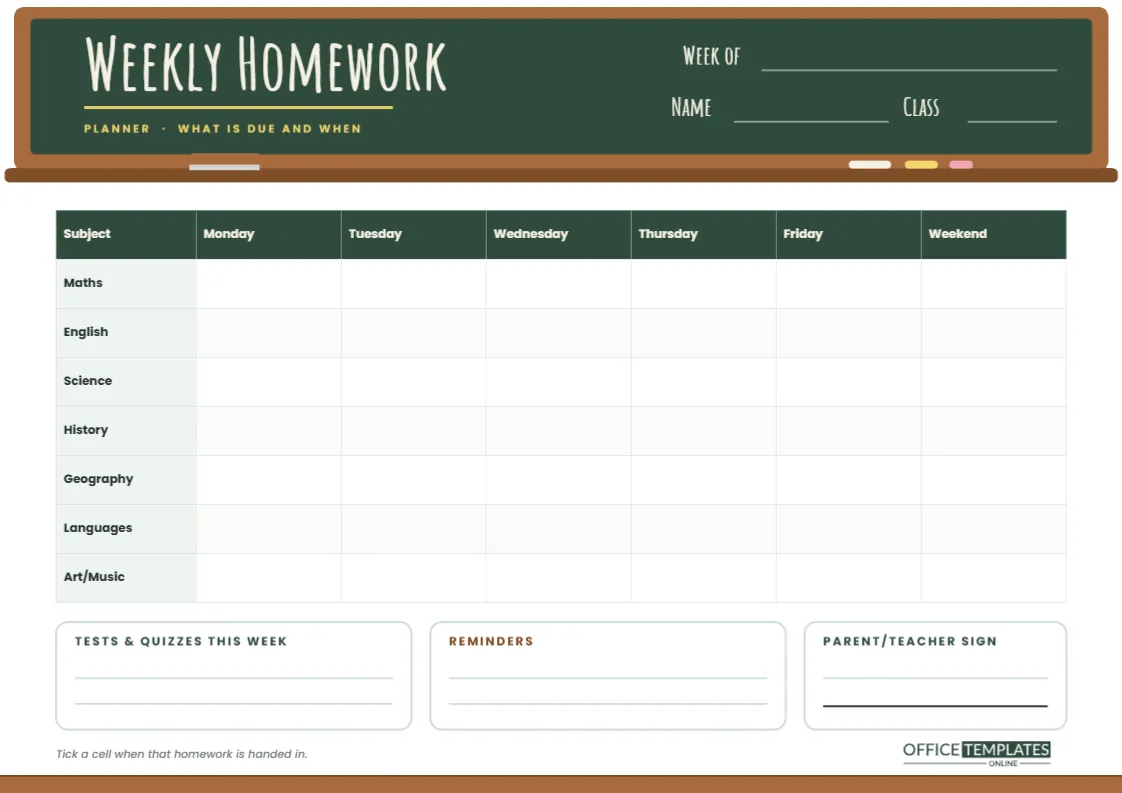
The header is drawn as a real classroom chalkboard: a deep green board inside a warm wooden frame, with a ledge running underneath. On the ledge sit a felt eraser and three sticks of chalk in white, yellow, and pink. The title, Weekly Homework, is set in the tall, hand-lettered Amatic SC typeface so it reads like chalk writing, with a yellow chalk underline and a small Planner · What is due and when tagline beneath it.
On the right side of the board are chalk-coloured lines for Week of, Name, and Class. At the very bottom of the page, a matching wooden rail closes the design, so the top and bottom feel like the same classroom wall.
How the Subject Grid Works
The main area is a table with a green header row. Down the left are seven subjects: Maths, English, Science, History, Geography, Languages and Art/Music. Across the top are Monday, Tuesday, Wednesday, Thursday, Friday, and a Weekend column. Each cell is where you write the task set for that subject on that day, or the task due that day if you prefer to plan by deadline.
Below the grid are three cards:
- Tests & Quizzes This Week: two lines for anything that needs revision rather than written work.
- Reminders: for permission slips, library books, money for a trip or a club that finishes late.
- Parent / Teacher Sign: a signature line for schools that ask families to confirm the week’s homework.
A small note at the foot of the page suggests ticking each cell once that piece of homework has been handed in, so the grid becomes a record as well as a plan.
Typical Homework Rhythm by Subject
Most schools follow a pattern, and noticing it makes the grid faster to fill in. Use this as a starting point and adjust it to your own timetable.
| Subject | How often homework usually comes | What to write in the cell |
|---|---|---|
| Maths | Two or three times a week, short sets | Exercise number and question range |
| English | Weekly reading plus one written task | Pages to read, or the essay title |
| Science | Weekly worksheet or ongoing project | Worksheet name, or the next project step |
| History/Geography | Every week or two, often research | Research question and source to use |
| Languages | Frequent vocabulary learning | Word list or page to learn |
| Art/Music | Occasional practice or sketchbook work | Practice minutes or sketch theme |
Filling It In on a Sunday Evening
The best moment to start a weekly homework planner is before the week begins. Sit down with the school portal, the class group chat, or last week’s notes and copy in anything already known: long-running projects, spelling tests, a book report due Friday. Then, each afternoon, add whatever new homework was set. Because the page is landscape, there is room to write a few words in every cell without cramming.
Many families keep the printed sheet on the fridge or pinned above the desk. Children see at a glance that Wednesday already has three tasks and can start one of them on Tuesday instead. That small shift is what stops the late-night rush.
Make the Chalkboard Your Own
- Rename the subjects. The subject names in the first column are ordinary table cells. Double-click the table to open Edit Table Data and type your own list, for example Physics, Chemistry and Biology instead of one Science row.
- Add rows. If you take more than seven subjects, use + Add Row in Edit Table Data. The table stays a real editor table, so borders and colours follow automatically.
- Change the board colour. Click the green board and choose a new fill. A charcoal blackboard or a blue whiteboard look both suit the wooden frame.
- Retitle it. Click Weekly Homework to change the words, for instance, Year 6 Homework or Revision Week.
- Keep the details together. The ledge with its eraser and chalk is grouped, so it moves as one object if you rearrange the header.
Printing a Landscape Planner Well
When you download the PDF, set your printer to A4 landscape and choose Actual size so the cells keep their proportions. The dark chalkboard band uses more ink than the rest of the page; if you print a stack each term, a laser printer or a local copy shop is the economical choice. Ordinary 80 gsm paper takes pencil and ballpoint well. If the planner lives on the fridge, slip it into a clear sleeve and write on the sleeve with a dry-wipe marker so one printout lasts the whole term.
Prefer screens? Download a PNG or JPG and open it in a tablet note-taking app, then write on it with a stylus each week.
Who This Layout Suits
The subject-by-day grid works best for students from upper primary through secondary school, where several teachers set homework independently, and nobody but the student sees the full load. Parents of younger children can fill it in together at the kitchen table. Tutors find it useful as a shared view: the student brings the sheet to each session, and the tutor can see which subjects are crowding the week.
Weekly Homework Planner Questions
Should I write the day homework is set or the day it is due?
Either works, but pick one and stick with it. Writing it under the due day shows deadlines clearly; writing it under the set day shows how much arrives at once. Many students write it under the due day and add a small set Mon note.
Why is there a Weekend column?
Some homework, especially reading and projects, naturally spills into Saturday and Sunday. Having a column for it stops weekend work from being forgotten until Sunday night.
Can a teacher use this for a whole class?
Yes. Fill in the grid once with the class’s homework for the week, download it, and share or print copies. Students then only need to tick the cells as they finish.
Wipe the Board Clean Each Week
Print a fresh sheet every Sunday, fill in what you already know, and let the chalkboard grid carry the rest of the week. By Friday, every ticked cell is proof of a week well handled.