Group projects are supposed to teach teamwork. Too often they teach frustration instead: one person does everything, another disappears, and the whole group panics the night before the deadline. The fix is not more effort; it is a shared plan that everyone can see. This Group Project Planner gives a team one page for who is doing what, by when, and how far along it is.
Four Pieces, One Picture
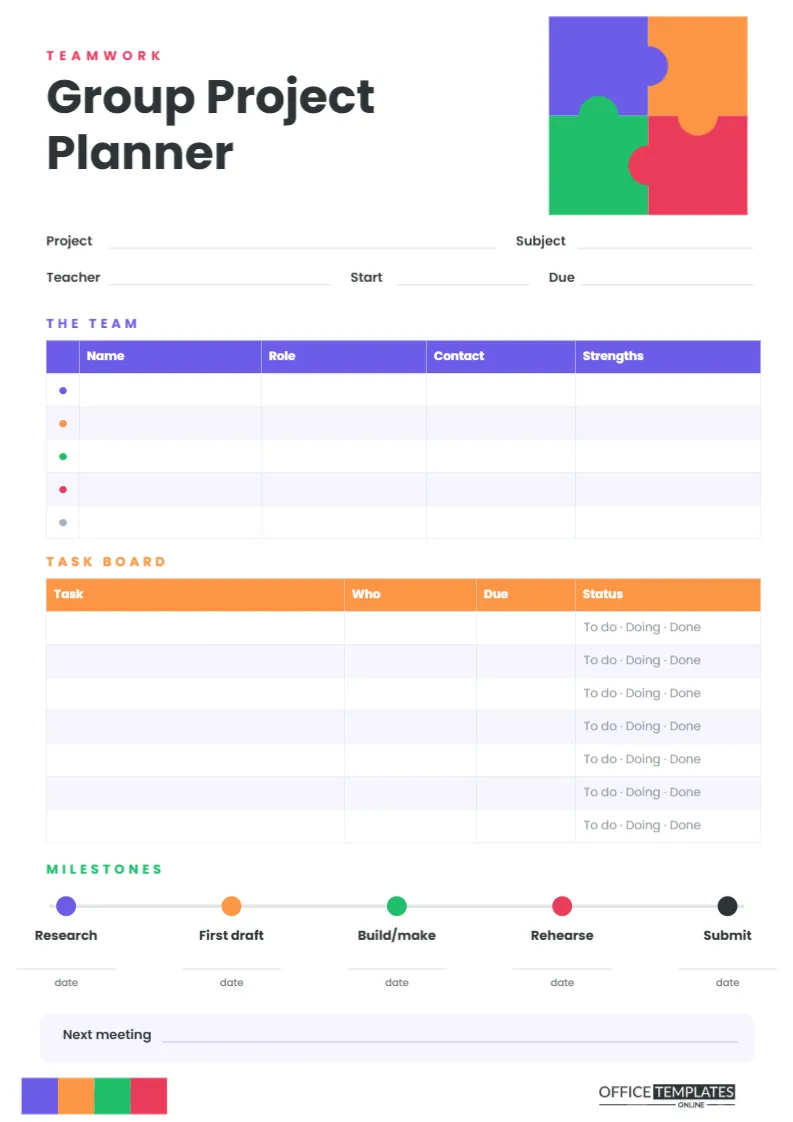
The design idea is a jigsaw. In the top right corner of this A4 portrait page (210 x 297 mm), four interlocking puzzle pieces in purple, orange, green, and pink fit together into a square, each piece’s knob locking into its neighbour. Each colour stands for a teammate, and the same four colours run through the page: coloured dots in the team table, a purple team header, an orange task board, and coloured milestones along a timeline. At the foot of the page, a strip of four smaller joined pieces sits beside our logo.
The title, Group Project Planner, is set in bold Poppins under a pink Teamwork label, followed by lines for Project, Subject, Teacher, Start date and Due date.
The Three Planning Tools
The Team
A purple-headed table lists up to five members, each marked with a coloured dot, with columns for Name, Role, Contact and Strengths. Agreeing on roles at the start is the single best way to prevent the I thought you were doing that problem.
Task Board
An orange-headed table with seven rows lists every task, who owns it, and when it is due. The Status column is pre-printed with To do · Doing · Done so members can circle where each task stands.
Milestones
A horizontal timeline with five coloured dots marks the big stages of any project: Research, First draft, Build/make, Rehearse and Submit, each with a date line underneath. A final line records the Next meeting.
Team Roles That Keep a Project Moving
The Role column works best when everyone has a clear job alongside their share of the work. These roles suit groups of three to five.
- Coordinator: Keeps the planner up to date, runs quick meetings, and checks the milestone dates. Not the boss, just the organiser.
- Researcher: Finds and checks sources, keeps a list of references, and shares useful material with the group.
- Writer or editor: Pulls everyone’s sections into one consistent document and checks spelling and style.
- Designer or builder: Leads on slides, posters, models or anything visual.
- Presenter: Plans the presentation order, organises the rehearsal, and makes sure everyone has a speaking part.
Use the Strengths column to match people to roles. Someone who writes well but dreads speaking might edit rather than present.
Breaking the Project Into Tasks
At the first meeting, list every job the project needs, however small, then assign each to one named person with a date. Good tasks are specific and finish in a week or less: find three sources on renewable energy, draft the introduction slide, buy card for the poster. Vague tasks like do the research are how projects stall. If there are more than seven tasks, add rows in the editor or write them on the back of the sheet.
Working Backwards From the Due Date
The milestone timeline is easiest to fill in from right to left. Write the submission date under Submit. Allow a few days before it for Rehearse, a week before that for Build/make, and so on back to Research. If the Research date turns out to be yesterday, the group knows immediately that the plan needs to be tighter.
Running a Ten-Minute Team Meeting
Short, regular check-ins keep a project on track far better than one long meeting a week before the deadline. Bring the planner and follow the same three steps every time. First, go round the Task Board: each person says what they finished, circles the new status, and names anything blocking them. Second, look at the next milestone date and ask whether the team is still on course. Third, assign any new tasks, write the date of the next meeting on the bottom line, and finish. Ten minutes, twice a week, is usually enough, and the Coordinator can keep the pace brisk by sticking to the page.
Adapting the Planner to Your Team
- Double-click the Team or Task Board table to open Edit Table Data. Add team members, extra tasks, or new columns such as Notes.
- Click any milestone label to rename it; a science project might use Hypothesis, Experiment, Results, Poster and Present.
- The puzzle is grouped, so you can recolour each piece to match your team’s colours or move the group as one unit.
- Type the whole plan in the editor and share the downloaded PDF with every member so everyone has the same copy.
Printing and Sharing the Plan
Print on A4 at Actual size. The colours are used in small areas, so the page is inexpensive to print. Give each team member a copy, or keep one master copy in a shared folder and bring it to every meeting. If the group works online, download a PNG and post it in the group chat each time it is updated, so there is never any doubt about the latest version.
Group Project FAQs
What if one member is not doing their tasks?
The task board makes this visible without arguments. Raise it early at a meeting; if nothing changes, the planner gives the teacher a clear, fair record.
Can teachers use it to assess teamwork?
Yes. Asking groups to hand in their planner with the project shows how work was shared and how well the team planned.
Does it suit university group work?
Definitely. The roles and milestones translate directly to seminar presentations and group reports.
Put the Pieces Together
Hold a first meeting, fill in the team, the tasks, and the milestones, and give everyone a copy. When every piece knows where it fits, the whole picture comes together on time.