A school year is long, but the moments that matter cluster in surprising ways. Exams bunch up before a holiday, two projects land in the same fortnight, and half-term arrives just as everyone needs it. An Academic Year Planner shows all twelve months side by side, so you can spot those pressure points in September rather than discovering them in March.
School Spirit Across the Top
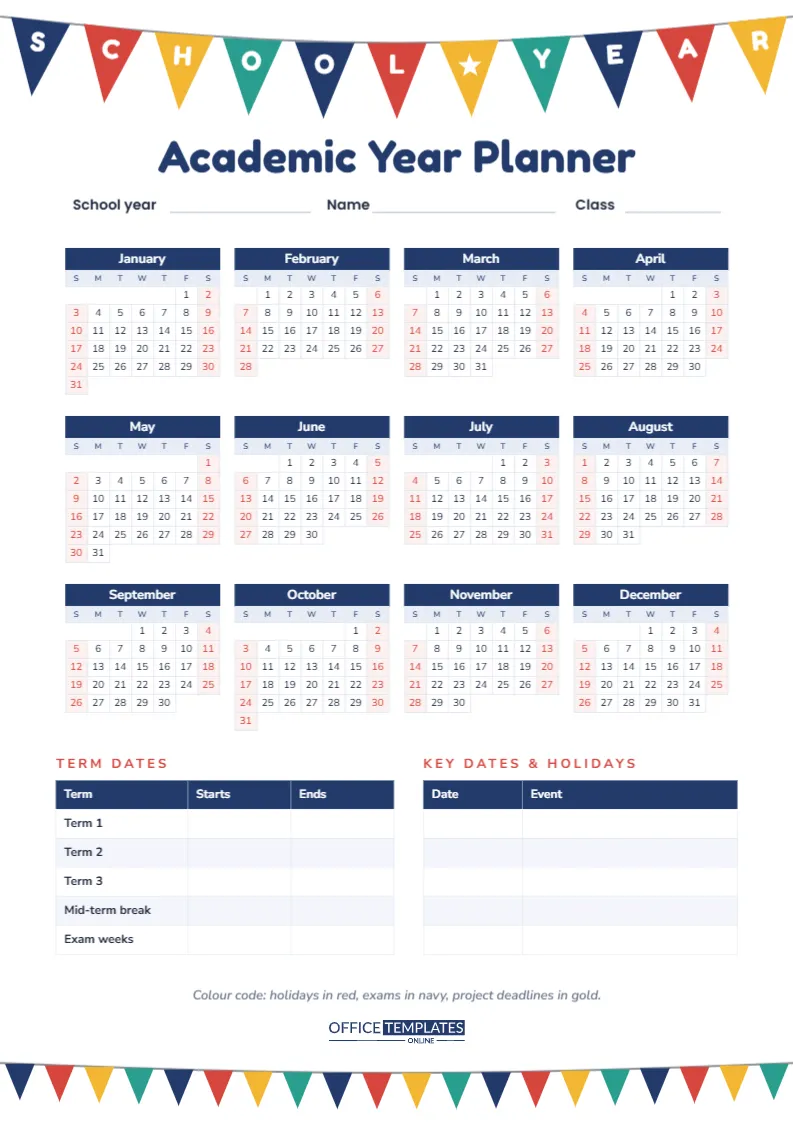
This A4 portrait page (210 x 297 mm) opens with a string of school pennants hanging across the full width. Eleven triangular flags in navy, red, gold, and teal spell out SCHOOL ? YEAR, with a white star in the middle flag. Beneath them, the title Academic Year Planner is set in bold, rounded Fredoka One navy lettering, followed by lines for School year, Name, and Class.
A smaller row of plain pennants runs along the bottom edge, so the page begins and ends with the same festive bunting.
Twelve Months on One Sheet
The centre of the page is a full-year calendar laid out in four columns and three rows. Each mini month has a navy name band, a pale blue row of day initials and clean white date cells. Saturdays and Sundays are printed in red on a faint pink tint, so weekends and school days separate at a glance.
The calendar is the editor’s own Calendar object set to its Full Year style, which means the dates are generated, not typed. The file opens on 2027; select the calendar, open Calendar Options and change the year, and every month rebuilds with the correct dates. You can also switch the week to start on Monday, adjust colours, or change the font there.
Term Dates and Key Dates Tables
Below the calendar sit two tables side by side:
- Term Dates with Starts and Ends columns for Term 1, Term 2, Term 3, a Mid-term break and Exam weeks.
- Key Dates & Holidays with a Date column and an Event column, five rows deep, for public holidays, parent evenings, sports day or a school trip.
A short line underneath suggests a colour code, and the logo sits just above the bottom bunting.
A Colour Code That Stays Readable
The quickest way to use a year planner is to mark dates with coloured pens after printing. Too many colours turn it into confetti, so keep to a small, consistent set. This is the key suggested on the page, with a couple of optional extras.
| Colour | Use it for | How to mark it |
|---|---|---|
| Red | Holidays and days off | Shade the whole date cell |
| Navy | Exams and tests | Circle the date |
| Gold | Project and coursework deadlines | Underline the date |
| Teal (optional) | Trips, performances and matches | Small dot above the number |
| Pencil (optional) | Dates not yet confirmed | Light tick you can erase |
Setting Up the Year in Twenty Minutes
- Pick the year: In Calendar Options, set the calendar year you need. If your school year runs from August to July, print two copies, one for each calendar year, and use the relevant half of each.
- Enter the terms: Copy term start and end dates from the school website into the Term Dates table. Double-click the table to open Edit Table Data and type directly.
- Add fixed holidays: List public holidays and school closures in Key Dates & Holidays. Use + Add Row if you need more than five.
- Personalise the header: Fill in the school year, name and class, or retype the lines to suit a teacher’s version (Class 5B · Room 14).
- Download and print: Then add colour by hand as the year goes on.
Who Uses a Year-at-a-Glance Page
Students use it to see exam seasons coming and to space out long projects. Parents use it to plan family holidays around term dates and to see when two children’s schools differ. Teachers print one for the classroom wall and a copy for their own planner, so pupils can count down to the next break with them. Homeschooling families can mark their own term blocks and rest weeks.
A Mid-Year Check-In Using the Same Page
Halfway through the year, take the planner down and look at it with fresh eyes. Count the navy exam circles still to come and note how many weeks sit between them. Look for gold deadlines that land in the same fortnight and start one of them earlier. Check the red holiday blocks: a long break is the perfect time to catch up on a subject that fell behind, and a short one is better kept for rest. Finally, compare what actually happened in the first half with what the page predicted. If assessments arrived without warning, ask teachers for the second-half schedule now and add it to the Key Dates table.
Teachers can run the same check-in with a class, asking pupils to find the busiest month and suggest how to prepare for it.
Printing the Year Planner
The mini months are small, so print at Actual size on A4 rather than Fit to page to keep the numbers crisp. A laser printer gives the sharpest date digits. The bunting and navy bands add colour without heavy ink coverage, so this page is economical to print in colour. For a wall planner that lasts all year, print on 160 gsm card or laminate it. You can also ask a print shop to enlarge the PDF to A3 for a classroom notice board.
Questions About the Year Planner
Can I show an academic year that starts in September?
The Full Year calendar shows January to December. For a September start, print the two calendar years your school year spans, or add a second page with Add Page and set it to the following year.
Can I show only school months?
The calendar always shows twelve months, which is helpful for planning summer too. Shade the months you do not need in light grey after printing.
Does it work in the Southern Hemisphere?
Yes. Because the school year there usually follows the calendar year, a single page covers it neatly.
Plan the Year, Enjoy the Year
Set the year, fill in the terms, and hang it where everyone can see it. With the whole school calendar in view, the busy weeks are easier to handle and the holidays are easier to look forward to.