Missed assignments are rarely about laziness. More often, the task was written on a scrap of paper, mentioned at the end of a lesson, or posted online on a day you were absent. An Assignment Tracker gives every piece of coursework one permanent line, from the day it is set to the day the grade comes back.
Designed Like the Folder in Your Bag
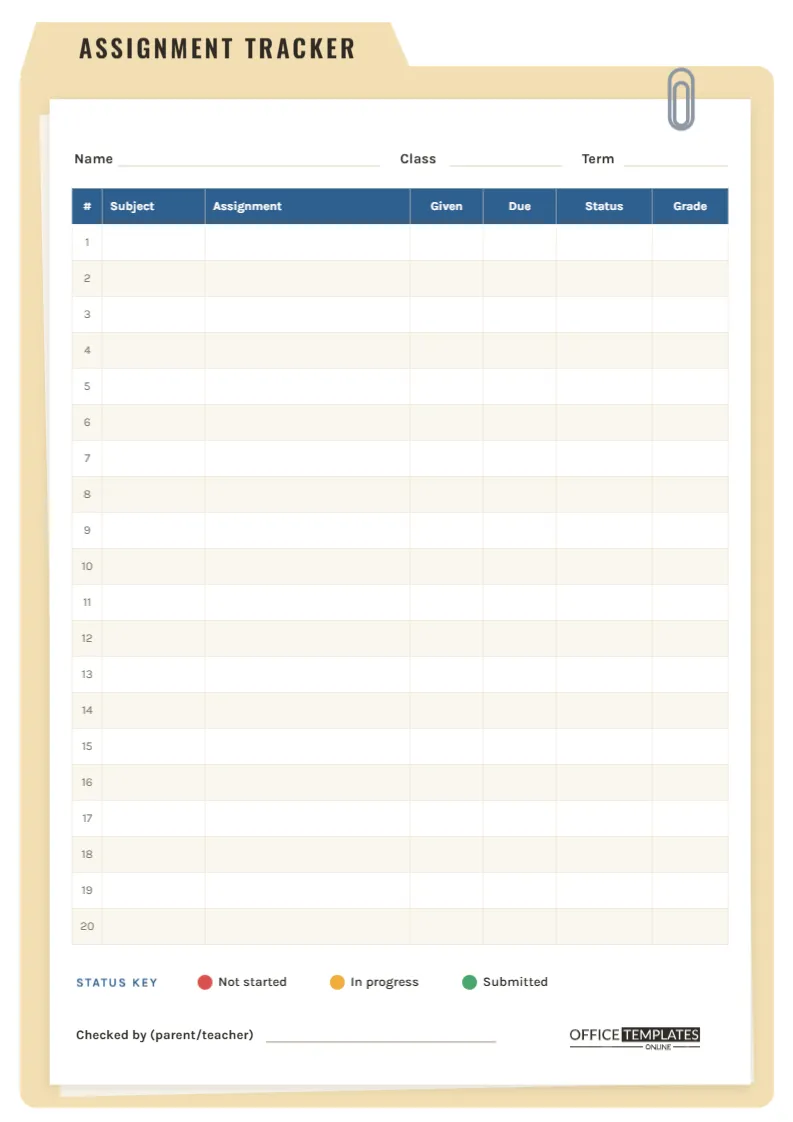
The whole A4 portrait page (210 x 297 mm) is styled as a manila file folder. A soft tan folder fills the page, with a tab at the top left that carries the title ASSIGNMENT TRACKER in tall, condensed Oswald capitals. Inside the folder sits a crisp white sheet with a light shadow, and a second, slightly tilted sheet peeks out behind it, as if the folder holds a small stack of work. A silver paper clip grips the top right corner of the front sheet.
It looks like something from a teacher’s filing cabinet, which is exactly the point: it signals that this page is the official record of your coursework.
What the Sheet Tracks
At the top of the sheet are lines for Name, Class, and Term. Below them is a blue-headed table with twenty numbered rows and seven columns:
- #: a row number, handy when a teacher asks Which assignment is that?
- Subject: the class the work belongs to.
- Assignment: the widest column, for the title or a short description.
- Given and Due: the date the work was set and the date it has to be handed in.
- Status: where the work stands right now.
- Grade: the mark or feedback once it is returned.
Underneath the table is a Status Key with three coloured dots, and a Checked by (parent/teacher) signature line next to our logo.
The Status Key, Explained
The Status column works best with a quick visual code instead of words. Draw a small dot in the cell with a coloured pen and update it as you go.
- Red dot: Not started. The assignment is written down, but no work has been done. Red rows with a close due date are your first job tonight.
- Amber dot: In progress. Research, a draft, or part of the questions are done. Add a second amber dot if you are more than halfway.
- Green dot: Submitted. Handed in or uploaded. Only turn a dot green once the work has actually left your hands, not when it is nearly finished.
Scanning the Status column top to bottom gives an instant health check: a column full of red means it is time to talk to a teacher or rearrange the week.
Walking Through One Row
Suppose your history teacher sets a source-analysis essay on 3 March, due 14 March. On row 7 you write History, Source analysis: causes of WW1, 3/3 and 14/3, and add a red dot. On 6 March you find two sources and write an outline, so the dot becomes amber. On 13 March you upload the essay and add green. Two weeks later, the essay comes back with a B+, which goes in the Grade column. That single line now tells the whole story, and when report time arrives, you can see every grade in one place.
Make the Tracker Fit Your Classes
- Double-click the table to open Edit Table Data. You can type subjects in advance, change column headings (for example, Points instead of Grade), or add rows beyond twenty.
- Rename the folder tab by clicking the title text. Coursework Log, Project Tracker, and Semester 2 Assignments all fit.
- Click the folder and choose a different fill if you prefer a colour-coded system, such as blue for sciences and green for humanities, with one tracker per group of subjects.
- The paper clip is a small grouped object; drag it to another corner or delete it if you want a plainer look.
Printing the Tracker for Your Binder
Print on A4 at Actual size so twenty rows stay easy to write in. The folder colour is light, so this template is kind to ink. Punch holes along the left edge and keep the tracker at the front of your subject binder, or slide it inside a real manila folder with your returned work behind it. For a digital version, download a PNG and annotate it in a notes app, or keep editing the template online and download a fresh copy whenever a row changes.
Habits That Make a Tracker Worth Keeping
- Write the assignment down the moment it is set, even if you think you will remember.
- Check the Due column every evening and sort tonight’s work by the nearest date.
- Update the Status dot as soon as something changes; a stale tracker gets ignored.
- Record grades honestly, including the disappointing ones. Patterns show you which subjects need extra time.
- Ask a parent or teacher to sign the Checked by line once a week. It keeps everyone informed without nagging.
Assignment Tracker FAQs
How is this different from a homework planner?
A homework planner shows what to do each day. An assignment tracker follows larger pieces of work over time, from set date to grade, which makes it ideal for essays, projects, and lab reports.
What if I have more than twenty assignments in a term?
Add rows in Edit Table Data, or start a second sheet with Add Page and continue the numbering from 21.
Can teachers use it for a class?
Yes. A teacher can list all the term’s assignments with due dates, download the file, and hand it out, leaving the Status and Grade columns for students to fill in.
Is it suitable for college students?
Absolutely. Rename Subject to Course and Grade to Score, and it becomes a semester coursework log.
Keep Every Assignment Accounted For
Open the template, add your name and term, and let the folder hold the details your memory does not have to. Twenty lines, three colours, and one signature a week are enough to stay on top of every deadline.