Attendance is one of the clearest predictors of progress at school, and it is also one of the easiest things to lose track of. A day off for a cold, a family wedding, a late arrival after a dentist appointment: individually they seem minor, but over a year they add up. This record keeps one student’s attendance for a whole year on a single landscape page, together with a log of every leave request.
Official Look, Friendly Detail
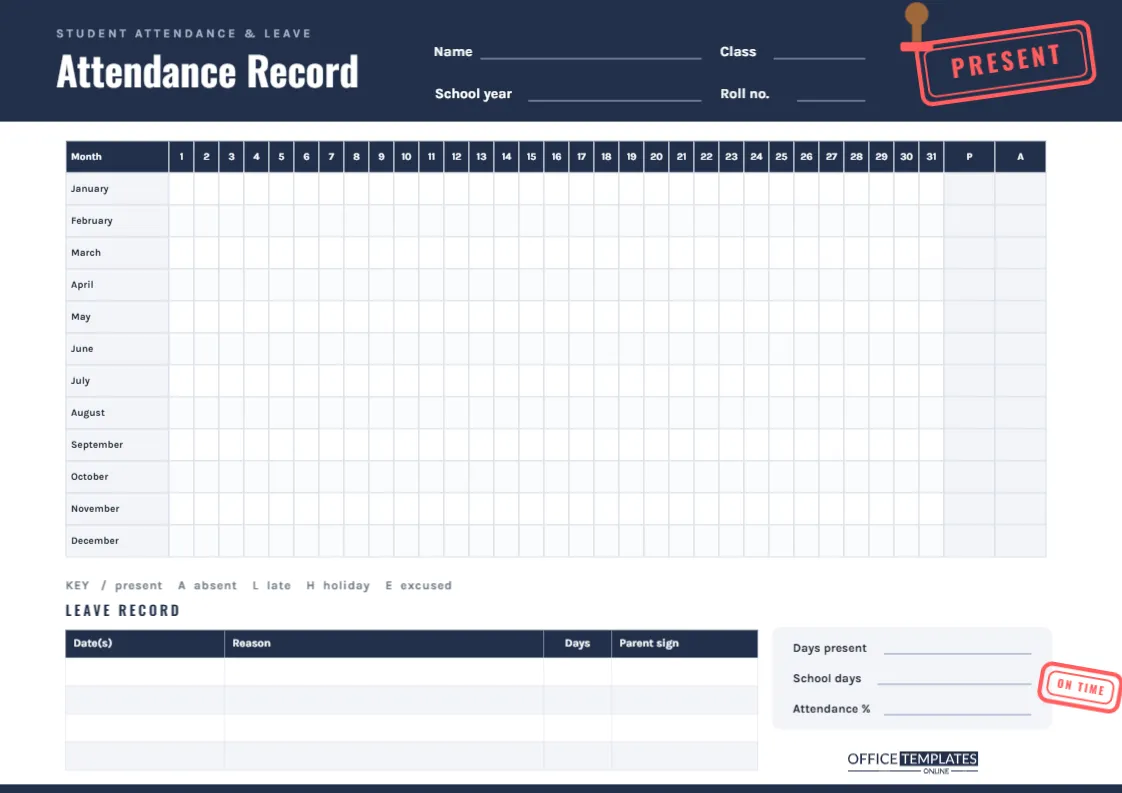
The page is A4 landscape (297 x 210 mm). A navy header band spans the top, with a small Student Attendance & Leave label above the title Attendance Record in white condensed Oswald. White writing lines for Name, Class, School year, and Roll no. sit in the band. On the right, a bright red rubber-stamp imprint reading PRESENT is pressed at a jaunty angle inside a double border, with a small wooden stamp just above it as if it had only just been lifted.
Lower down, a smaller ON TIME stamp sits beside the summary box, and a thin navy line closes the bottom edge. It reads as an official register, with just enough personality to make students want to fill it in.
The Year-at-a-Glance Register
The main table has a row for every month from January to December and a column for every day from 1 to 31, followed by two shaded total columns: P for days present and A for days absent. With 12 x 31 small cells, the whole year’s attendance fits on one sheet, and patterns such as frequent Monday absences or a cluster of late arrivals in winter become obvious.
Attendance Codes
A key under the table suggests five codes. Using the same marks all year keeps the register readable:
| Code | Meaning | Counts as |
|---|---|---|
| / | Present for the whole day | Present |
| A | Absent without an approved reason | Absent |
| L | Late arrival | Present (note it separately if your school tracks lateness) |
| H | School holiday or closure | Not a school day |
| E | Excused absence, such as illness with a note or an approved appointment | Absent, but authorised |
Weekends can simply be left blank or shaded with a pencil, so they are not counted by mistake.
Working Out the Attendance Percentage
A summary box on the right holds three lines: Days present, School days and Attendance %. The calculation is simple:
Attendance % = (days present ÷ school days) × 100
For example, if the school was open for 186 days and the student was present on 177 of them, the attendance is 177 ÷ 186 × 100 = 95.2%. Many schools consider anything below about 90% a concern, because it means missing roughly half a day every week. Checking the figure at the end of each term, not only at the end of the year, gives time to act if it is slipping.
The Leave Record
Below the register, a separate table titled Leave Record has columns for Date(s), Reason, Days, and Parent sign. Every planned absence, such as a medical appointment, a family event, or a religious festival, gets a line, with the parent’s signature confirming it. When the school asks about an absence months later, the answer is already written down.
Spotting Patterns Before They Become Problems
The real value of a year-long grid is what you notice when you step back from it. Run your finger down a single day column: if absences keep landing on the same weekday, it may point to a lesson the student is avoiding or a regular clash with something else. Look along each month’s row: a run of L codes in winter might mean the morning routine needs to start ten minutes earlier when it is dark. A sudden cluster of A codes after a steady term can be an early sign of illness, worry, or friendship trouble. None of these patterns show up clearly in a report card, but they jump out of the register, giving parents and teachers the chance to talk before a small issue grows.
Who Keeps This Record
Parents use it to keep their own copy of a child’s attendance, which is useful when checking a school report or planning family trips. Homeschooling families use it to log instruction days where local rules require a record. Tutors and private schools use it for individual students, and older students keep it themselves to stay honest about lateness and missed days.
Editing the Register
- Double-click the register to open Edit Table Data. If your school year starts in September, retype the month names in school-year order.
- Change the codes in the key line to match your school’s system; some use O for present or U for unauthorised.
- Add rows to the Leave Record with + Add Row if you expect more than four absences.
- Recolour the navy header and red stamps to school colours. Each stamp is made of editable shapes and text, so you can also change the wording, for instance to WELL DONE.
Printing a Detailed Grid
With so many cells, this page must be printed at Actual size on A4 landscape; shrinking it makes the boxes hard to mark. A laser printer gives the crispest grid lines. Because the register is used all year, print it on heavier 120 to 160 gsm paper or keep it in a clear sleeve on the fridge, marked with a fine pencil or pen. Download a PDF copy at the end of the year for your records.
Attendance Record FAQs
Does it cover a whole school year?
Yes. All twelve months fit on one page, so both calendar years of a September-to-July school year can be shown by reordering the month names.
How do I record half days?
Draw a diagonal line through the cell and mark one half, or use a separate code such as ½.
Can a teacher use it for a whole class?
It is designed for one student per page. Teachers can make one page per pupil, adding pages with Add Page, for small groups or tutoring.
Every Day Counts
Fill in the student’s details, mark today, and keep the register somewhere visible. Twelve rows of steady ticks are one of the best foundations a school year can have.