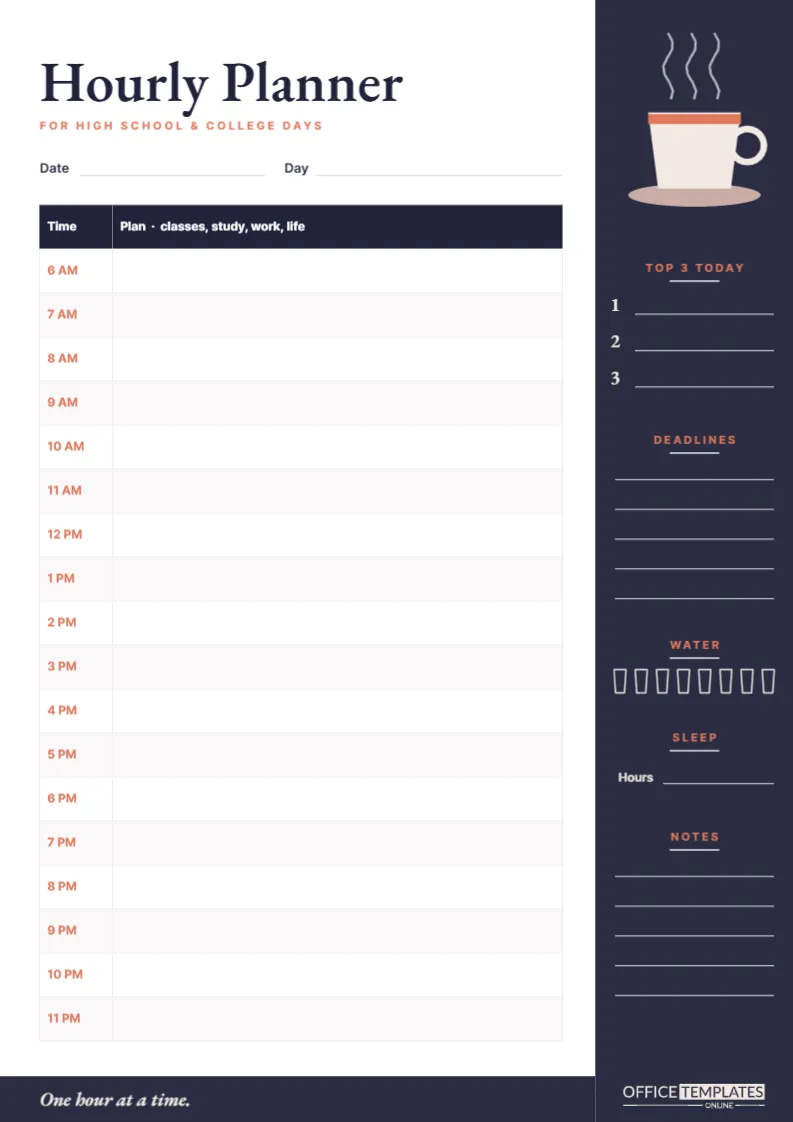
By high school and certainly by college, the day stops being run by a bell. Lectures are scattered, study time is self-directed, and a part-time job, sport, or social life competes for the same hours. Time-blocking, giving every hour a job, is how many successful students stay in control. This hourly planner is built for exactly that, with a calm, grown-up design.
A Quiet Design for a Busy Day
The page is A4 portrait (210 x 297 mm). A tall charcoal sidebar runs down the right edge, and a matching charcoal band runs along the bottom, joining it like the corner of a café table. At the top of the sidebar, a cream coffee cup with a terracotta band and a round handle sits on a pale latte saucer, with three wisps of steam rising above it.
The title, Hourly Planner, is set in EB Garamond, a classic book typeface, with For high school & college days in small terracotta capitals underneath. The footer band carries the line One hour at a time. In italic cream lettering, with our logo in cream on the sidebar. The overall palette of charcoal, cream, and terracotta is deliberately low-key, suitable for a desk in a dorm or a library carrel.
Eighteen Hours, One Line Each
After lines for Date and Day, the main table runs from 6 AM to 11 PM, one row per hour, with the time printed in terracotta and a wide Plan column headed classes, study, work, life. That header is a reminder that the planner is not only for studying: meals, travel, exercise, work shifts, and rest belong in it too.
The Sidebar
- Top 3 Today: three numbered lines for the day’s non-negotiables.
- Deadlines: five lines for anything due soon, so it stays in sight while you plan the hours.
- Water: eight small glass outlines to fill in through the day.
- Sleep: a line for last night’s hours.
- Notes: five lines for reminders, ideas, or a to-buy list.
A Time-Blocked College Day
Here is what a filled-in Tuesday might look like for a first-year university student. Notice that almost every hour has a purpose, including rest.
| Time | Plan |
|---|---|
| 7 AM | Wake up, breakfast, review Top 3 |
| 8 AM | Walk to campus, listen to lecture recording |
| 9 AM | Lecture: Introduction to Psychology |
| 10 AM | Library: finish lab report methods section |
| 11 AM | Seminar: Statistics |
| 12 PM | Lunch with friends |
| 1 PM | Deep work: essay outline (phone off) |
| 2 PM | Deep work: essay first 500 words |
| 3 PM | Gym |
| 4 PM | Part-time job, café |
| 8 PM | Dinner, call home |
| 9 PM | Review lecture notes, flashcards |
| 10 PM | Wind down, plan tomorrow |
Time-Blocking Tips That Actually Work
- Put fixed commitments in first. Classes, shifts, and appointments go in before anything else.
- Protect your best hours. If you think most clearly in the morning, schedule the hardest study there and move emails and errands to the afternoon.
- Plan in blocks, not minutes. One hour per row is deliberate: it is enough for real progress and short enough to stay focused.
- Leave a buffer. Keep one or two hours lightly planned. Something always runs late.
- Review the day in the evening. Cross out what happened, move what did not, and fill in the next page before bed.
- Colour-code. Many students use one highlighter for classes, one for study, and one for personal time, which shows the balance of the day at a glance.
Pairing Hourly Pages With a Weekly View
An hourly planner is detailed by design, so it works best with a lighter weekly overview beside it. Each Sunday, list the week’s classes, deadlines, and shifts on a weekly sheet. Then, each evening, take one hourly page and plan tomorrow in full, pulling tasks from the weekly list into specific hours. That rhythm of a weekly plan plus a daily detailed plan means you never try to schedule an entire week by the hour, which is exhausting and rarely survives Tuesday. The Deadlines section in the sidebar is where the two meet: copy in anything due within the next few days so it is visible while you decide how to spend each hour.
During exam season, many students switch to hourly pages every day, because study leave has no timetable of its own and structure makes a real difference to how much gets done.
Customizing Your Planner
- Double-click the table to open Edit Table Data. Night owls can change the times to run from 8 AM to 1 AM; early risers can start at 5 AM.
- Split rows into half-hours by adding rows and relabeling the times, which suits exam days with back-to-back slots.
- Rename sidebar sections: Deadlines could become Readings, and Water could become Breaks.
- Change the charcoal to navy or forest green if you prefer; the cream coffee cup works with any dark tone.
Printing and Using It Daily
Print on A4 at Actual size. The dark sidebar and footer use more ink than a plain page, so if you print one per day, a laser printer or a print shop stack is the economical option. Alternatively, switch the sidebar to a lighter grey before printing. Students who plan digitally can download a PNG and use it as a daily page in a tablet app, duplicating it each morning.
Hourly Planner FAQs
Is an hourly planner too rigid?
Only if you treat it as a contract. Think of it as a first draft of your day; adjusting it as things change is part of the process.
Can high school students use it?
Yes, particularly during study leave, weekends, holidays, and exam periods when the day is less structured.
Why track water and sleep on a study planner?
Because both have a direct effect on concentration and memory. Seeing them next to your schedule makes it harder to ignore them.
Own Your Hours
Fill in tomorrow tonight: fixed commitments first, top three tasks next, then everything else. Pour a coffee (or a water), and take the day one hour at a time.