Most students take notes by writing down as much as they can, as fast as they can, and never looking at them again. The Cornell method, developed at Cornell University in the 1950s, fixes that with a simple page layout. It divides the sheet into three areas, one for notes, one for questions, and one for a summary, so reviewing becomes part of note-taking rather than an afterthought.
A Notebook Page, Upgraded
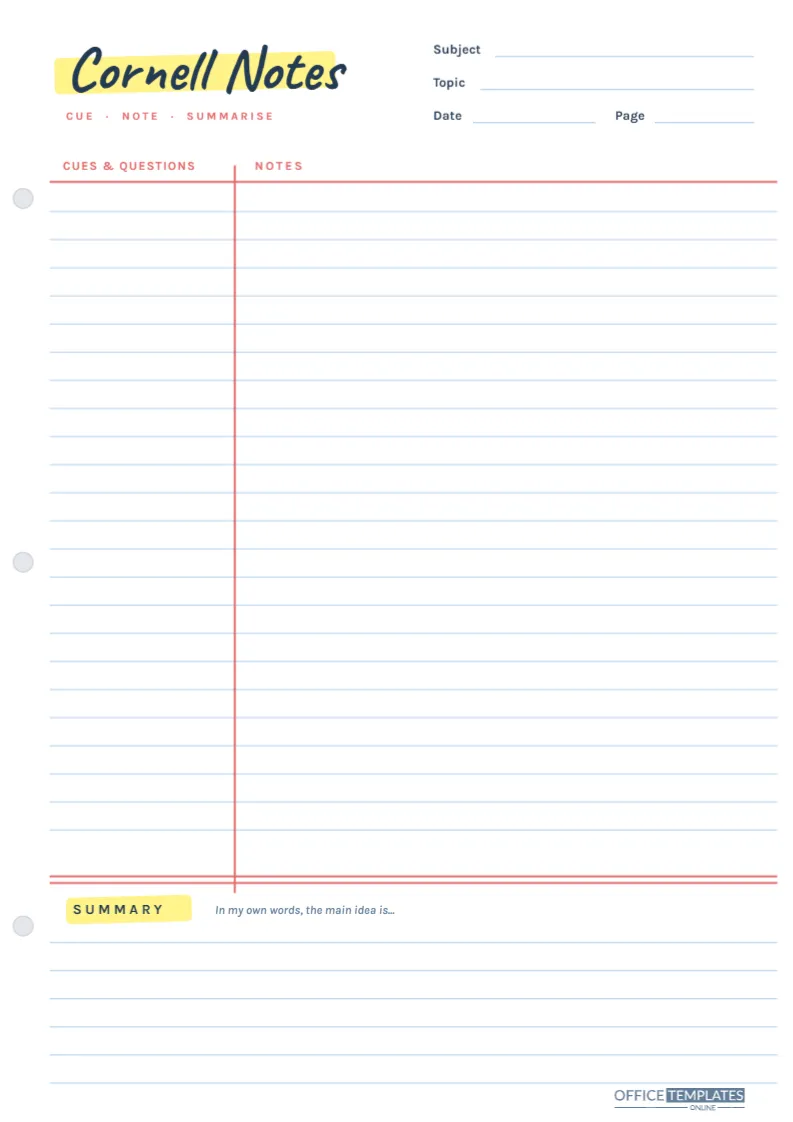
This template looks like a sheet torn from a good school notebook. It is A4 portrait (210 x 297 mm) with pale blue horizontal rules, a red vertical margin line and three grey punched holes down the left edge, ready for a ring binder.
The title, Cornell Notes, is written in the handwritten Caveat font over a yellow highlighter swipe, as if you had marked it yourself, with a small red Cue · Note · Summarise line underneath. On the right are lines for Subject, Topic, Date, and Page. Near the bottom, a double red line separates the notes from the summary area, and the word SUMMARY gets its own highlighter swipe, so the top and bottom of the page are marked the same way.
The Three Zones of a Cornell Page
Cues and questions (left column)
The narrow column to the left of the red margin is for keywords, questions, and prompts. It stays mostly empty during class and fills up afterwards.
Notes (right column)
The wide area to the right is where you write during the lesson: main ideas, examples, diagrams, definitions and anything the teacher emphasises. There are over twenty ruled lines, enough for a full lesson in neat handwriting.
Summary (bottom)
Below the double red line, six ruled lines hold a summary. An italic prompt starts you off: In my own words, the main idea is…
The Method in Five Steps
- Record: During class, write notes in the right column. Use short phrases, abbreviations, and bullet points; skip lines between ideas so there is room to add later.
- Reduce: Within a day, reread your notes and write questions or keywords in the cue column next to each section. What causes seasons? Beside a paragraph about the tilt of the Earth is perfect.
- Recite: Cover the notes column with a sheet of paper. Read each cue and answer it out loud from memory, then uncover to check.
- Reflect: Write the summary at the bottom in two to four sentences, in your own words.
- Review: Spend a few minutes each week reciting from the cues again. This spaced review is what makes notes stick for exams.
What a Finished Section Looks Like
Here is a short example from a Year 8 science lesson on photosynthesis, showing how the two columns work together.
| Cue column | Notes column |
|---|---|
| What is photosynthesis? | Plants make glucose from CO2 + water using light energy. Happens in chloroplasts (green = chlorophyll). |
| Word equation? | carbon dioxide + water ? glucose + oxygen (light needed) |
| 3 limiting factors | Light intensity, CO2 concentration, temperature. Too cold = enzymes slow. |
| Why does it matter? | Source of food for food chains, and of the oxygen we breathe. |
Summary for that page: Photosynthesis is how plants use light to turn carbon dioxide and water into glucose and oxygen. Its speed depends on light, carbon dioxide, and temperature, and it supports almost all life on Earth.
Writing Cues That Make You Think
The quality of the cue column decides how useful the page will be at revision time. Single keywords are fine for vocabulary, but questions are usually stronger, because they force you to retrieve the answer rather than recognise it. Mix in why and how questions as well as what: Why does temperature limit photosynthesis? is more demanding than limiting factors. You can also use the cue column for exam-style prompts such as Compare… or Explain two reasons…, which trains you for the way questions are really asked.
Filling In the Header
The Subject, Topic, Date and Page lines seem minor, but they turn a pile of loose sheets into an organised set. Number the pages in each topic (1 of 3, 2 of 3) and file them in date order. When revision season arrives, you can pull out every page on one topic in seconds, and the cue columns become ready-made revision questions.
Customize the Page
- Click the title to change it, for instance to the subject name, so each binder section has its own heading.
- Change the highlighter colour by clicking the yellow swipe; many students colour-code subjects this way.
- The ruled lines and margin are grouped, so they stay aligned; click the group to recolour the rules if you prefer grey or green lines.
- Edit the summary prompt to match a teacher’s instruction, such as Three key points from today.
Printing Notes Pages in Bulk
Download the PDF and print on A4 at Actual size. This design uses very little ink, with only the highlighter swipes and red lines in colour, so it is ideal for printing a stack of thirty at a time. Choose standard 80 gsm paper for pencil and ballpoint, and punch holes along the left using the printed hole marks as a guide. Tablet users can download a PNG and use it as a page template in a handwriting app.
Who Should Try Cornell Notes
Secondary and university students get the most from the method, especially in content-heavy subjects like science, history, and economics. It also works for reading notes: write the chapter’s key points on the right and questions on the left. Teachers who introduce the method with a shared template find students’ notes become far more consistent, which makes checking and feedback quicker.
Cornell Notes FAQs
Why is the cue column on the left?
So you can cover the notes and test yourself using only the cues, which is the heart of the method.
Do I need to fill the whole page every lesson?
No. Start a fresh page for each lesson or topic, even if the last one was half empty; it keeps the summaries meaningful.
Can I type Cornell notes?
You can type into the page in the editor, but most research and experience suggest handwriting helps memory. Many students handwrite in class and type up the summary later.
Turn Notes Into Knowledge
Print a stack, take your next lesson’s notes on it, and add the cues that evening. The first time you test yourself from the left column, you will see why this simple layout has lasted for decades.