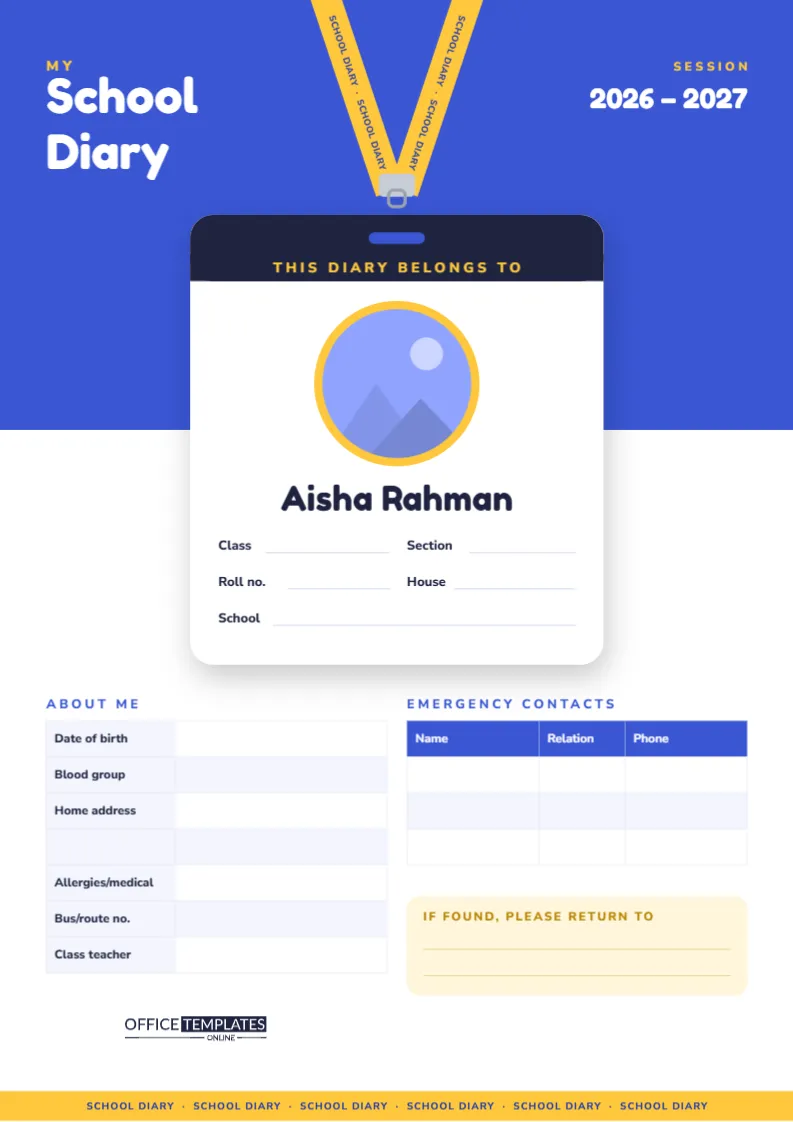
Every school diary needs a first page that says whose it is. It is the page a teacher checks on the first day of term, the page that brings a lost diary home, and the page with the phone numbers someone needs in an emergency. This template turns that practical page into something students are proud to show: a student ID card hanging from a lanyard, with their own photo on it.
An ID Card on a Lanyard
The page is A4 portrait (210 x 297 mm). The top half is a strong royal blue. In the top left corner, a yellow My sits above the words School Diary in big white Fredoka One letters, and in the top right, Session 2026 – 2027 is ready to be updated. Two yellow lanyard straps printed with School Diary · School Diary run down from the top edge and meet at a silver clip.
Hanging from the clip is a white ID card with rounded corners and a soft shadow, overlapping the blue and white halves of the page. Its dark header reads This Diary Belongs To in yellow capitals, with a small blue slot where the lanyard attaches. Inside the card is a round photo inside a thick yellow ring, the student’s name in large type, and lines for Class, Section, Roll No., House, and School. At the bottom of the page, a yellow strap band printed with School Diary runs from edge to edge, echoing the lanyard.
Adding the Student’s Photo
The round photo area is a real photo slot. In the editor, click it and choose Replace Image, then upload a head-and-shoulders photo. The picture fills the circle, and the frame keeps its size and yellow ring, so the card layout stays exactly as designed. A plain, well-lit background works best, like a school photo. Then click the sample name and type the student’s own.
The Information Sections
Under the card are three blocks:
- About Me: a two-column table with Date of birth, Blood group, Home address (with an extra line for a long address), Allergies/medical, Bus/route no., and Class teacher.
- Emergency Contacts: a blue-headed table with Name, Relation, and Phone for three people.
- If Found, Please Return To: a pale yellow box with two lines.
What to Write, and What to Keep Private
A diary travels everywhere and is often left on desks and buses. Share what helps a child be safe and returned, but think twice about anything that could be misused if the diary is lost.
| Field | Recommended | Consider leaving out or shortening |
|---|---|---|
| Name, class, school | Yes, needed to return the diary | Keep as is |
| Photo | Yes, helps staff and substitute teachers | Use a school-style photo, not a personal snapshot |
| Home address | Only if the school requests it | Many families write the school address in Return to instead |
| Allergies/medical | Yes, if relevant to safety | Keep it to what staff need to know |
| Emergency contacts | Yes, at least two | Use first names and relation rather than full details if preferred |
| Date of birth | If the school asks for it | Otherwise leave blank |
Filling It In Online or by Hand
You can type everything in the editor before printing, which gives a neat, legible result that teachers appreciate. Double-click the About Me or Emergency Contacts table to open Edit Table Data and type into the cells, or add rows if you want more contacts. Alternatively, print the page with just the photo and name filled in, and let the student write the rest by hand on the first day of school, which many younger children enjoy.
Making It Match Your School
- Click the blue top half and change it to your school colour; the yellow lanyard and card stand out against almost any strong colour.
- Update 2026 – 2027 to the current session.
- Rename House to Section, Group, or Form depending on your school’s system.
- The lanyard straps and clip are grouped, so you can move or recolour them together without disturbing the card.
Printing and Placing the Page
Download a PDF and print on A4 at Actual size, ideally on a colour printer so the photo looks good. The blue band uses a fair amount of ink, but you only print this page once a year. Heavier 160 gsm card makes a sturdy front page that survives a full year in a school bag. Glue or bind it as the first page of the diary, or slip it into the clear front pocket of a binder so it acts as the cover.
Checking the Details Each Term
Information on a front page goes out of date faster than people expect. A parent changes jobs and phone numbers, a child moves bus route, a new allergy is diagnosed. Make it a habit to check the page at the start of every term: read each line of the About Me and Emergency Contacts tables and update anything that has changed. If the diary is typed in the editor, open your saved design, change the cells and print a fresh page to glue over the old one.
Beyond the Diary
The same page works as the first sheet of a homework folder, a reading-record binder or a class portfolio. Teachers sometimes make one for every pupil at the start of the year as a welcome gift, adding each child’s photo and printing them in a batch. Parents of younger children often keep last year’s page in a memory box, because the photo shows how much a child has changed in one school year.
Questions About the Front Page
Can I use a rectangular photo?
Yes. Replace Image fills the circular frame from any photo; choose one where the face is near the centre so nothing important is cropped.
Is there space for more than three emergency contacts?
Add rows in Edit Table Data. The table grows downward into the free space.
Can older students use it?
Absolutely. Secondary students often prefer a darker colour scheme; change the blue to navy or charcoal.
Make It Yours on Day One
Add a photo, type the name, and update the session. It takes five minutes, and the diary will have a proud owner and a way home if it ever goes missing.