A weekly planner hits the sweet spot between a daily page and a monthly calendar. It is detailed enough to hold every homework task and appointment, but short enough to see at a glance. Plan the week on Sunday, glance at it each morning, and the week feels organised from the start.
Three Highlighters and a Tidy Grid
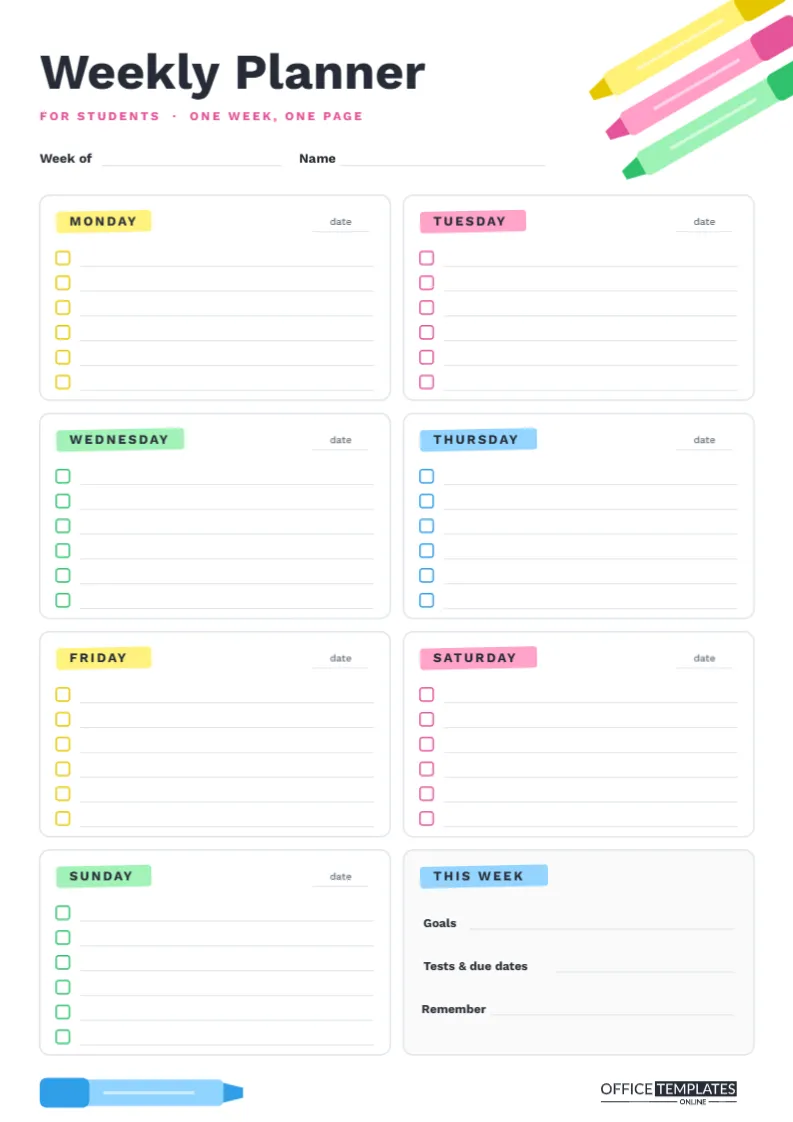
This A4 portrait page (210 x 297 mm) takes its style from the stationery every student reaches for: highlighter pens. Three chunky highlighters, yellow, pink and green, each with a darker cap and a chisel tip, slide in diagonally from the top right corner of the page. A single blue highlighter lies along the bottom left, balancing the design, next to our logo.
The title Weekly Planner is set in strong Work Sans with a pink For students · One week, one page line beneath it and lines for Week of and Name. Below, the page is divided into eight tidy boxes, two per row, and every day’s name sits on its own highlighter swipe, cycling through yellow, pink, green and blue as if marked by hand.
Eight Boxes for One Week
Monday to Sunday each get a box with a small date line in the corner and six checklist lines with tick boxes. The tick boxes are outlined in the same colour as that day’s highlighter swipe, which keeps each box visually distinct. The eighth box, titled This Week, has a soft grey background and three labelled lines: Goals, Tests & due dates, and Remember.
Giving the weekend its own two full boxes is intentional. Saturday and Sunday often hold reading, project work, sport and family plans, and they deserve the same attention as school days.
A Colour Code Borrowed From the Highlighters
The four highlighter colours on the page suggest a simple system for your own pens. Mark each task with the colour of its category, and the balance of your week becomes visible immediately.
| Highlighter | Category | Examples |
|---|---|---|
| Yellow | Homework and assignments | Maths worksheet, essay draft |
| Pink | Tests and deadlines | Spelling test, project due |
| Green | Activities and appointments | Football, dentist, music lesson |
| Blue | Personal and home | Chores, birthday, reading for fun |
If a week is almost all pink, it is a heavy assessment week; plan lighter evenings and early nights. If there is no blue at all, add something enjoyable.
A Five-Step Sunday Setup
- Write the dates: Fill in Week of and each day’s date line.
- Add fixed events: Clubs, lessons, appointments, and family plans go in first.
- Add known deadlines: Copy every test and due date into This Week, then into the right day.
- Spread the work: Break bigger tasks into steps and place them on the days before the deadline, not on the deadline itself.
- Set one or two goals: Write them in This Week, such as hand everything in on time or read three chapters.
The whole setup takes about fifteen minutes and pays for itself by Tuesday. If you share a home calendar with family, check it during step two, so a dentist visit or a cousin’s party does not collide with a deadline.
Using the Page During the Week
Check the planner each morning to see the day’s tasks, and again after school to add new homework. Tick tasks as they are done; move unfinished ones to the next day with an arrow rather than rewriting them, so you can see which tasks keep slipping. On Friday, look at the week as a whole. Lots of ticks deserve a small celebration; lots of arrows are a sign that the plan was too full or a task was too big.
What Belongs on the Six Lines
Six lines per day encourages good choices about what deserves a place. Homework tasks come first, written as specific actions: Science: label the heart diagram rather than just Science. Next come things with a time attached, like a club at four or a lesson at six. Then the small jobs that are easy to forget, such as returning a library book or bringing a signed form. If there is space, add one thing just for you: a chapter of a good book, a walk, a call with a friend. What does not belong on the lines are vague intentions like study more or be organised. Those live in the Goals line of the This Week box, where they guide the week without cluttering each day.
Younger students may find it helpful to have a parent write the first week with them, talking through what goes where.
Customize the Weekly Planner
- Click any day name to edit it, for instance, to start the week on Sunday or to label a box Weekend instead.
- Change the three items in This Week to what matters most to you, such as Money, Exercise, or Reading.
- Click a highlighter swipe to recolour it; the pens in the corner can be recoloured to match.
- Type recurring items straight onto the lines before printing, so regular clubs and lessons appear automatically every week.
Printing a Term of Weeks
Print on A4 at Actual size. The design is mostly white with small splashes of colour, so it is economical to print a whole term at once. Punch and file the pages in a binder, or staple them into a booklet with the Diary Front Page from our collection on top. Students who prefer digital planning can download a PNG and write on it each week in a tablet app.
Weekly Planner Questions
Are six lines per day enough?
For most students, yes. If a day overflows, it is usually a sign that some tasks belong on another day.
Can I use it with a daily planner?
Absolutely. Use the weekly page for the overview and a daily page for detailed planning on busy days.
Does it work for teachers?
Yes. Many teachers use it for lesson preparation, marking, and meetings, simply renaming the This Week box to Priorities.
Highlight Your Week
Print a page, grab your highlighters, and set up next week on Sunday evening. One page, seven days, and a clear plan are all it takes.