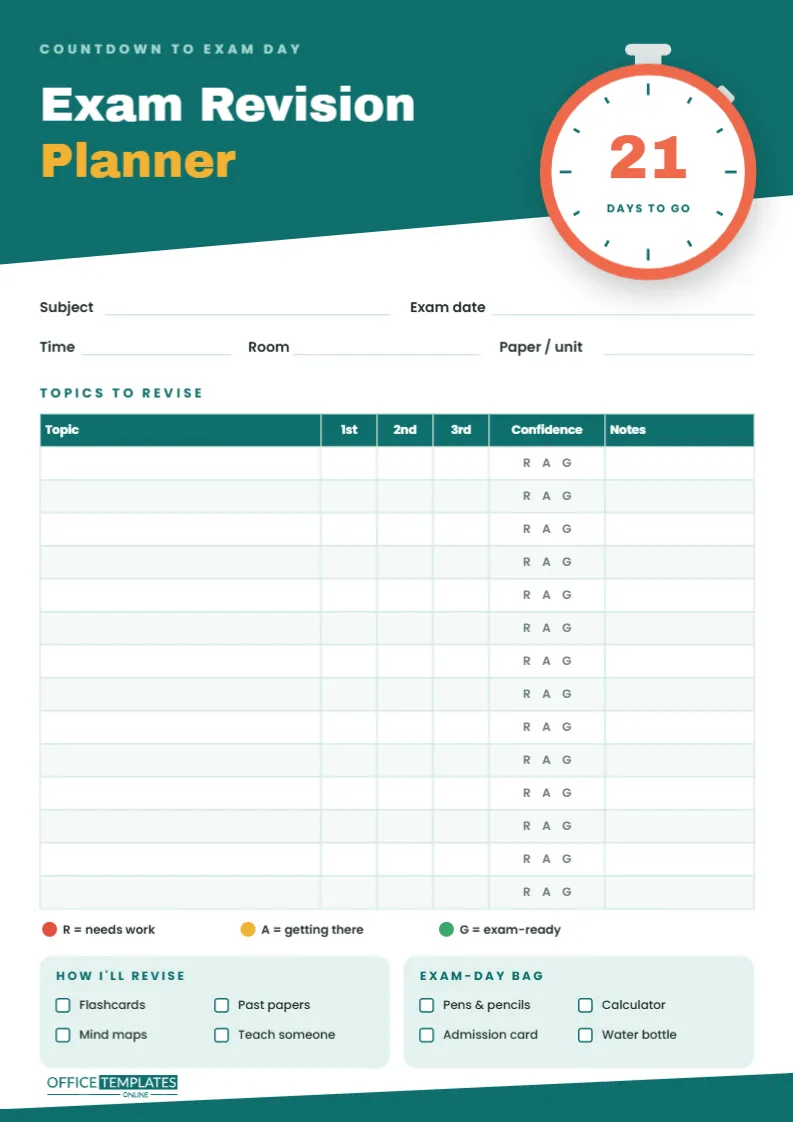
Revision fails in two predictable ways: starting too late, or spending hours on the topics you already know because they feel comfortable. This Exam Revision Planner tackles both. A countdown puts a number on the time left, and a topic table with three revision rounds and a traffic-light confidence score shows exactly where your effort should go.
Built Around a Stopwatch
The page is A4 portrait (210 x 297 mm). A deep teal header runs across the top with a bold slanted lower edge, carrying the words Exam Revision in white and Planner in amber, both in the heavy Archivo Black typeface. A pale Countdown to exam day line sits above them.
Breaking over the slanted edge on the right is a large stopwatch: a white face inside a thick coral ring, with teal minute marks, a crown button on top and a side button angled at the shoulder. In the centre of the face is a big coral number, 21, with Days to go underneath. That number is ordinary editable text, so you can set it to whatever your countdown really is. At the foot of the page, a teal band slants the same way as the header, closing the design.
Everything the Planner Asks For
- Exam details: Subject, Exam date, Time, Room and Paper/unit, so the practical information is never more than a glance away.
- Topics to Revise: a fourteen-row table with columns for Topic, 1st, 2nd and 3rd revision rounds, Confidence and Notes. Every Confidence cell is printed with R A G so you simply circle a letter.
- Legend: red for needs work, amber for getting there, and green for exam-ready.
- How I’ll Revise: tick boxes for Flashcards, Past papers, Mind maps and Teach someone.
- Exam-Day Bag: tick boxes for Pens & pencils, Calculator, Admission card, and Water bottle.
A 21-Day Countdown Plan
Three weeks is a realistic revision window for one exam paper. Here is one way to use the planner across those three weeks; stretch or squeeze it to match your own number of days.
| Days to go | Focus | What happens on the page |
|---|---|---|
| 21 to 15 | Map and first pass | List every topic from the syllabus. Revise each once, tick the 1st column and circle a first confidence letter. |
| 14 to 8 | Target the red | Second round on red and amber topics only, using the active methods ticked in How I’ll Revise. Tick the 2nd column and re-rate. |
| 7 to 3 | Exam practice | Timed past papers. Any topic that costs marks gets a 3rd-round tick and a note on what went wrong. |
| 2 to 1 | Light review | Skim green topics, re-read notes, pack the Exam-Day Bag and sleep properly. |
Update the big number on the stopwatch each morning if you keep the planner in the editor, or cross it out and rewrite it on the printed copy. Watching it fall is surprisingly motivating.
Why Rate Confidence With Traffic Lights?
Ticking a topic as revised says nothing about whether you could answer a question on it. The R A G column forces an honest second judgement. After each round, ask yourself: could I explain this to a friend without notes? If not, it is not green yet. Over the three weeks you should see reds become ambers and ambers become greens. Topics that stay red after two rounds are the ones to take to your teacher.
Revision Methods That Earn Their Tick Boxes
Flashcards suit definitions, dates, vocabulary, and formulas; test yourself rather than re-reading them. Past papers are the single best preparation because they show the question style and time pressure. Mind maps help with topics that connect, such as causes and effects in history or processes in biology. Teaching someone, even an imaginary audience, exposes gaps quickly. Tick the methods you commit to using, and aim for at least two per subject.
Balancing Several Subjects at Once
During a full exam season, you may be counting down to six or seven papers at the same time. Keep one planner per subject, lay them side by side on the desk each Sunday, and compare the stopwatch numbers. The paper with the lowest number and the most red letters gets the first slot each day; a mostly green subject can drop to a short review every other day. This stops the natural habit of revising a favourite subject first while a difficult one waits until the last minute.
Editing the Planner for Your Exams
- Click the 21 on the stopwatch and type your real countdown.
- Double-click the topic table to open Edit Table Data. Paste in your syllabus topics, rename columns (for example, Chapter instead of Topic), or add rows for a longer syllabus.
- Change the checklist items by clicking their text; Protractor or Dictionary might belong in your Exam-Day Bag.
- Make one planner per subject. The design is the same, so the pages file neatly together, and you can use Add Page to keep them in one document.
Printing Your Revision Sheets
Download the PDF and print on A4 at Actual size. The teal header and stopwatch ring are the main areas of colour; the rest of the page is white and easy on ink. Pin the sheet above your desk rather than filing it away, because a revision plan only works if you see it every day. If you prefer, print in greyscale: the R A G letters still work when you colour them in by hand.
Exam Revision Planner: Your Questions
How many topics should one planner hold?
Fourteen rows cover most single exam papers. For a subject with more, add rows or split it across two pages by unit.
What if my exam is less than three weeks away?
Set the stopwatch to the real number and compress the plan: one quick first pass, then focus almost entirely on red topics and past papers.
Can teachers hand this out before exam season?
Yes. Fill in the topic list for the class, download it and print copies, so every student starts with the full syllabus already listed.
Start the Clock
Set your countdown, list your topics, and circle your first confidence letters today. The sooner the stopwatch starts, the more of those reds turn green before exam day.