The first week of a college semester brings a flood of information: syllabi, room changes, instructors’ office hours, grading policies, and an academic calendar full of deadlines that matter a great deal later on. A Semester Course Planner gathers the essentials into one reference page that you can pin above your desk and check in seconds, instead of searching through a dozen course portals.
A Portico at the Top of the Page
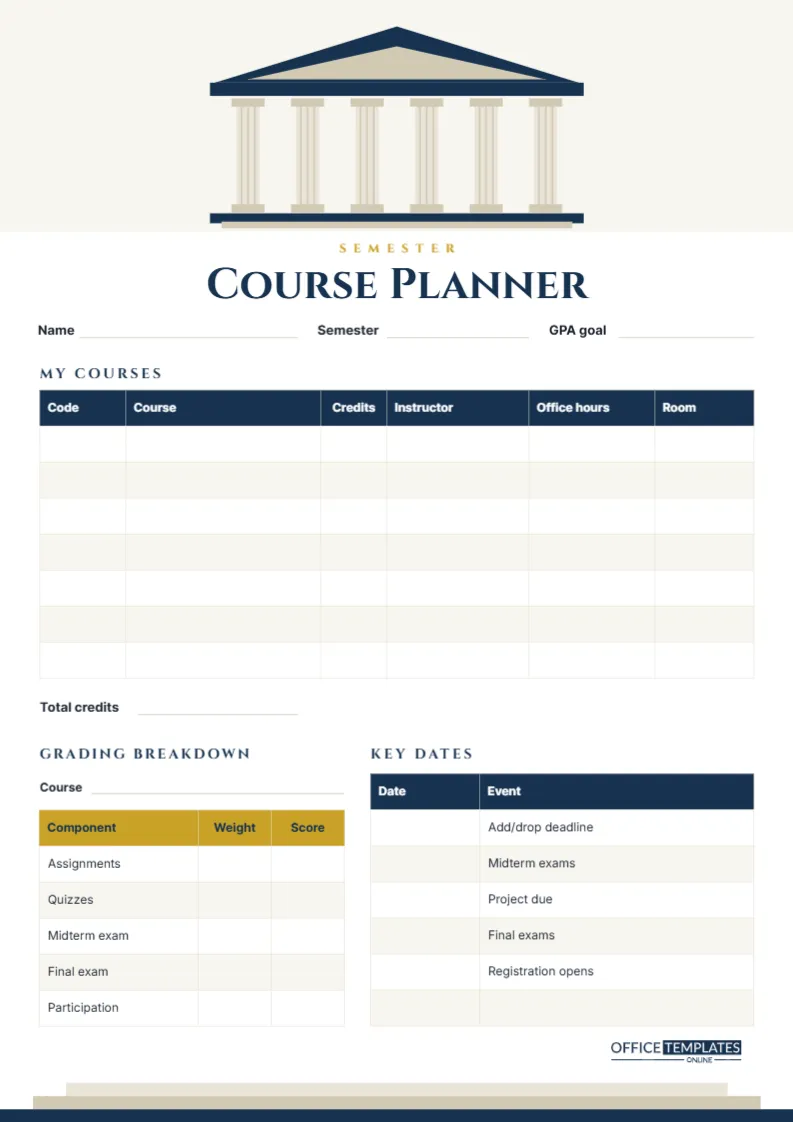
The design borrows the architecture of a traditional university. The header of this A4 portrait page (210 x 297 mm) is a pale stone band holding a classical portico: a navy triangular pediment with a stone-coloured face, a navy beam, six fluted stone columns with square capitals and bases, and a navy platform with a stone step beneath. It is the kind of entrance found on libraries and old lecture halls around the world.
Below it, the word SEMESTER is spaced out in gold, above Course Planner in the carved, Roman-style capitals of the Cinzel typeface. The page closes with a flight of stone steps rising from a navy base along the bottom edge, as if the whole page were the front of a building. Lines for Name, Semester, and GPA goal sit under the title.
What the Planner Records
My Courses
A navy-headed table with seven rows lists each course with its Code, Course title, Credits, Instructor, Office hours, and Room. A Total credits line sits underneath.
Grading Breakdown
A gold-headed table lists the components of a course grade: Assignments, Quizzes, Midterm exam, Final exam, and Participation, with columns for Weight and Score, and a Course line above it to name the class it refers to. Most students fill it in for their most demanding course, or add pages for others.
Key Dates
A navy table with Date and Event columns is pre-labelled with the dates that catch students out: Add/drop deadline, Midterm exams, Project due, Final exams, and Registration opens, plus a spare row.
Credit Load and Study Time
A common guideline in many colleges is to expect about two hours of independent study for every credit hour of class each week. It varies by subject and institution, but it is a useful sanity check when you total your credits.
| Total credits | Class hours per week | Suggested study hours per week | Typical feel |
|---|---|---|---|
| 12 | About 12 | About 24 | Full-time, manageable alongside a part-time job |
| 15 | About 15 | About 30 | A standard full load |
| 18 | About 18 | About 36 | Heavy; limit other commitments |
If your Total credits line and your work or sports schedule add up to more hours than exist in a week, it is better to know in week one, while the add/drop deadline is still open.
Making the Most of Office Hours
The Office hours column is one of the most valuable on the page, and one of the least used. Instructors set this time aside for students, and those who visit early in the semester often find courses easier and recommendations easier to get later. A few tips:
- Go in the first three weeks, even just to introduce yourself and ask about the course.
- Bring a specific question or a problem you attempted, rather than saying, I don’t understand anything.
- Check whether office hours are in person, online, or by appointment, and note it in the table.
- Visit before exams, not after, when there is still time to act on advice.
Using the Grading Breakdown Strategically
Copy each component’s weight straight from the syllabus. Then, as scores come in, write them in the Score column. The table immediately shows where the grade will be won or lost: if the final exam is worth 40%, it deserves proportionally more preparation than a 10% participation grade, even though participation feels more immediate each week. Knowing the weights also helps you decide whether extra-credit work is worth your time.
The First Week Checklist
The planner is easiest to complete during the first week of classes, when all the information is fresh. As each course meets for the first time, fill in its row straight from the syllabus. Then work through a short list: find every classroom before your first lecture there; add each instructor’s office hours and preferred contact method; copy the grading weights for your hardest course; and transfer every date from the academic calendar into Key Dates. Finally, add up your credits and compare the total with your other commitments. By the end of the week, the page holds everything you would otherwise have to look up again and again.
Customizing the Course Planner
- Double-click any table to open Edit Table Data. Add course rows if you take more than seven, or rename columns such as Room to Building/Room or Link for online classes.
- Replace the key-date labels with dates from your own college’s academic calendar, and add rows for spring break or reading week.
- Change the navy and gold to your college colours; the portico is a single grouped object, so it recolours and moves as one piece.
- Use Add Page to create a grading breakdown page for every course.
Printing and Placement
Print on A4 at Actual size. The stone header is pale, and the navy is limited to lines and small bands, so the page prints cleanly in colour or greyscale. Pin it above your desk, keep a copy in the front of your main notebook, and save a PNG on your phone for quick checks between classes. Reprint whenever a room or office-hours time changes, which happens more often than anyone expects in the first fortnight.
Semester Planner FAQs
Is this suitable for high school students?
Yes, especially for students taking advanced or dual-enrolment courses. Rename Credits to Periods per week if your school does not use credits.
Where do I find the key dates?
Your college’s academic calendar, usually on the registrar’s page, lists add/drop, withdrawal, and exam dates.
What is a sensible GPA goal?
One based on last semester plus a small, realistic improvement. Write it down; goals you can see are goals you work towards.
Step Into the Semester Prepared
Fill in your courses during the first week, copy the key dates, and pin it up. Everything else about the semester will be easier with the essentials standing in plain view.