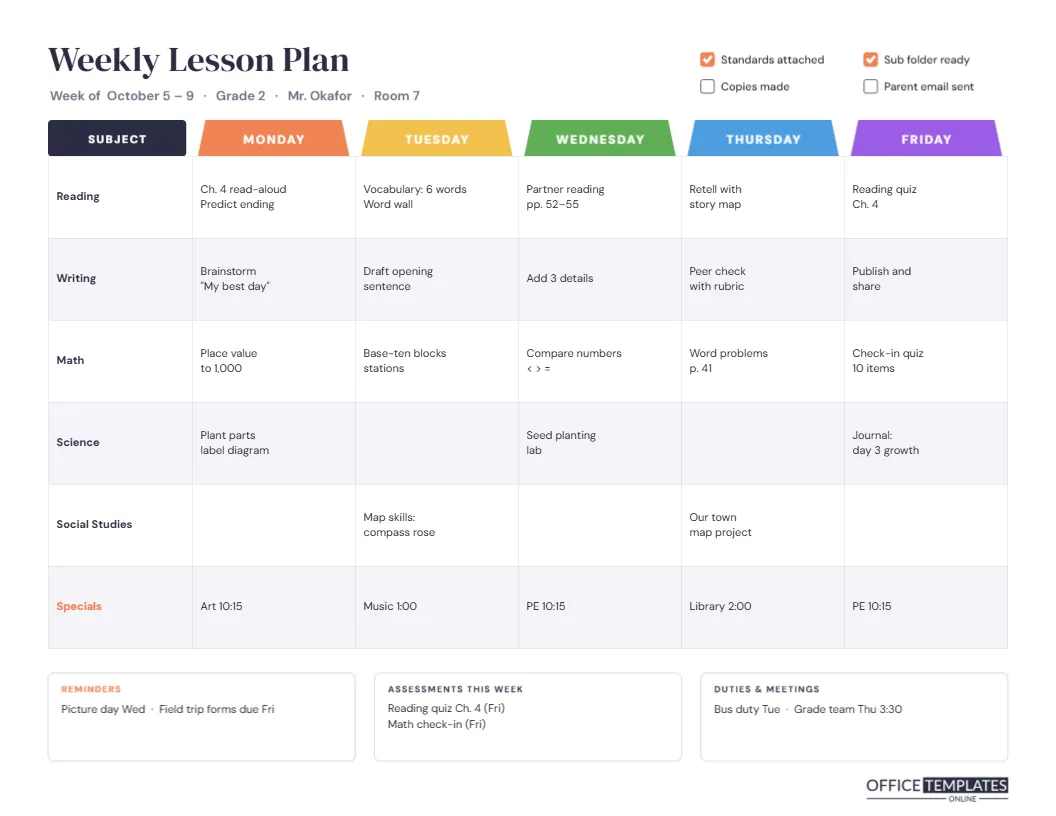
Elementary teachers plan by the week far more often than by the day. You need to see whether science happens on Monday and Wednesday, where the reading quiz falls, and which afternoon art steals your writing block. This weekly lesson plan template lays the whole week out on one landscape page, with subjects running down the side and the five school days running across.
Seeing the Whole Week at Once
The page is US Letter turned sideways, 11 x 8.5 inches, which gives each day a column wide enough for two short lines of notes per subject. One look tells you whether the week is balanced, whether assessments clash, and what needs copying before Monday morning.
File-Divider Tabs for Each Day
Above every day column sits a coloured tab shaped like the divider in a ring binder: orange for Monday, yellow for Tuesday, green for Wednesday, blue for Thursday and purple for Friday. A navy Subject tab heads the first column. The colours make it easy to find your place in a hurry and look cheerful pinned beside your desk. The title, Weekly Lesson Plan, is set in DM Serif Display, with a line underneath naming the week, grade, teacher, and room.
How the Grid Is Organised
The main grid is a real editor table with six rows: Reading, Writing, Math, Science, Social Studies, and Specials. Each cell holds a short note. Here is part of the sample week for a Grade 2 class:
| Subject | Monday | Wednesday | Friday |
|---|---|---|---|
| Reading | Ch.4 read-aloud, predict ending | Partner reading pp. 52–55 | Reading quiz Ch.4 |
| Math | Place value to 1,000 | Compare numbers < > = | Check-in quiz, 10 items |
| Science | Plant parts label diagram | Seed planting lab | Journal: day 3 growth |
| Specials | Art 10:15 | PE 10:15 | PE 10:15 |
Empty cells are left on purpose for subjects that don’t meet every day. To change subjects, open Edit Table Data and type new names in the first column; Add Row creates an extra subject such as Phonics or Social-Emotional Learning.
The Prep Checklist
Top right, four tick boxes keep Sunday-night preparation honest: Standards attached, Copies made, Sub folder ready, and Parent email sent. Ticked boxes turn orange. Change the labels to your own routine, such as Library books returned or Newsletter sent.
Reminders, Assessments and Duties
Three boxes run along the bottom. Reminders hold the week’s events (picture day, field-trip forms). Assessments this week lists quizzes and checks so you can spread them out. Duties and meetings records bus duty, team meetings, and parent conferences, the things that quietly eat planning time.
Planning a Week in Twenty Minutes
- Fill the Specials row first; those times are fixed.
- Place assessments, then work backwards to the lessons that build to them.
- Write a short phrase per cell, not a full plan; daily detail lives elsewhere.
- Check the week for balance: no subject should disappear for three days running.
- Tick the prep list as you finish.
Editing Colours and Day Names
The tabs are simple shapes with text on top. Pick new colours to match your classroom or school, or rename them for a four-day week or a Monday-Thursday tutoring schedule. If your school runs A/B days, rename the tabs Day A to Day E.
Weekly Plans for Middle and High School
Secondary teachers often teach the same subject to several sections. Replace the subject names with period numbers (Period 1 · Algebra, Period 3 · Geometry) and the grid becomes a week-at-a-glance for every class you teach.
Getting the Grid Onto Paper Sideways
Use Download As PDF and print at actual size with landscape orientation. The page looks great printed in colour and pinned on a noticeboard, but it also reads well in black and white because the tab labels are white text on solid shapes.
Sharing the Week With Your Team
Grade-level teams often plan together and share one grid. Duplicate the file for each teacher, or download a PNG and post it in your team chat. Administrators who ask for weekly plans get a tidy, consistent document every time.
Keeping a Year of Weekly Plans
Save each week under the date it starts, such as Week of Oct 5. By June, you have a complete record of what was taught when, which is invaluable when you plan the same grade next year or hand your class to a long-term substitute.
When a Day Goes Off Plan
Fire drills, assemblies, and snow days happen. Rather than rewriting the week, draw an arrow on your printed copy to push a lesson to the next free cell, or edit the table online and slide the activity one column to the right. The grid makes the knock-on effect visible: if Tuesday’s math moves to Wednesday, you can immediately see that Wednesday’s games day needs to shift too.
A Grid That Supports Your Substitute
If you are absent unexpectedly, a substitute can teach from this page with very little explanation. Each cell already says what the class should be doing, and the reminders box flags anything unusual. Many teachers keep the current week’s grid at the front of their sub folder for exactly this reason, and the Sub folder ready tick box is there as a weekly nudge.
Common Questions About the Weekly Grid
Can I fit more text in each cell?
Yes. Reduce the table’s body font size in the table settings, or shorten notes to keywords.
Can I add a Saturday column?
Yes. Use the table tools to add a column, then add a tab shape above it.
What size is the page?
US Letter landscape, 11 x 8.5 inches.
Does it work for homeschool?
It does, though there is a dedicated homeschool weekly plan in this set with space for each child.
Can two teachers share one grid?
Yes. Co-teachers often add their initials to each cell, such as (JO) or (KM), so everyone knows who leads which lesson that week.
How do I mark a holiday?
Type No school across that day’s cells, or recolour its tab grey so the gap stands out at a glance.