“It went well” is not a report
Every tutor has said it at the door: “It went well today.” Parents nod, but they are paying for results, and a friendly sentence is not evidence. Tutors who keep clients for years tend to share one habit: a regular, professional tutoring progress report that shows what was covered, what improved and what comes next. This template gives you that document, ready to fill in.
What a parent sees in thirty seconds
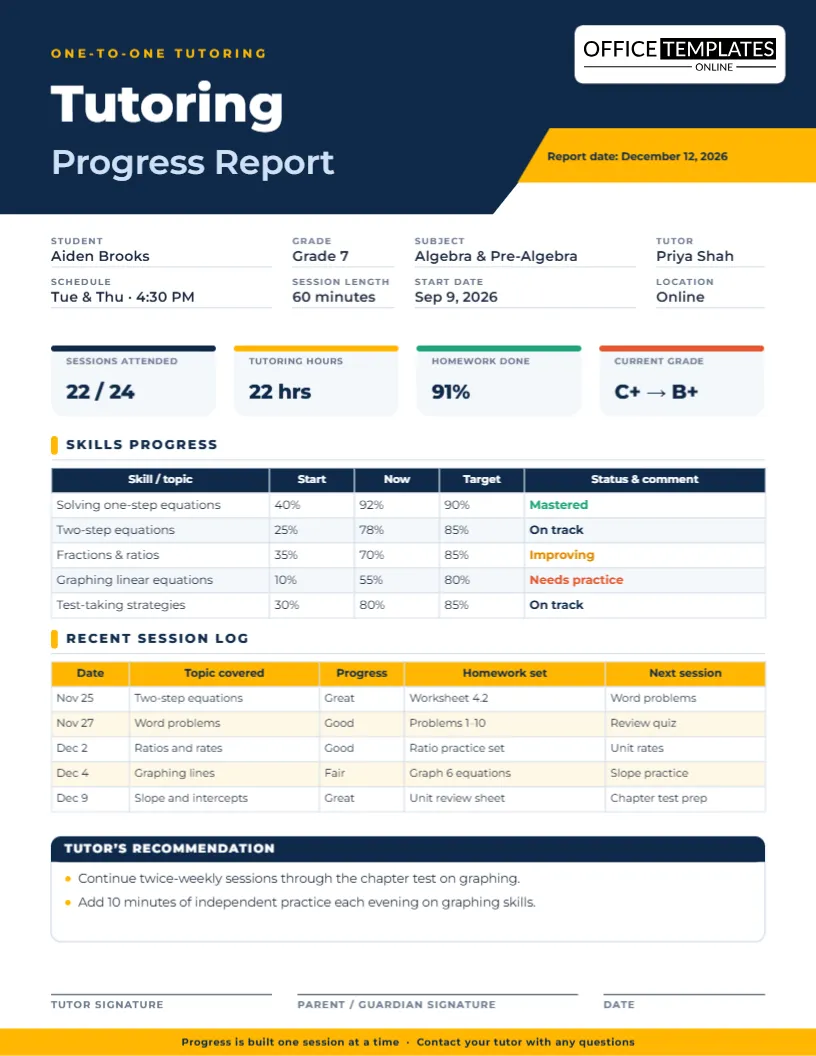
The page opens with a bold navy and gold header and four summary tiles: sessions attended (22 of 24), tutoring hours, homework completion (91 percent) and the current grade, shown as a movement such as C+ to B+. Before reading a single line of detail, the parent already knows the student is showing up, doing the work and improving.
The skills table: start, now, target
This is the heart of the report. Each row is a topic, and three percentage columns show where the student began, where they are now and the target you are aiming for. A colored status ends each row: Mastered in green, On track in navy, Improving in amber and Needs practice in red. Because the table is a real editable table, adding a skill takes seconds and removing one is just as easy.
The session log: proof of rhythm
Below the skills sit the five most recent sessions, each with a date, topic, progress rating, homework set and plan for next time. It shows parents that lessons are structured, that homework is deliberate and that every session leads somewhere.
Close with a recommendation
The last box is a short tutor’s recommendation, for example: continue twice-weekly sessions through the chapter test, and add ten minutes of independent graphing practice each evening. A clear next step is what turns a report into a renewal.
A simple monthly cycle
- Week 1: Assess quickly and note the starting percentages.
- Weeks 2 and 3: Log each session as you finish it, while details are fresh.
- Week 4: Update the tiles, adjust the skills table and write your recommendation.
- Send it: Email the PDF on the same day each month so parents come to expect it.
Positioning tips for independent tutors
- Add your own logo beside the title so the report doubles as branding.
- Use honest but constructive status labels; “Needs practice” builds trust where “Failing” builds worry.
- Keep every report; a year of them is the best testimonial you will ever have.
- Mention homework openly so parents can help without guessing.
Five-minute setup checklist
- Type the student, grade, subject, tutor, schedule, session length, start date and location.
- Update the four tiles with real attendance, hours, homework and grade figures.
- Edit the skills table topics and percentages.
- Add the latest sessions, adding or deleting rows as needed.
- Write your recommendation, then sign and date.
Where this layout works
Math and science tutoring is the obvious fit, but the columns are generic enough for English, languages, coding and test preparation. Learning centers can create one report per student, online tutoring platforms can send it as a downloadable PDF, and school homework clubs can use it for parent updates. Special education providers may find the measurable start-and-target columns useful when documenting gains.
Paper or pixels?
The page is US Letter, 8.5 x 11 inches. Print it at actual size for face-to-face parent meetings, or download the PDF and attach it to an email. The PNG and JPG versions suit quick sharing by text message. Because the template can be reopened at any time, updating it next month means changing numbers, not rebuilding a layout.
FAQ for tutors
How often should I send a report?
Monthly is common, with a short note after big exams.
Can I use it for group tutoring?
Yes. Create one per student, or change the fields to a group name and average scores.
Can I replace the grade tile?
Yes. Swap it for quiz average, confidence rating or any measure you track.
Can I change the status colors?
Select the status text in a cell and choose another color from the toolbar.
One layout, several subjects
Math and science
List topics such as equations, ratios and graphing, and use the percentage columns for quiz scores or self-rated confidence. The status column then tells a parent where extra practice is needed.
Reading and writing
Rename the columns to reading level, fluency, essay structure and vocabulary. Keep “Start”, “Now” and “Target” as level names or scores, whichever your assessments produce.
Test preparation
Track practice test scores by section. The “Target” column becomes the score the student needs for admission or a scholarship, and the session log shows how each lesson works towards it.
Handling a difficult update
Sometimes progress stalls. The format helps because the numbers are visible and the recommendation box gives you room to explain. Be straightforward: say what has not moved, describe what you will change and ask the family to support one specific habit. Parents respond better to a plan than to reassurance.
A simple parent-call script
- Thank the family and say you have sent the report.
- Highlight one clear win from the skills table.
- Explain the one topic that needs work and what you will do about it.
- Ask if they have noticed anything at home that would help.
- Confirm the next session times and finish on the goal.
Showing value without overselling
Parents notice honesty. If a target is ambitious, say so. If a student improved from 25 to 78 percent on a topic in a few weeks, let the numbers speak. Nothing convinces a family to keep going like their child’s own progress laid out in a clear table with your name on it.
Keeping the report short and useful
A tutoring report is not an essay. Keep each comment to a few words, limit skills to five or six rows and reserve the recommendation box for one clear next step. Parents read short reports on time and share them with the student, which is where the change really happens.
Turn “it went well” into proof. Open the template, add your numbers and send a report your clients will keep.