If you run an after-school program, you already know the truth: what happens between the last bell and pick-up matters enormously, and families rarely see it. This after-school student progress report template gives that time a voice. Here are the five things parents ask most often, and how the page answers each one.
1. “Is my child actually coming every day?”
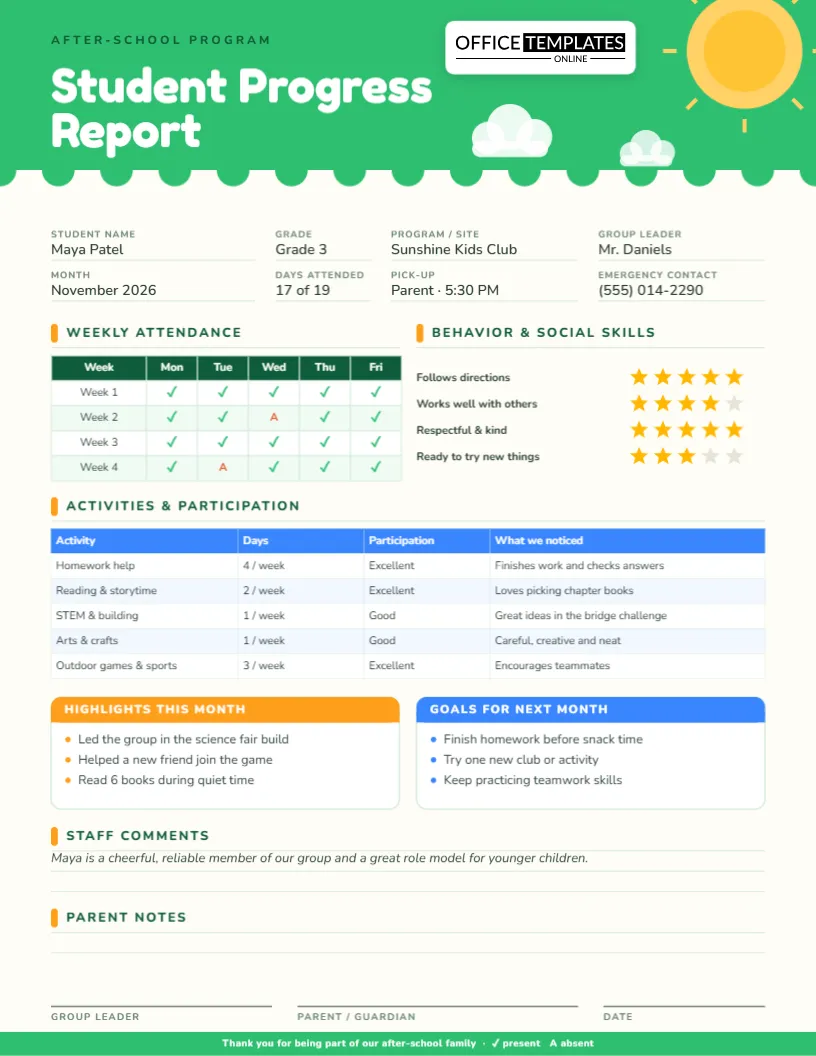
A weekly attendance grid shows Monday to Friday for four weeks, with green ticks for attendance and a red A for absences. It takes seconds to fill in, and it answers the question at a glance. A field at the top also summarizes the month, for example “17 of 19 days”.
2. “What do they do all afternoon?”
The activities table lists each part of your program with the days per week, a participation level and a note about what staff noticed. Sample rows cover homework help, reading and storytime, STEM and building, arts and crafts, and outdoor games. Rename them to match your own schedule, or add rows for chess club, coding or dance.
3. “Is my child behaving and making friends?”
Five-star ratings summarize four social skills: follows directions, works well with others, respectful and kind, and ready to try new things. Gold stars are earned and gray stars are open. A quick glance tells a parent whether the day-to-day experience is going well, without a long paragraph.
4. “What are the highlights?”
An orange box celebrates specific moments: leading a science fair build, helping a new friend join the game, reading six books during quiet time. Specifics matter; parents keep them in their hearts long after the report is filed.
5. “What should we work on?”
A blue goals box for the next month keeps the tone forward-looking: finish homework before snack, try one new club, keep practicing teamwork. It gives families and children the same short list to aim at.
The look and feel
A bright green header with a scalloped edge, a smiling sun and puffy clouds makes the page friendly for children and parents alike. Fields at the top cover student, grade, program or site, group leader, month, days attended, pick-up arrangement and an emergency contact. The typeface is round and easy to read, and the layout fits US Letter, 8.5 x 11 inches.
Filling it in: a two-minute routine
- Type the child’s details and program name at the top.
- Mark attendance with a tick or an A in each cell.
- Recolor stars from gray to gold to set ratings.
- Adjust the activities table and write two or three highlights.
- Add staff comments and leave the parent notes area open.
Who uses it
School-based after-school programs, community centers, church and library programs, park district clubs, childcare centers with school-age groups, homework clubs and summer camps all have the same need: prove that their time is valuable. Program directors can also attach the reports to funder updates.
Words to borrow
- “Maya finishes her homework before snack and checks her answers carefully.”
- “She encouraged teammates during outdoor games.”
- “Goal for next month: try one new club and keep practicing teamwork.”
- “Thank you for supporting reading at home; it shows in her confidence.”
Sending it home
Download the PDF for a printed copy at pick-up, or the PNG or JPG for a text message or email. The footer reminds parents that a tick means present and an A means absent. Keep a copy per child for annual reviews.
Short answers
Can I add more weeks?
Yes. The attendance grid is an editable table.
Can I use it for summer camp?
Yes. Retitle it and rename the activities.
Can I change the colors?
Yes. Select any shape or text and pick a new color, or replace the sun with your own logo.
A sample month at one program
Sunshine Kids Club runs five afternoons a week. Week one, Maya attends every day. In week two she misses Wednesday with a cold, and staff mark an A in that cell. By the end of November her grid shows seventeen ticks and two absences. Her leader adds three notes: she leads the group during the bridge-building challenge, she helped a new child join a game and she read six books during quiet time. The report goes home in her backpack on the last Friday of the month.
Keeping staff consistent
When several people fill in reports, ratings drift. A short guide helps:
- Agree what a five-star day looks like and what a three looks like.
- Decide who fills in attendance and who writes highlights.
- Use the same wording for participation: Excellent, Good, Needs support.
- Have a second staff member skim each report before it leaves the building.
Reporting to funders and school partners
Many programs are funded on outcomes such as attendance, homework completion and social skills. The same reports, stripped of names, become a compact evidence pack. Total the attendance grids for a monthly percentage, count how many children moved from Good to Excellent in homework help and quote a few highlights. Funders enjoy specifics far more than adjectives.
Tone with young children
For younger groups, share the report aloud at pick-up and let the child point to their favorite star or highlight. For older students, show them the goals box and ask which goal they would like to choose themselves. Ownership makes goals stick, and children who help write their goals are more likely to reach them.
Involving the children themselves
Older children enjoy having a say in their report. At the end of the month, ask each child to name their favorite activity and one thing they are proud of, then add it to the highlights box in their own words. Children who see their voice on the page take more ownership of their behavior and their goals.
Using the parent notes area
The blank lines at the bottom are an invitation, not an afterthought. Ask parents to jot down a question or a change in routine, such as a new pick-up person or an allergy update, and return the page signed. It turns a one-way report into a two-way conversation and keeps your records current.
Keeping families informed year-round
Save every monthly report in the child’s folder. At the end of the year, the stack shows attendance patterns, favorite activities and growth in social skills, which makes a lovely summary for families and a reliable record for your program.
Show families what their children achieve after the bell. Open the template, add your program details and download it today.