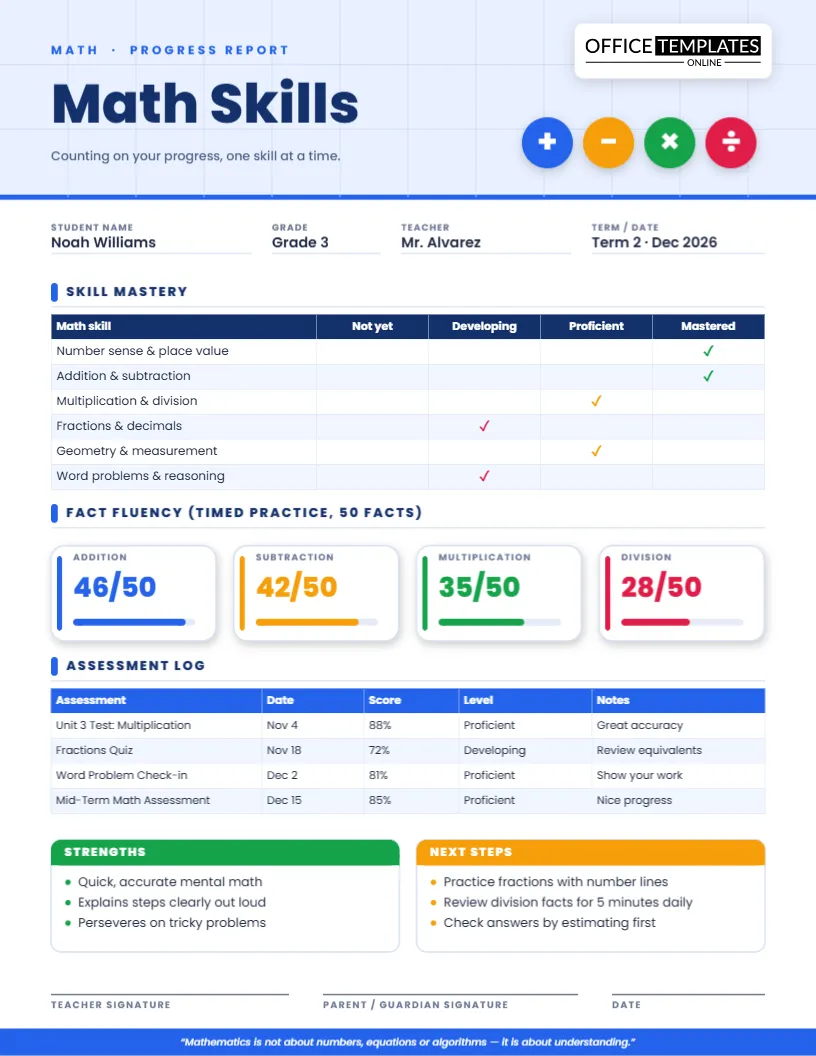
At a glance: one page, four operations, six math strands, timed-fact scores, an assessment log and a clear next step. Everything below explains how the math skills progress report template turns a term of numbers into something a family can read in two minutes.
Four ways this report makes math progress visible
1. A mastery matrix instead of a single grade
A percentage hides where a child is strong or stuck. The skill mastery table covers number sense and place value, addition and subtraction, multiplication and division, fractions and decimals, geometry and measurement, and word problems. Each row carries one tick across four levels, from Not yet to Mastered, so patterns jump out at once.
2. Fact fluency you can see
Four rounded tiles, one per operation, show a score out of fifty with a colored progress bar. Blue is addition, amber is subtraction, green is multiplication and rose is division. Families quickly learn which color needs attention.
3. A dated assessment history
The assessment log lists each quiz or test with date, score, level and a two- or three-word note. Over a term it tells the story of growth and dips far better than a final mark.
4. Feedback that ends in action
Two boxes finish the page: strengths in green and next steps in amber. Because each is limited to three short lines, families come away with a plan, not a pile of comments.
Inside the page
A light-blue header with a faint graph-paper grid and four round badges (plus, minus, times, divide) sets a friendly tone before any data appears. Student name, grade, teacher and term follow. The layout is US Letter portrait, and every table is an editable table object rather than a static picture.
A worked example: the fractions unit
Suppose Noah just finished a fractions unit. In the mastery table you place a rose tick under Developing for fractions and decimals. In the assessment log you add “Fractions Quiz, Nov 18, 72%, Developing, Review equivalents”. In the next steps box you write “Practice fractions with number lines”. A parent reading the page sees the same story three times, from three angles, and knows precisely what to do at the kitchen table.
Customize it in three moves
- Change the words. Click any text to edit names, skills, notes and quotes.
- Change the numbers. Type new scores in the tiles, then drag the end of each colored bar to match.
- Change the shape of the table. Add rows for extra strands or delete ones you do not assess, using the Table menu or Manage Data.
Where it fits
- End-of-term reporting in grades 1 to 8
- Standards-based grading, where levels replace percentages
- Math intervention groups and after-school math clubs
- Tutors who must prove measurable progress
- Homeschool math portfolios
- Pre- and post-unit reports for a single topic
Best practices from teachers who report math well
- Keep one color per operation all year so students recognize it instantly.
- Record the assessment date every time; trends matter more than snapshots.
- Show young students scores as 42/50 rather than percentages.
- Celebrate a Mastered strand in the comment; motivation is part of the data.
- Limit next steps to actions that take five minutes.
Print and share notes
The report is 8.5 x 11 inches. Print at actual size and in color for the best result; ticks and table lines remain readable in black and white. To email it, download a PNG or JPG for quick viewing, or the PDF for a crisp document. You can reopen the template later, update the scores and download a new copy for the next period.
Quick answers
Can I change the four operations?
Yes. Rename the tiles to any facts you track, such as squares, doubles or place value.
Which grades is it for?
Roughly grades 1 to 8. Change skills and fact counts to suit your class.
Does the footer quote have to stay?
No. Replace it with your own class motto or delete it.
Ideas for the strands, by grade band
Grades 1 and 2
Rename the strands to counting and place value, addition and subtraction within twenty, shapes, measurement and simple word problems. Use fact tiles for addition and subtraction only, and change the total from fifty to twenty for younger students.
Grades 3 to 5
Keep the sample strands. Multiplication, division and fractions are the big shifts in these years, so the mastery matrix will show them clearly. Consider a rose tick next to fractions until a child is secure.
Grades 6 to 8
Swap in ratios and proportions, expressions and equations, geometry, statistics and problem solving. Replace the tiles with algebra readiness measures such as integer operations or equation solving.
Talking to families about math anxiety
Many parents feel anxious about math, and it shows. A report that begins with what is mastered and ends with a small, achievable step signals that struggling is normal and fixable. Avoid the phrase “not a math person” and instead use language such as “still developing” or “practicing”. The color of a tick can also help: amber is neutral, rose is a call for attention and green is a celebration.
Using the report with standards-based grading
If your school reports levels instead of percentages, rename the four columns to match your rubric language and delete the percentage scores from the assessment log. The layout works equally well for reports that mix levels and marks. Many teachers add a second column of dates to show when a strand was first marked Proficient, which turns the report into a growth record.
Turning the numbers into a family routine
Ask parents to pick one strand and one operation to practice for two weeks. A fact tile in amber or rose becomes the target, and five minutes at the table, with cards, a game or a quick oral quiz, is plenty. At the next report, compare the tile and celebrate any gain, even a single point. Small, visible wins keep motivation high through the harder units.
Encourage children to explain a solution aloud. Explaining is one of the fastest ways to expose a gap and to build confidence, and it costs nothing.
Make every score meaningful. Open the template, enter your student’s results and download a clear, encouraging math report today.