What is Nazra, and what does a progress report show?
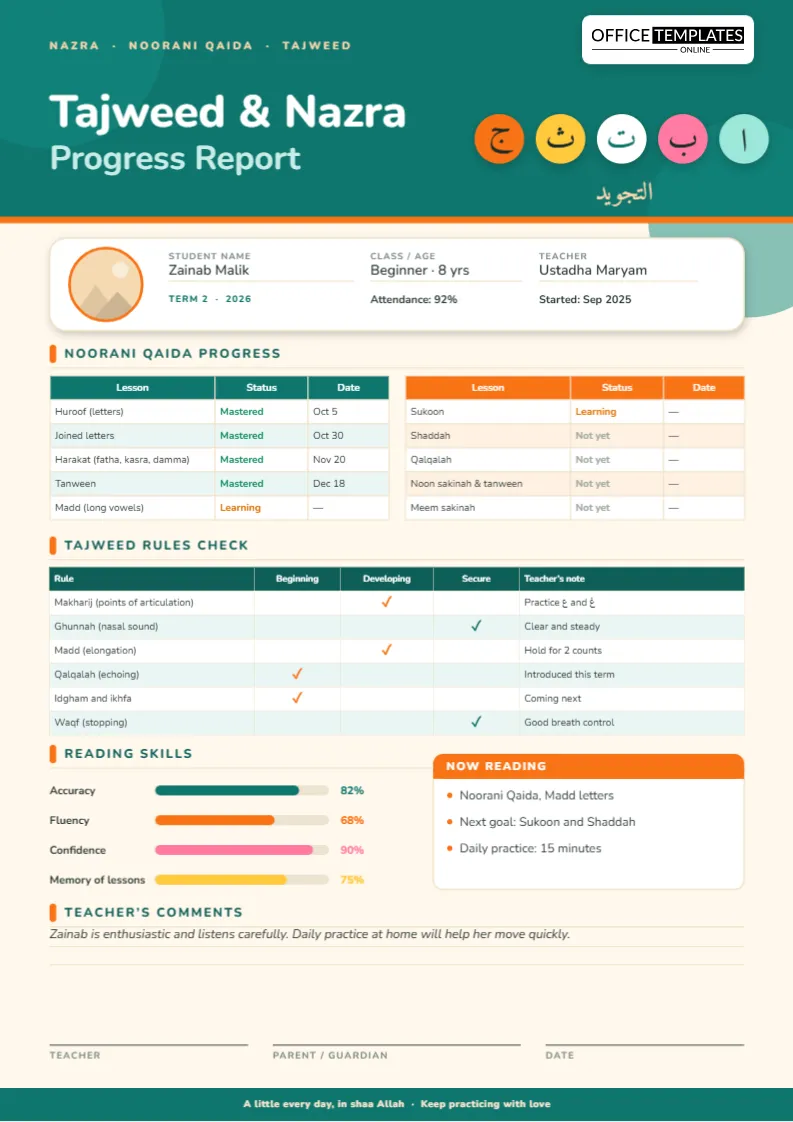
Nazra means reading the Qur’an from the written text, and it is where most children begin their journey with the Qur’an, first learning the letters and sounds, then reading with tajweed, and finally reciting with fluency. This Tajweed and Nazra progress report template gives teachers a bright, friendly way to show parents where a child is on that path.
What is the Noorani Qaida?
The Noorani Qaida is a beginner’s primer that teaches Arabic letters, vowel marks and the basic reading rules a child needs before opening the Qur’an. Editions differ slightly in how they order the lessons, so the template lists common topics and lets you rename them. The sample lists Huroof (letters), joined letters, Harakat (fatha, kasra and damma), tanween, madd (long vowels), sukoon, shaddah, qalqalah, noon sakinah and tanween, and meem sakinah.
How to read the status column
Two tables sit side by side, one for each half of the primer. Every lesson has a status and a date: green for Mastered, orange for Learning and gray for Not yet. Parents can see at a glance what their child has finished, what they are working on and what is coming next. You can add more lessons or remove some by editing the tables.
Which tajweed rules do children learn first?
Teachers introduce rules gradually, and the “Tajweed rules check” table follows a typical sequence. It lists makharij (points of articulation), ghunnah (nasal sound), madd (elongation), qalqalah (echoing), idgham and ikhfa, and waqf (stopping). Three columns, Beginning, Developing and Secure, show how well the child applies each rule when reading, and a short teacher’s note explains the next step, such as “Practice ? and ?” or “Hold for 2 counts”. Feel free to replace the sample rules with those in your syllabus.
The reading skills meter
Four colorful bars show accuracy, fluency, confidence and memory of lessons as percentages. They are simple shapes, so change the number and drag the bar to match. Confidence often matters as much as accuracy for young children: a shy student who reads correctly but quietly is still developing, and a bar makes that visible without a word of criticism.
The friendly touches
- A teal header with colorful Arabic letters on round bubbles: alif, ba, ta, tha and jim.
- A student card with photo, name, class, teacher, term, attendance and start date.
- A “Now reading” box that names the current lesson, the next goal and the daily practice time.
- A teacher’s comment area and three signature lines.
- A footer message: “A little every day, in shaa Allah.”
How can I help my child at home?
Parents do not need to read Arabic fluently to support a child. Ask them to sit nearby for fifteen minutes a day, listen with interest and praise effort. Encourage a regular time and a quiet place. Ask the child to teach you one thing they learned, since explaining is a wonderful way to consolidate learning. The “Now reading” box is the perfect place to write a simple home routine.
Filling in the report
- Open the template in the editor and use Replace Image on the round photo.
- Type the child’s name, class, teacher, term, attendance and start date.
- Update each lesson’s status and date in the two tables.
- Move the ticks in the tajweed table and adjust the four skill bars.
- Write the “Now reading” box and a warm comment, then download the report.
Wording ideas for young learners
- “Zainab listens carefully and repeats each sound with confidence.”
- “She is ready to begin Sukoon and Shaddah in the next lesson.”
- “Daily practice of just fifteen minutes will help her grow quickly.”
- “Please encourage her to read aloud to a family member.”
Paper size and printing
The report is A4, 210 x 297 mm. Print in color on standard paper to keep the letter bubbles and colored bars bright, and hand it to the parent at the end of term. To send it digitally, download a PNG or JPG and share it by phone, or use the PDF for a tidy attachment.
More questions
- Can I use this for adults learning to read Qur’an?
- Yes. Change the header wording and the photo, and rename the “Class / age” field. The lessons and rules are the same.
- Does it teach tajweed rules?
- No. It records what a teacher has taught and how well the student applies it; teaching should always come from a qualified teacher.
- Can I change the Arabic letters in the header?
- Yes. Click any letter and type another, or replace the bubbles with your own decoration.
- How do I add more lessons?
- Select a table and add rows from the Table menu, or use Manage Data to type them in.
Tips for teachers of very young children
- Keep sessions short and joyful; five minutes of full attention beats twenty minutes of struggle.
- Repeat sounds together, then individually, so shy students can build confidence.
- Use color and movement: tracing letters in the air, sorting letter cards or playing a simple sound game.
- Praise effort out loud and note it on the report, for example “tries carefully even when a sound is difficult”.
Motivating with small rewards
A sticker, a star in the corner of the report or a special seat for the week can lift a child’s spirits. Some teachers add a small line to the comments, such as “Star reader this week”, so that parents can celebrate at home. Keep rewards gentle and focused on effort rather than comparison with classmates.
Moving from the primer to the Qur’an
When the Noorani Qaida is complete, most students begin reading short surahs and then move on through Juz Amma and beyond. Use the “Now reading” box to record the new goal and the daily practice time. When the student reaches this stage, you can continue to use the same template, renaming the lessons table to the portions being read, or follow it with the Quran completion report card when the whole Qur’an is finished.
Show parents how their child is growing in the Qur’an. Open the template, add the lessons and download a cheerful report today.