A Silver Gradient and Gold Edge for a Gift Card
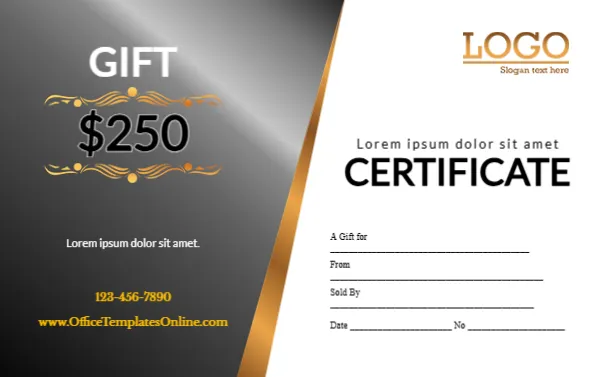
A silver and charcoal gradient panel fills the left side of this card, edged with a gold diagonal band. GIFT sits in white, and $250 sits between two gold ornaments, with a placeholder line, a phone and a website in gold below. The white right side has a gold LOGO, a spaced placeholder line, CERTIFICATE in bold black and lines for A Gift for, From, Sold By, Date and No. It looks sleek and modern, with a premium metallic feel.
A Sleek Card in Wallet Size
The card is 3.375 x 2.125 inches, CR80, so it fits wallets and card holders.
Placeholders and the Website
Both short lines are Lorem ipsum, so replace them with a slogan and a greeting. The website uses the template site’s address, so type your own. Swap the gold LOGO for your own and fill in the voucher lines for each customer. Number each card in the No line so you can track it when it is redeemed.
Preparing the Silver Card
- Replace both Lorem lines.
- Type your website.
- Swap the logo.
- Set the value.
- Print.
A Sleek Look for Modern Businesses
Silver and gold feel sleek and modern, suiting barbers, car valeting, tech shops and gyms. The diagonal gold band adds movement. It also suits luxury car dealers and watch shops.
Smooth Silver Gradients in Print
Print at high quality so the silver gradient stays smooth without visible bands.
Durable Plastic Cards
Order PVC cards from a print shop for durability, especially if customers keep the card in a wallet.
Changing the $250 Value
Change the value for each set you print, keeping the gold ornaments around it. A matching set in several values gives customers a choice.
Silver Card Terms
Add short terms on the back. Mention the expiry date and that the card is not exchangeable for cash.
A Register of Silver Cards
Track each card in a simple register. Mark each card as used when it is redeemed.
Using the Silver Card
Sell it at the counter.
Step by Step Editing of the Silver Gold Diagonal 250 Design
- On the silver gold diagonal 250 design, click the main headline and type your own words, keeping a similar length.
- Retype every name, date and contact line on the silver gold diagonal 250 design, checking each against a trusted source.
- Search the silver gold diagonal 250 design for the words Lorem and Company so that no placeholder remains.
- Click any logo or photo on the silver gold diagonal 250 design, choose Replace Image and resize the new picture to fit.
- Zoom the silver gold diagonal 250 design to full size and read each line aloud before you save it.
- Keep a clean master of the silver gold diagonal 250 design without private details, so later versions start tidy.
Consider the brown and gold card. Similar designs include the birthday card. Compare it with the shopping voucher. The rest of the series around the silver gold diagonal 250 design is in gift certificate and voucher templates.