Who This Dining Certificate Is Right For
| Business type | Fits well? | Why |
|---|---|---|
| Family restaurant | Yes | The warm dinner photo shows people at a table, which matches the experience |
| Cafe or bistro | Yes | Replace the photo with your own dining room or signature dish |
| Catering company | Yes | Change the wording from Restaurant Name to your business name |
| Food truck or bakery | With changes | Swap the picture and the fork and knife icon for something that suits you |
If your venue is somewhere guests sit down and share a meal, this is the design to start with. A diner who is given this certificate under a tree already knows what the gift is for.
The Look of the Certificate
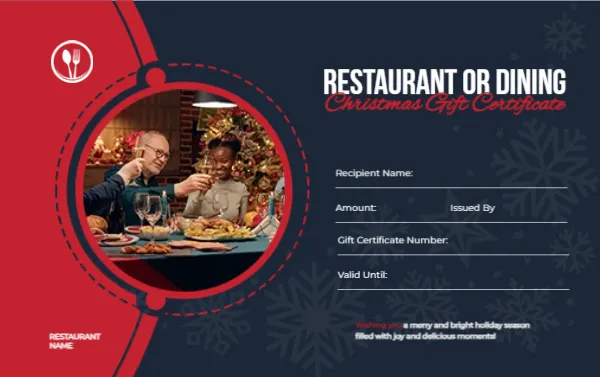
This is a landscape card measuring 3.375 x 2.125 inches, the size of a credit card. The left third is bright red with a thin dashed circle drawn around a round photograph. The picture shows an older man and a younger woman raising glasses at a dinner table with a decorated Christmas tree behind them. The rest of the card is dark navy with faint snowflake outlines. A white fork and knife icon sits at the top left, and the words RESTAURANT NAME are printed small in the bottom left corner.
The heading is large white capital letters reading RESTAURANT OR DINING. Below it, in a red italic script, are the words Christmas Gift Certificate. The footer message says “Wishing you a merry and bright holiday season filled with joy and delicious moments!”
What Guests and Staff Write on It
Four lines sit in the lower right area of the navy panel:
- Recipient Name
- Amount, with Issued By beside it
- Gift Certificate Number
- Valid Until
All of these are text boxes. Change the label to Table Size, Course or Visit Date if your restaurant sells experiences rather than plain dollar values.
Customising the Design for Your Venue
Open the template in the editor and start with the words RESTAURANT OR DINING. If you run a pizza place, a steakhouse or a sushi bar, type the cuisine instead, and the heading will still fit. Replace RESTAURANT NAME in the bottom left with the real name or paste your logo over it. Click the round photograph, choose Replace Image, and upload a picture of your own dining room, a plated dish or a happy table. Use a bright photo with a clear centre, because the circle crops the edges.
The red and navy are separate shapes. A green and cream version suits an Italian restaurant, and a black and gold version suits a steakhouse.
Printing and Handing Out
- Print on 250 to 300 gsm card stock so the certificate feels like a gift.
- Eight of these small cards fit on one letter sheet, so a batch for a busy week is quick to print.
- Write the number in the Gift Certificate Number line before you give the card away and note it in your reservation system.
- Consider offering a small bonus certificate for every set of larger ones sold. Print the terms on the back.
Related designs in the same series include the retail store Christmas gift certificate and the spa and wellness certificate, which share this field layout.
Dining Certificate FAQ
Can I add my menu or terms on the back?
Yes. Duplicate the page in the editor, remove the photo, and use the space for conditions such as no cash value or one certificate per table.
Does the photo have to be a dinner scene?
No. Any image works. A single dish or your storefront can be a good choice if you do not have a lifestyle photo.
Browse more holiday designs in the Christmas gift certificate templates collection.