Red Satin Bows and a $200 Banner on a Christmas Certificate
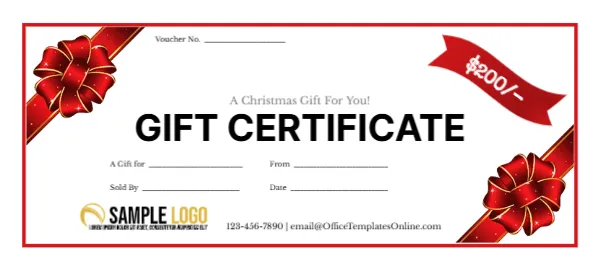
A thin red border frames this white certificate, with shiny red satin ribbons and bows tied across the top left and bottom right corners. A red ribbon banner at the top right shows $200/ in white. A Christmas Gift For You! sits in grey above GIFT CERTIFICATE in large bold black capitals. A Voucher No. line sits at the top, and lines for A Gift for, From, Sold By and Date sit below, with a gold logo, phone and email at the foot.
A Small Voucher Size
The certificate is 5.28 x 2.38 inches. Four fit in a column on a letter sheet, which makes it efficient for shops printing large numbers.
Value Banner and Contacts
The banner shows $200/ with a trailing slash, a style used in some countries to show no cents. Change the value to suit. The footer uses the template site’s email, so type your own, and swap the sample logo.
Preparing the Satin Bow Certificate
- Set the value.
- Swap the logo.
- Type your phone and email.
- Number each voucher.
- Print four per sheet.
Using the Voucher Number and Sold By Lines
The Voucher No. and Sold By lines help shops track who sold each certificate and match it when a customer redeems it. Fill them in at the till, and keep a matching record in a book or spreadsheet.
An Elegant Look for Premium Shops
The white background and glossy red bows look elegant and premium, which suits jewellers, boutiques, florists and spas. The bold title is easy to read at a glance.
Printing the Glossy Bows
The bows are photographic images with shine. Print on smooth card at high quality so they look rich rather than flat.
Printing Sets With Different Values
Make copies with different values, such as $50, $100 and $200, so customers can choose. Change the banner text on each version.
Adding an Expiry Line
The design has no expiry date. Add a Valid until line beside the date if your business sets expiry dates, and check local rules.
Small Envelopes for Small Vouchers
At this size, small red envelopes or card wallets make neat holders for each voucher.
Using the Satin Bow Certificate
Keep them by the till.
Step by Step Editing of the Red Bows 200 Design
- On the red bows 200 design, click the main headline and type your own words, keeping a similar length.
- Retype every name, date and contact line on the red bows 200 design, checking each against a trusted source.
- Search the red bows 200 design for the words Lorem and Company so that no placeholder remains.
- Click any logo or photo on the red bows 200 design, choose Replace Image and resize the new picture to fit.
- Zoom the red bows 200 design to full size and read each line aloud before you save it.
- Keep a clean master of the red bows 200 design without private details, so later versions start tidy.
Another option is the gold seal holiday certificate. A related layout is the snowflake holiday certificate. Also worth a look: red Merry Christmas certificate. Looking beyond the red bows 200 design? See all gift certificate and voucher templates.