A Pale Snowflake and Red Ribbon for a General Holiday Certificate
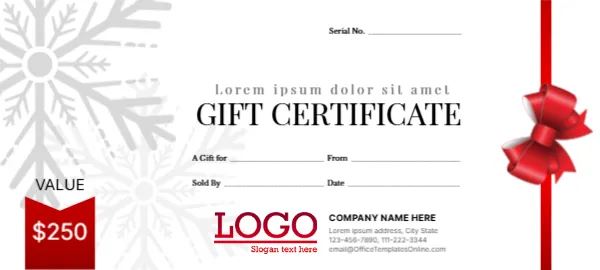
A large pale grey snowflake fills the left side of this white certificate, with a vertical red ribbon and a red bow on the right edge. A red value tag at the lower left shows VALUE above $250. A spaced grey line of placeholder text sits above GIFT CERTIFICATE in tall black capitals, with a Serial No. line at the top right. Lines for A Gift for, From, Sold By and Date sit in the middle, and a red LOGO with COMPANY NAME HERE and contact lines sits at the foot.
Slim Voucher With Company Details
The certificate is 5.28 x 2.38 inches. Unlike some vouchers, it has a full company block with an address, two phones and an email, which saves printing details on the back.
Lorem Greeting and Company Block
The line above the title reads Lorem ipsum dolor sit amet, so replace it with a greeting such as Season’s Greetings. Replace COMPANY NAME HERE, the Lorem ipsum address and the template site’s email with your details. Change the $250 value and number each voucher in the Serial No. line.
Preparing the Snowflake Certificate
- Replace the Lorem greeting.
- Type your company details.
- Set the value.
- Number each voucher.
- Print and trim.
A Winter Design for Any Business
The snowflake and red ribbon feel wintry without being tied to one holiday, so the certificate suits December, New Year and January sales.
Writing a Short Greeting
Use the greeting line for a short message, such as Warm wishes this winter, or the name of a promotion, such as Winter Spa Special.
Serial Numbers for Tracking
The Serial No. line helps you track each voucher. Use a simple sequence, such as 2026 001, and keep a record of each sale.
Printing the Pale Snowflake
The snowflake is very light grey. Print at high quality so it stays visible without overpowering the text.
Snowflake Stickers on Red Envelopes
Red or white envelopes with a snowflake sticker complete the look.
Terms on the Back
Print short terms on the back, such as Valid for 12 months.
Using the Snowflake Certificate
Offer it all winter long.
Step by Step Editing of the Snowflake Red Ribbon Value Design
- On the snowflake red ribbon value design, click the main headline and type your own words, keeping a similar length.
- Retype every name, date and contact line on the snowflake red ribbon value design, checking each against a trusted source.
- Search the snowflake red ribbon value design for the words Lorem and Company so that no placeholder remains.
- Click any logo or photo on the snowflake red ribbon value design, choose Replace Image and resize the new picture to fit.
- Zoom the snowflake red ribbon value design to full size and read each line aloud before you save it.
- Keep a clean master of the snowflake red ribbon value design without private details, so later versions start tidy.
A related layout is the gold seal holiday certificate. Also worth a look: red bow Christmas certificate. Next to try is the Easter gift certificate. Looking beyond the snowflake red ribbon value design? See all gift certificate and voucher templates.