A Yellow Ornament and Name Band for a Housing Society
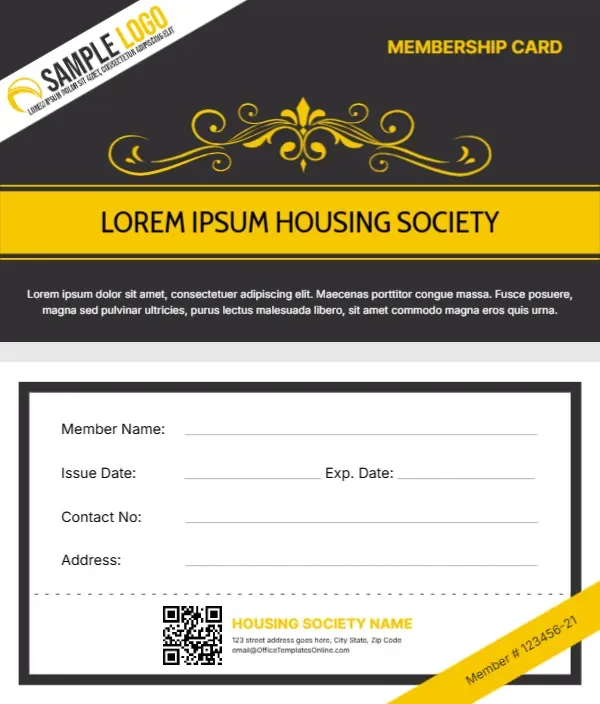
The charcoal front has a white diagonal strip across the top left corner holding the logo, and MEMBERSHIP CARD sits in yellow at the top right. A yellow scroll ornament with a fleur de lis spreads across the middle, and a wide yellow band carries LOREM IPSUM HOUSING SOCIETY in dark capitals. A placeholder paragraph sits at the foot. The back is white inside a charcoal frame, with fields, a QR code and a yellow member number ribbon.
Yellow Band Front and Framed Back
The card is 3.5 by 2 inches. The back lists member name, issue and expiry dates, contact number and address, then a dashed line, a QR code, the society name and address and a diagonal yellow ribbon reading Member # 123456 21.
Society Name, Address and Member Number
Type your society name in the yellow band and on the back. Replace the Lorem paragraph with a short line such as Residents and authorised family members only. The back uses the template site’s email, so swap it for the society office email, and set each member number on the ribbon.
Personalising the Society Card
- Type the society name twice.
- Swap the logo.
- Rewrite the Lorem line.
- Set each member number.
- Update the office email.
Using the Card at the Gate
Many societies check cards at the gate or clubhouse. Add the house or flat number to the address line so guards can confirm residents quickly.
Cards for Family Members
Issue a card per adult resident, and mark tenants or family members with a short note beside the name if your rules treat them differently. Domestic staff and drivers may need their own pass, so consider a second colour version marked Staff.
A QR Code for the Society Notice Board
Link the QR code to the society’s notices, maintenance requests or contact page.
Printing for Residents
Print on 350 gsm card or PVC. Laminated cards last longer at gates and pools.
Collecting Cards When Residents Move
Ask residents to return cards when they move out, and keep a register so old cards can be disabled.
Issuing Society Cards
Hand cards out at the society office and record each issue.
Step by Step Editing of the Housing Society Yellow Band Design
- On the housing society yellow band design, click the main headline and type your own words, keeping a similar length.
- Retype every name, date and contact line on the housing society yellow band design, checking each against a trusted source.
- Search the housing society yellow band design for the words Lorem and Company so that no placeholder remains.
- Click any logo or photo on the housing society yellow band design, choose Replace Image and resize the new picture to fit.
- Zoom the housing society yellow band design to full size and read each line aloud before you save it.
- Keep a clean master of the housing society yellow band design without private details, so later versions start tidy.
A related layout is the temple membership card. Also worth a look: mosque membership card. Next to try is the business membership card. The rest of the series around the housing society yellow band design is in membership card templates.