Tan Camouflage and a Chevron Emblem for a Veterans Club
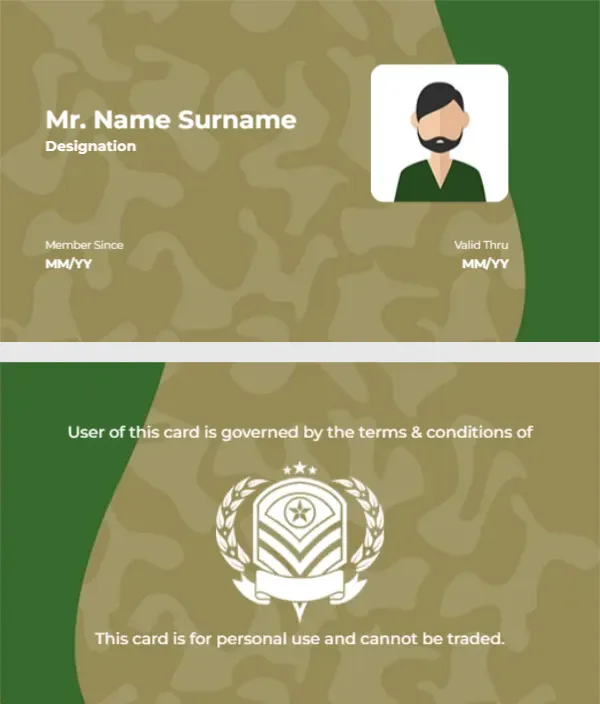
A tan camouflage pattern covers the front, with a dark green curve on the right. An avatar of a bearded man in a green shirt sits in a white rounded square, and Mr. Name Surname and Designation sit on the left in white. Member Since and Valid Thru fields with MM YY placeholders sit at the lower corners. The back reverses the colours, with a green curve, a white emblem of chevrons and stars inside a laurel wreath, and two lines of terms.
Avatar Front and Emblem Back
The card is 3.5 x 2 inches. The emblem fills the centre of the back, with one line of text above it and one below.
Terms Text and an Important Caution
The back reads User of this card is governed by the terms and conditions of, then the emblem, then This card is for personal use and cannot be traded. Change User to Use and add the club or association name after of. This card suits veterans associations, cadet clubs and airsoft or paintball clubs. It must not be used or presented as an official military ID, which is illegal in many countries.
Personalising the Camouflage Card
- Fix User to Use.
- Add the club name.
- Type the name and designation.
- Set the member and valid dates.
- Swap the avatar for a photo.
Choosing Your Own Emblem
The chevron and star emblem is generic. Replace it with your association’s own badge, and avoid copying official insignia of any armed force.
Designation Line Ideas
Designation can show a role in the club, such as Treasurer, Range Officer or Life Member, rather than a military rank.
Dates in Month and Year
The MM YY format is short and fits the corners. Use the same format on both dates, for example 03 26 and 03 28.
Printing Camouflage
The camouflage is a printed pattern, so it prints well on matte card. Check that the white name text stays clear over the lighter patches.
Club Events and Ranges
Clubs often check cards at ranges or events. A real photo instead of the avatar makes checks quicker.
Keeping an Association Register
Record each card with the member’s role and dates.
Step by Step Editing of the Military Camouflage Emblem Design
- On the military camouflage emblem design, click the main headline and type your own words, keeping a similar length.
- Retype every name, date and contact line on the military camouflage emblem design, checking each against a trusted source.
- Search the military camouflage emblem design for the words Lorem and Company so that no placeholder remains.
- Click any logo or photo on the military camouflage emblem design, choose Replace Image and resize the new picture to fit.
- Zoom the military camouflage emblem design to full size and read each line aloud before you save it.
- Keep a clean master of the military camouflage emblem design without private details, so later versions start tidy.
Compare it with the sports club membership card. You may also like the sports club card with a navy pattern. For comparison, open the temporary membership card. Looking beyond the military camouflage emblem design? See all membership card templates.